Data Element change Event Type on Purchase Rule | Community
Skip to main content
Level 4
July 27, 2021
Solved

Data Element change Event Type on Purchase Rule

  • July 27, 2021
  • 1 reply
  • 2362 views

Hi Team,


I have used data element change event type on purchase rule I have used Order_ID data element, but still the rule is not firing. Kindly help, as I am new to launch.
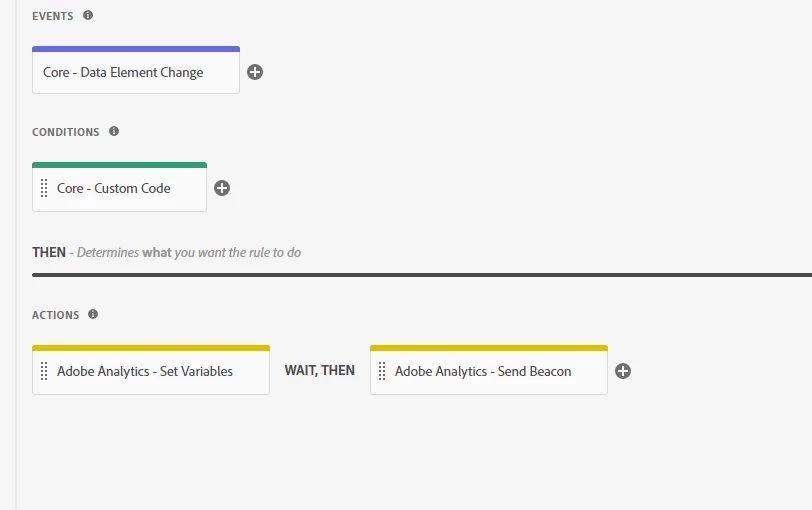


Note: the duration of data element is none.

This post is no longer active and is closed to new replies. Need help? Start a new post to ask your question.
Best answer by Jacob-DDdev

First test would be to try out that rule without whatever code you're using for the condition to see if that's what's blocking the rule from firing. So which page is the rule supposed to fire? Checkout, gateway, or confirmation?

Also, as a note, the event "Data Element Change" checks the variable at a frequency of 1 second. So if you are navigating away before the Core extension has an oppertunity to check the values within the data elements, that could be an issue.

1 reply

Jacob-DDdev
Level 6
July 27, 2021

Hi @bindukumari1990 ,


Can you provide context in which the data element is being updated? Is it from within another rule or are you calling _satellite.setVar() directly? It seems more likely that the mechanism setting the variable is failing or the condition on the rule is not met.

Jacob-DDdev
Level 6
July 27, 2021

Also, as a potential solution, since you are calling _satellite.setVar() directly: You can try to put the logic that you are looking for for setting the data element and the variables within a "Direct Call" event type with satellite.track(). This method could avoid some of the timing issues that may arise from the "Data Element Change" event.