AEP Edge Network not sending info to AA and is displaying "one of more aep mobile track events are missing an aep edge hit event" | Community
Skip to main content
New Member
October 21, 2022
Solved

AEP Edge Network not sending info to AA and is displaying "one of more aep mobile track events are missing an aep edge hit event"

  • October 21, 2022
  • 2 replies
  • 4153 views

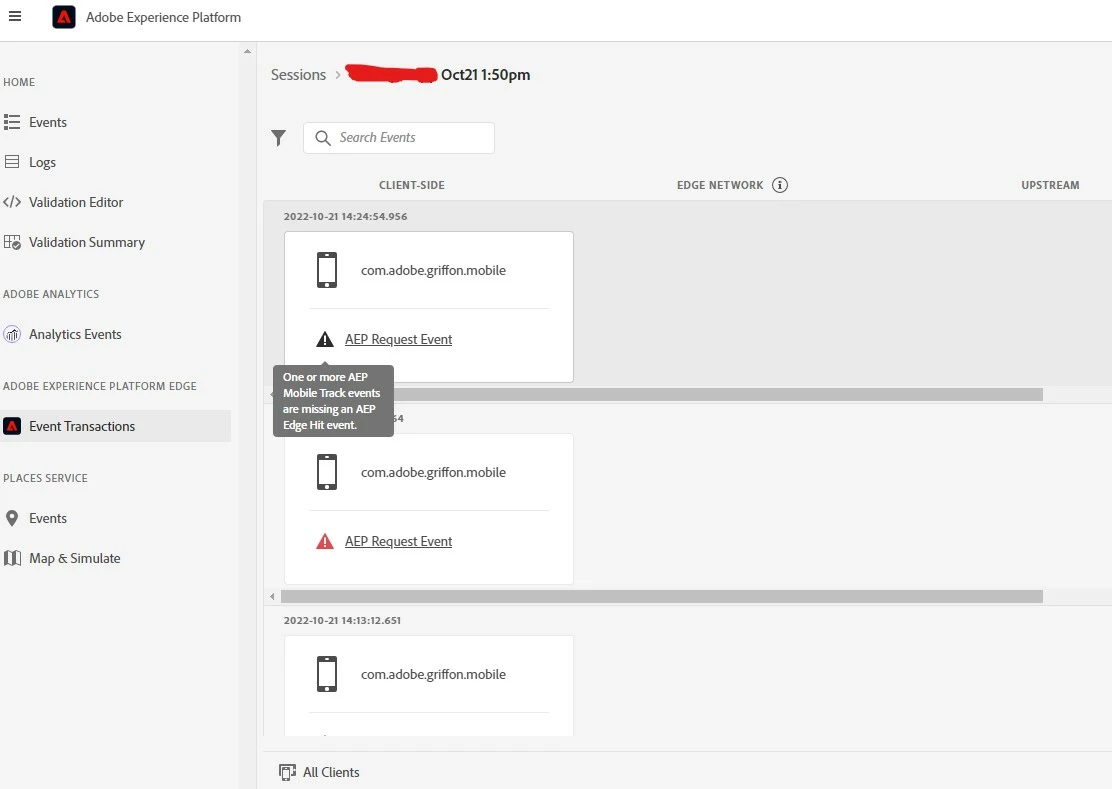
Currently utilising "AEP Edge network" extension with App event data but when I'm checking the Assurance (Griffon) to debug it appears the data is not sending and is displaying this error message "One or more AEP Mobile Track events are missing an AEP Edge Hit event". 


Anyone know what this means and how to fix this so that the data will send to AA through the Edge Network?
 

This post is no longer active and is closed to new replies. Need help? Start a new post to ask your question.
Best answer by rp-zackanalytics

For future readers...we found our issue for our situation when we received this error. The app developer had implemented the "Consent" extension without us realizing it. Once we installed the Consent extension within Adobe tag manager (Tags) and configured consent to default to "yes", the hits started flowing threw the Edge network

2 replies

ranjithd
Level 4
February 23, 2023

The error message "One or more AEP Mobile Track events are missing an AEP Edge Hit event" typically occurs when there are AppEvent data points that are not associated with a corresponding Edge Hit event. This can happen when the AppEvent data points are not being properly sent through the Edge Network to Adobe Analytics (AA).

To fix this issue and ensure that the AppEvent data is being properly sent through the Edge Network to AA, you should check the following:

  1. Verify the Edge Network extension is properly implemented: Ensure that the AEP Edge Network extension is properly implemented in your application and that it is properly sending data through the Edge Network.

  2. Verify the AppEvent data is being properly tracked: Verify that the AppEvent data is being properly tracked and sent to the Edge Network through the Mobile SDK.

  3. Verify the Edge Hit event is being properly implemented: Ensure that the Edge Hit event is properly implemented in your application and that it is properly associated with the AppEvent data points.

  4. Verify the Assurance (Griffon) is properly configured: Double-check that the Assurance (Griffon) configuration is set up properly and that it is properly configured to receive data from the Edge Network.

  5. Check for any other configuration issues: Check for any other configuration issues that may be preventing the AppEvent data from being properly sent through the Edge Network to AA.

If you're still having trouble, it may be helpful to reach out to Adobe's technical support for further assistance.


Level 2
March 10, 2023

Is it possible to point to some documentation that gives some more details on each of these items?

ranjithd
Level 4
March 13, 2023
rp-zackanalyticsAccepted solution
Level 2
March 20, 2023

For future readers...we found our issue for our situation when we received this error. The app developer had implemented the "Consent" extension without us realizing it. Once we installed the Consent extension within Adobe tag manager (Tags) and configured consent to default to "yes", the hits started flowing threw the Edge network

NimashaJain
Adobe Employee
Adobe Employee
June 26, 2023

thanks @rp-zackanalytics It is super helpful for you to share the info.


@8089076 Great to you leading the product discussion.