While creating an experience fragment,other templates (not only experience fragment) are also visible AEM 6.5 | Community
Skip to main content
June 11, 2020
Solved

While creating an experience fragment,other templates (not only experience fragment) are also visible AEM 6.5

  • June 11, 2020
  • 4 replies
  • 2271 views

While creating an experience fragment,other templates (not only experience fragment) are also visible when we set other templates (cq:allowedpaths) set to /content(/.*)? 

Is this product issue in AEM 6.5 or expected behaviour.

Note : I have added only experience fragments paths in cq:allowedtemplate property.
This post is no longer active and is closed to new replies. Need help? Start a new post to ask your question.
Best answer by ms114

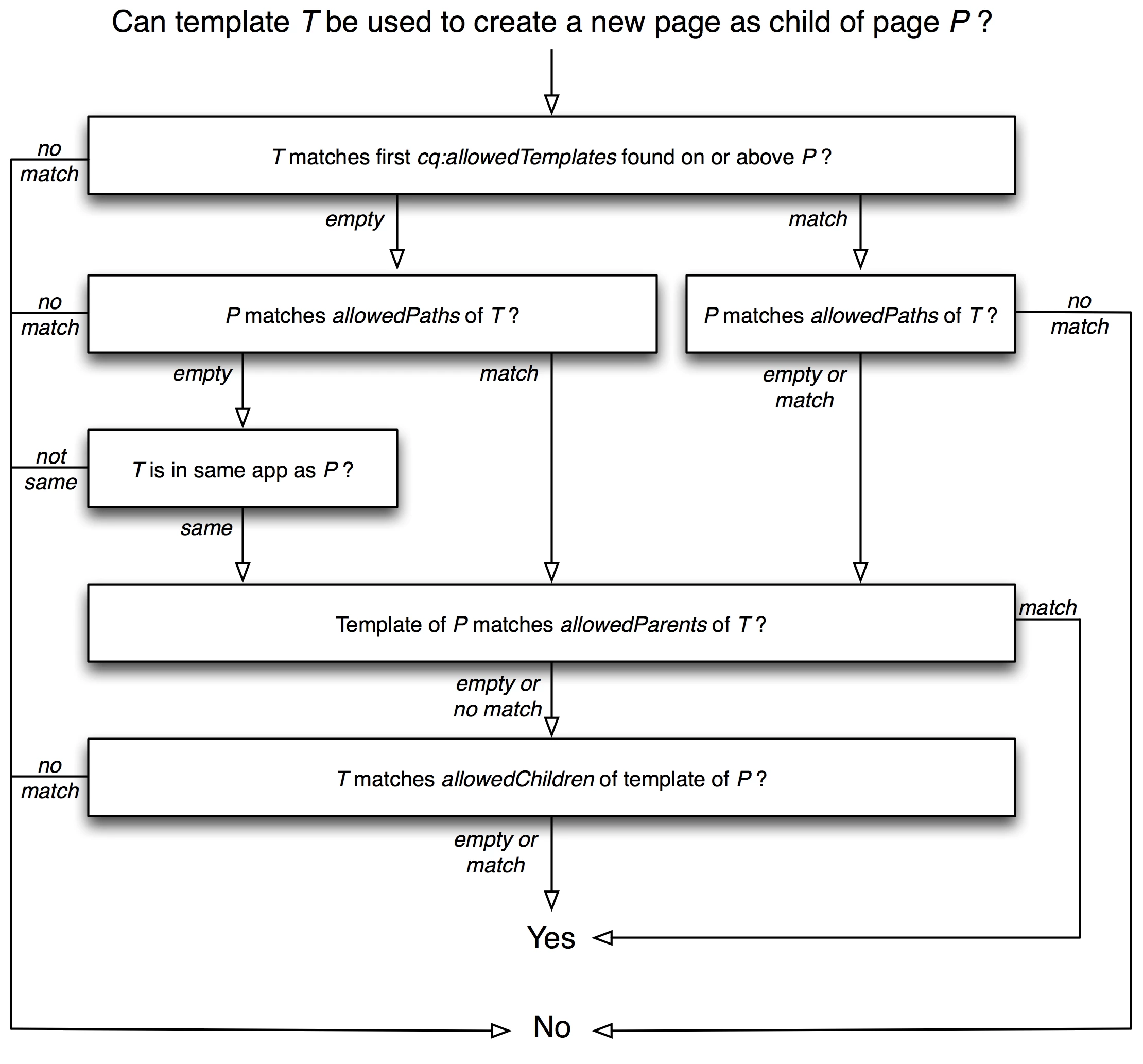
If you dont define cq:allowedTemplates at  /content/experience-fragments. then what AEM would do will list all the templates matching the regEx i.e. /content(/.*) . As experience-fragments is under /content, the regEx matches and the templates get displayed. The rendering logic can be found via this diagram


4 replies

Surabhi_Katiyar
Adobe Employee
Adobe Employee
June 11, 2020

As I can check in the Adobe documentation, it is mentioned that combining both cq:allowedTemplates and allowedPaths is not recommended and only cq:allowedTemplates should be used. combining them can lead to very complex rules that are difficult to track and manage.

Also, in AEM 6.4.3 combination of both was working but it was a product bug and that has been corrected in AEM 6.4.4 and now it is only recommended to use cq:allowedTemplates

For more information on this please check the below document also:

https://helpx.adobe.com/experience-manager/6-4/sites/developing/using/templates.html#main-pars_title_1885710792

So, I would now recommend you to please use the cq:allowedTemplate property on the folder level as this is Adobe recommended property.

Adobe Employee
June 11, 2020

Allowed templates for experienced fragments should be set for XF root folder, for example at /content/experience-fragments.

You need to define cq:allowedTemplates property as Sring[] and set all available templates there, example:

/libs/cq/experience-fragments/components/experiencefragment/template

/conf/we-retail/settings/wcm/templates/experience-fragment(.*)?

ms114Adobe EmployeeAccepted solution
Adobe Employee
June 11, 2020

If you dont define cq:allowedTemplates at  /content/experience-fragments. then what AEM would do will list all the templates matching the regEx i.e. /content(/.*) . As experience-fragments is under /content, the regEx matches and the templates get displayed. The rendering logic can be found via this diagram


vanegi
Adobe Employee
Adobe Employee
June 14, 2020

Hello Rahul,

To make XF template available in the touch UI for creating experience fragments, you need to add experience fragment template in the allowed templates(cq:allowedTemplates = /conf/test-project/settings/wcm/templates/experience-fragment-web-variation) instead of allowedPaths on the /content/experience-fragments/<project>.


And then when you go to AEM start screen, http://localhost:4504/aem/start.html, click experience fragment then select the test-project folder and click create, XF template is available for selection. 


Thanks,

Vaishali