Where is the deleted page Archived in TOUCH UI 6.4 | Community
Skip to main content
May 5, 2021
Solved

Where is the deleted page Archived in TOUCH UI 6.4

  • May 5, 2021
  • 2 replies
  • 5245 views

We are currently migrating from Classis to Touch UI 6.4. While exploring , we deleted a page to see the functionality of restoring. It asked us to archive the page before deletion but where do I go about to look for it to restore it?

This post is no longer active and is closed to new replies. Need help? Start a new post to ask your question.
Best answer by MarkusBullaAdobe

Hi @mriz!

You are probably referring to the following dialog:
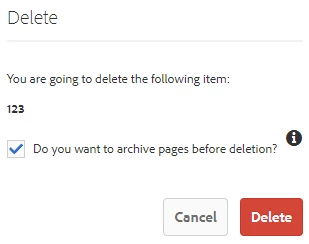
 

That's a question I get a lot from my customers.

For AEM as a Cloud Service, there is a "Restore" button available once you have selected a page. It will open a dialog to restore a page/tree:

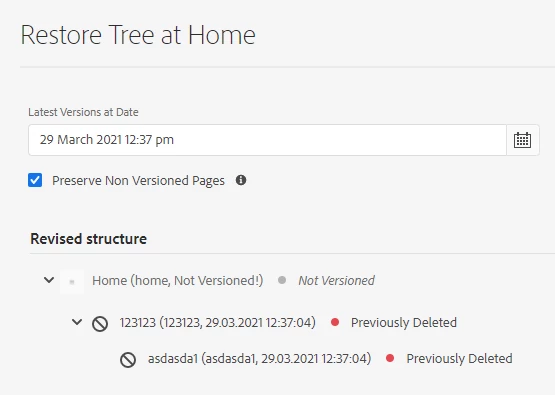


Unfortunately, this restore functionality is not yet implemented for Touch UI in AEM 6.4 nor 6.5. 😕😕

I expect it to be made available with one of the next updates / service packs for AEM 6.5, but have no insight into the exact roadmap or timeline. As AEM 6.4 will not receive additional updates (see release reoadmap and product end of life matrix), I wouldn't expect it for that specific version of AEM.

2 replies

Ritesh_Mittal
Community Advisor and Adobe Champion
May 5, 2021


@mriz  If you have created the version of page earlier then it will store under /tmp/versionhistory/..


This is how we create a version in touch UI, in classic also kind of same approach we had just UI was different, select the page in selection mode and from left hand side select timeline then from below drop down select "Save As Version"

February 15, 2023

How long are these pages stored in the TMP directory and does each version remain permanently or do they only keep a certain number of versions? Wondering if we need to be conscious to schedule a 'garbage dump' eventually?

MarkusBullaAdobe
Adobe Employee
MarkusBullaAdobeAdobe EmployeeAccepted solution
Adobe Employee
May 5, 2021

Hi @mriz!

You are probably referring to the following dialog:


That's a question I get a lot from my customers.

For AEM as a Cloud Service, there is a "Restore" button available once you have selected a page. It will open a dialog to restore a page/tree:


Unfortunately, this restore functionality is not yet implemented for Touch UI in AEM 6.4 nor 6.5. 😕😕

I expect it to be made available with one of the next updates / service packs for AEM 6.5, but have no insight into the exact roadmap or timeline. As AEM 6.4 will not receive additional updates (see release reoadmap and product end of life matrix), I wouldn't expect it for that specific version of AEM.

January 2, 2024

Has this restore functionality been added to AEM 6.5 yet? If not, do we have an expected date?