Unable to create content fragment model in AEM 6.5 throws server error | Community
Skip to main content
Level 2
May 28, 2020
Solved

Unable to create content fragment model in AEM 6.5 throws server error

  • May 28, 2020
  • 3 replies
  • 8447 views

I'm unable to create content fragment model in one of our environments even when i'm logged in with admin. It throws server error.

Attaching screenshot and stack trace in the comments below.
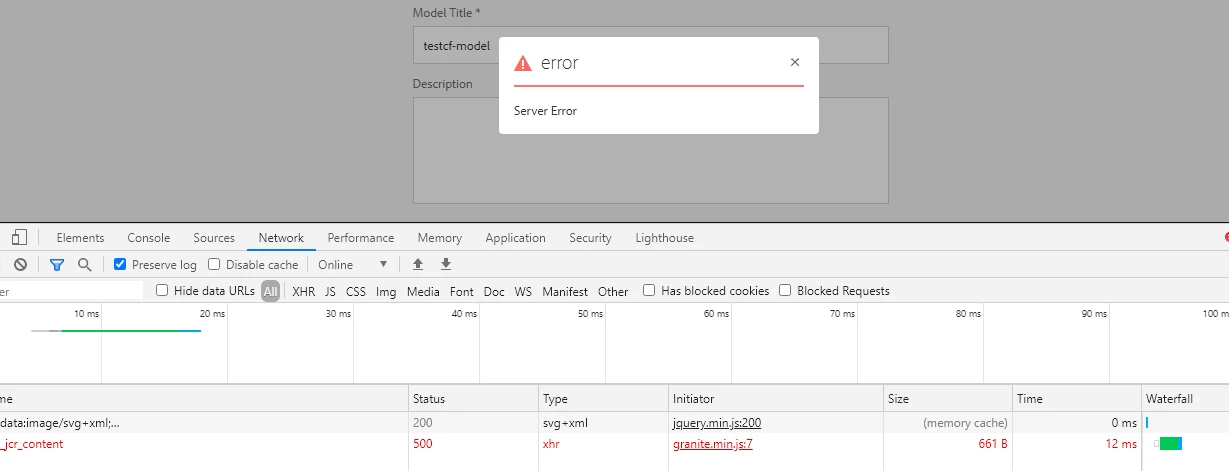


22.05.2020 04:23:03.064 *ERROR* [10.30.60.206 [1590139383053] POST /mnt/overlay/dam/cfm/models/console/content/createmodelwizard.html/conf/dam/cfm/models/console/content/createmodelwizard/_jcr_content HTTP/1.1] org.apache.sling.engine.impl.SlingRequestProcessorImpl service: Uncaught SlingException

java.lang.NullPointerException: null

        at org.apache.jsp.apps.cq.Page.POST_jsp._jspService(POST_jsp.java:208)

        at org.apache.sling.scripting.jsp.jasper.runtime.HttpJspBase.service(HttpJspBase.java:70) [org.apache.sling.scripting.jsp:2.3.6]

        at javax.servlet.http.HttpServlet.service(HttpServlet.java:725) [org.apache.felix.http.servlet-api:1.1.2]

        at org.apache.sling.scripting.jsp.jasper.servlet.JspServletWrapper.service(JspServletWrapper.java:502) [org.apache.sling.scripting.jsp:2.3.6]

        at org.apache.sling.scripting.jsp.jasper.servlet.JspServletWrapper.service(JspServletWrapper.java:449) [org.apache.sling.scripting.jsp:2.3.6]

        at org.apache.sling.scripting.jsp.JspScriptEngineFactory.callJsp(JspScriptEngineFactory.java:339) [org.apache.sling.scripting.jsp:2.3.6]

This post is no longer active and is closed to new replies. Need help? Start a new post to ask your question.
Best answer by khamat_bn

@nandini559 ,

Two Things

1) If you have installed the Service pack recently-There might possibilities that you core package affected and its not Active state. Please verify it and try to restart the AEM. 

2) If the issue persist, then uninstall the SP and install it again with other browser except chrome and see all bundles are getting Active state or not.

Once your all bundles are active then you good to go.

Let us know if its works for you.


Happy Coding 

~BK 🙂 

3 replies

Adobe Employee
May 28, 2020

What version and service pack are you running ?

Can you Invalidate Caches then Rebuild Libraries [1] and give it a try in private browser ?

[1] http://[host]:[port]/libs/granite/ui/content/dumplibs.rebuild.html

Level 2
May 28, 2020
Definitely, We are running on AEM 6.5.4
Adobe Employee
May 28, 2020

Was it working before? Did you recently install SP4 for AEM 6.5.x?


Level 2
May 28, 2020
We have recently installed AEM 6.5 along with SP4. Since then it doesn't work.
khamat_bn
khamat_bnAccepted solution
Level 4
June 4, 2020

@nandini559 ,

Two Things

1) If you have installed the Service pack recently-There might possibilities that you core package affected and its not Active state. Please verify it and try to restart the AEM. 

2) If the issue persist, then uninstall the SP and install it again with other browser except chrome and see all bundles are getting Active state or not.

Once your all bundles are active then you good to go.

Let us know if its works for you.


Happy Coding 

~BK 🙂