Sort page in alphabatical order in sites.html (AEM 6.3) | Community
Skip to main content
Himanshu_Singhal
Community Advisor
Community Advisor
October 22, 2018
Solved

Sort page in alphabatical order in sites.html (AEM 6.3)

  • October 22, 2018
  • 8 replies
  • 9065 views

Hi,

I'm using AEM 6.3 and want to sort pages in sites.html in alphabetical order. I want to sort the pages in alphabatical based on page title.

I've followed the steps mentioned in blog Adobe Experience Manager Customization: AEM 6.2 sort pages in sites admin console and I'm able to sort the pages based on last modified and last published but not able to sort then based on title.

Any idea?

Regards,
Himanshu

This post is no longer active and is closed to new replies. Need help? Start a new post to ask your question.
Best answer by arunpatidar

HI,

It works in 6.3

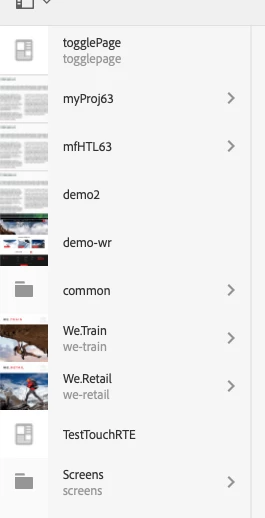
Output - Ascending order z-a and Z-A

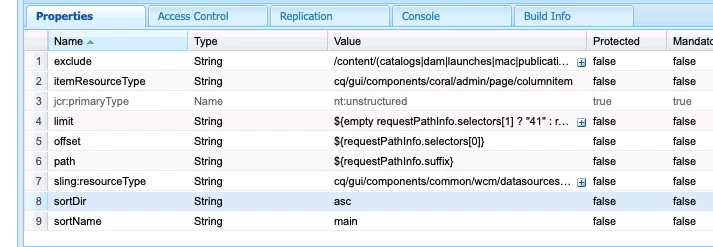
datasource changes

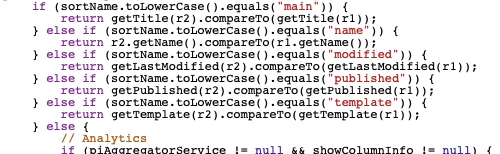
datasource code(already present)

8 replies

arunpatidar
Community Advisor
Community Advisor
October 22, 2018

Hi,

I think sorting by title is OOTB.

I am able to do it in 6.3

Arun Patidar
July 6, 2022

Hi Arun,

This query might not be exactly related to this but I am facing a similar issue with respect to OOTB sorting with Commerce products if there are more items on the page.
However, sorting works if there are just 8-10 items. Any suggestions on this?


Regards,

Nitesh

Himanshu_Singhal
Community Advisor
Community Advisor
October 22, 2018

Hi,

The sorting of pages based on title shall appear based on page load.

The package which is shared in blog, it contains overlay of all 3 views (list, column and card). And, if I used the property value as "published" then it shows the pages as per last modified status in ascending or descending order.

I want the same in case of title as well.

arunpatidar
Community Advisor
arunpatidarCommunity AdvisorAccepted solution
Community Advisor
October 22, 2018

HI,

It works in 6.3

Output - Ascending order z-a and Z-A

datasource changes

datasource code(already present)

Arun Patidar
smacdonald2008
Level 10
October 22, 2018

Thanks Arun for posting this detailed information

Himanshu_Singhal
Community Advisor
Community Advisor
October 23, 2018

Thanks Arun for the detailed explanation.

But, I think either I failed to explain properly or I'm missing something here.

The pages order which you've shown in screenshot (ascending z-a, Z-A)

togglePage -> myProj63 -> myHTL63 -> demo2 -> demo-wr -> common -> ?? --> ??

The WE.Train & WE.Retail, shouldn't it come at the top?

Also, could you please share the files path where I can find the code you've attached?

arunpatidar
Community Advisor
Community Advisor
October 23, 2018

Hi,

The sorting is based on java.util.Comparator

which compare string(type) character by character based on ASCII and returns integer based on comparison result.

So sorting order is correct in above screenshot.

You can find complete code at:

/libs/cq/gui/components/common/wcm/datasources/childpages/childpages.jsp

Arun Patidar
Himanshu_Singhal
Community Advisor
Community Advisor
October 23, 2018

Thanks Arun for providing detailed explanation :-)

I've 1 more question here about how it can be achieved in Classic UI?

Regards,

Himanshu

smacdonald2008
Level 10
October 23, 2018

In AEM 6.3 - its recommended to use TOuch UI.