Identifying content pages which is in Not Published status in AEM Author | Community
Skip to main content
samsundar23
Level 4
August 17, 2021
Solved

Identifying content pages which is in Not Published status in AEM Author

  • August 17, 2021
  • 2 replies
  • 6623 views

I'm using AEM 6.5.7.

There are around 2000 content pages which might or might not be Published.

I could not manually verify due to huge number of content pages.


I want to get the content pages which is in Not Published status using AEM query builder.

I tried multiple queries which was not giving the result needed for me.


In terms of a report, is it possible to get an extract from published cross-matched against status in AEM author.

I mean automatically identify pages in publish instance (i.e., live pages) that have a ‘Not published’ status in AEM Author.


Kindly let me know.

Thanks in advance.
 

This post is no longer active and is closed to new replies. Need help? Start a new post to ask your question.
Best answer by VeenaVikraman

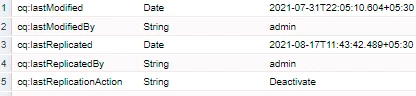
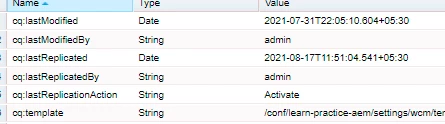
Whenever a page is Activated or Published , few properties get set on the page. (See below) . 


When a page is unpublished , it sets lastReplicationAction as "Deactivate"


There can be few scenarios 


1. If the page is never published , these properties will not be present on the page. So you can search for existence of any of these properties. Something like below


2. If the pages are published, there can be a scenario when the pages are unpublished and not available in publish, then the cq:lastReplicationAction property will be Deactivated. 


So you can combine both 1 and 2 and make a query to search


1_property=cq:lastReplicationAction
1_property.operation=exists
2_property=cq:lastReplicationAction
2_property.value=Deactivate
p.or=true


This should give you the entire list of pages which is not published at all or which were published but now deactivated.


Thanks

Veena ✌


2 replies

Adobe Employee
August 17, 2021

Hi @samsundar23 ,

If you need to find out the pages which were never published then Can you try below query in Querybuilder

http://localhost:4502/libs/cq/search/content/querydebug.html


type=cq:Page
path=/content/site
property=cq:lastReplicated_publish

property.operation = not


This query will give the list of pages which were never published!! 


Hope this helps!!!

Thanks 

VeenaVikraman
Community Advisor
VeenaVikramanCommunity AdvisorAccepted solution
Community Advisor
August 17, 2021

Whenever a page is Activated or Published , few properties get set on the page. (See below) . 


When a page is unpublished , it sets lastReplicationAction as "Deactivate"


There can be few scenarios 


1. If the page is never published , these properties will not be present on the page. So you can search for existence of any of these properties. Something like below


2. If the pages are published, there can be a scenario when the pages are unpublished and not available in publish, then the cq:lastReplicationAction property will be Deactivated. 


So you can combine both 1 and 2 and make a query to search


1_property=cq:lastReplicationAction
1_property.operation=exists
2_property=cq:lastReplicationAction
2_property.value=Deactivate
p.or=true


This should give you the entire list of pages which is not published at all or which were published but now deactivated.


Thanks

Veena ✌