HTL - render multiple select dropdown | Community
Skip to main content
Level 2
October 6, 2018
Solved

HTL - render multiple select dropdown

  • October 6, 2018
  • 10 replies
  • 5232 views

Could you advice on how to display the multi selected dropdown list via Sightly HTL for AEM 6.4? For example in a dropdown inputField, multi selected: name, email, phone. How can HTL display that on a component? Thanks in advance

cq dialog:

sling:resourceType="granite/ui/components/foundation/form/select"
multiple="{Boolean}true"

name="./inputField"

I tried the following but doesn't work

<sly data-sly-test="${properties.inputField == name}">

     <input type="text" name="name" />

</sly>

I wanted to print a pre-defined code based on the multi value

<input type="text" name="name" />

<input type="email" name="email" />

<input type="tel" name="phone" />

When check in the content the the properties inputField type is multi with values name,email,phone

This post is no longer active and is closed to new replies. Need help? Start a new post to ask your question.
Best answer by VeenaVikraman

Yup I was also trying the same

<sly data-sly-list.fieldType="${properties.inputField}">

    <input data-sly-test="${fieldType == 'emailAddress'}" type="email" name=${fieldType} class="form-control" placeholder="${'Business Email {0}' @ i18n, format='*'}" required data-error="${'Please, enter a valid email address' @ i18n}" />

    <sly data-sly-test="${fieldType == 'name'}">

        <div class="row">

            <div class="col-xs-12 col-md-6">

                <div class="form-group">

                    <input type="text" name="firstName" class="form-control" placeholder="${'First Name {0}' @ i18n, format='*'}" required data-error="${'Required information' @ i18n}" />

                </div>

            </div>

            <div class="col-xs-12 col-md-6">

                <div class="form-group">

                    <input type="text" name="lastName" class="form-control" placeholder="${'Last Name {0}' @ i18n, format='*'}" required data-error="${'Required information' @ i18n}" />

                </div>

            </div>

        </div>

    </sly>

</sly>

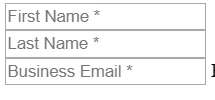
Just a note. Make sure to end your input tag with / else your list will only run once. In the above same, in the same list I have tried to render all you required fields
Thanks

Veena

10 replies

VeenaVikraman
Community Advisor
Community Advisor
October 6, 2018

Hi

  You can do the below

<sly data-sly-list.type="${properties.inputField}">

     <input type=${type} name=${type} />

</sly>

  Please refer Sightly how to get multivalued properties 

Thanks

Veena

Level 2
October 6, 2018

How about if there is extra attributes to print that is different for each selected item?

For email selected:

<input type="email" name="emailAddress" class="form-control" placeholder="${'Business Email {0}' @ i18n, format='*'}" required data-error="${'Please, enter a valid email address' @ i18n}">

For name selected:

<div class="row">
  <div class="col-xs-12 col-md-6">
  <div class="form-group">
  <input type="text" name="firstName" class="form-control" placeholder="${'First Name {0}' @ i18n, format='*'}" required data-error="${'Required information' @ i18n}">
  </div>
  </div>
  <div class="col-xs-12 col-md-6">
  <div class="form-group">
  <input type="text" name="lastName" class="form-control" placeholder="${'Last Name {0}' @ i18n, format='*'}" required data-error="${'Required information' @ i18n}">
  </div>
  </div>
</div>

VeenaVikraman
Community Advisor
Community Advisor
October 6, 2018

What will be the values from the dialog ? ./inputField ?

VeenaVikraman
Community Advisor
Community Advisor
October 6, 2018

One thing may be you can do is create a model and in that you create separate Get and Set Methods for email and name. Inject "inputField" and in PostConstruct fetch each value and set them separately to email and name fields . That way it will be easy for you to handle .

Level 2
October 6, 2018

<items
   jcr:primaryType="nt:unstructured">
  <name
   jcr:primaryType="nt:unstructured"
   text="Name"
   value="name"/>
  <email
   jcr:primaryType="nt:unstructured"
   text="Email"
   value="emailAddress"/>
  <phone
   jcr:primaryType="nt:unstructured"
   text="Phone"
   value="busPhone"/>
</items>

If is not possible with data-sly-test and render custom html for each selection, would need to look into sling model if HTL is not possible. Maybe change the dropdown to a list of checkbox boolean value.

VeenaVikraman
Community Advisor
Community Advisor
October 6, 2018

You can do this using sling model to keep your code less complex. Try it and let me know if it didn't work.

Level 2
October 6, 2018

Thanks for the advice. I am trying to use only HTL avoiding sling model

VeenaVikraman
Community Advisor
Community Advisor
October 6, 2018

Okay let me then try this for you using HTL and see if we can work this out. Give me few minutes

Level 2
October 6, 2018

Combining both data-sly-list and data-sly-test, I am able to custom render the html output based on the multi selection. Thanks a lot for the inspiration!

<sly data-sly-list.type="${properties.inputField}">
  <sly data-sly-test="${type == 'emailAddress'}">
  <div class="form-group">
  <input type="email" name="emailAddress" class="form-control" placeholder="${'Business Email {0}' @ i18n, format='*'}" required data-error="${'Please, enter a valid email address' @ i18n}">
  </div>
  </sly>
</sly>

VeenaVikraman
Community Advisor
VeenaVikramanCommunity AdvisorAccepted solution
Community Advisor
October 6, 2018

Yup I was also trying the same

<sly data-sly-list.fieldType="${properties.inputField}">

    <input data-sly-test="${fieldType == 'emailAddress'}" type="email" name=${fieldType} class="form-control" placeholder="${'Business Email {0}' @ i18n, format='*'}" required data-error="${'Please, enter a valid email address' @ i18n}" />

    <sly data-sly-test="${fieldType == 'name'}">

        <div class="row">

            <div class="col-xs-12 col-md-6">

                <div class="form-group">

                    <input type="text" name="firstName" class="form-control" placeholder="${'First Name {0}' @ i18n, format='*'}" required data-error="${'Required information' @ i18n}" />

                </div>

            </div>

            <div class="col-xs-12 col-md-6">

                <div class="form-group">

                    <input type="text" name="lastName" class="form-control" placeholder="${'Last Name {0}' @ i18n, format='*'}" required data-error="${'Required information' @ i18n}" />

                </div>

            </div>

        </div>

    </sly>

</sly>

Just a note. Make sure to end your input tag with / else your list will only run once. In the above same, in the same list I have tried to render all you required fields

Thanks

Veena