
How hide Request Publication and Request Unpublication in AEM 6.5 | Adobe Higher Education
Skip to main content
venkateshk87129
Level 2
May 13, 2020
Beantwoord

How hide Request Publication and Request Unpublication in AEM 6.5

  • May 13, 2020
  • 2 reacties
  • 6231 Bekeken

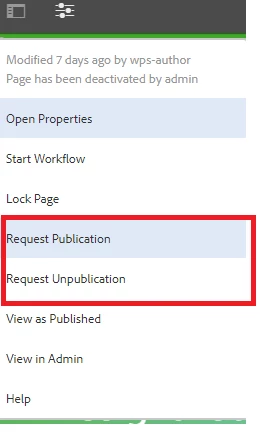
How to hide Request publication and Request Unpublication option to content authors, this option is showing for  only if users don't have permission for workflows request-for-activation and request-for-deactivation
 

Er kunnen geen reacties meer worden geplaatst op dit onderwerp.
Beste antwoord door Dipti_Chauhan

All these options are available at : /libs/wcm/core/content/editor/jcr:content/content/items/content/header/items/headerbar/items/pageinfopopover/items/list/items

 and these are rendered based on granite:rendercondition. You need to overlay your item and update rendercondition based on your requirement,


Thanks

Dipti


2 reacties

joerghoh
Adobe Employee
Adobe Employee
May 13, 2020

You can use renderconditions to hide/display according to your own requirements. See http://www.nateyolles.com/blog/2016/07/aem-granite-custom-render-conditions for a nice introduction to this topic.

venkateshk87129
Level 2
May 15, 2020
thanks jorg, This articls helps to customizatin
Dipti_Chauhan
Community Advisor
Community Advisor
May 14, 2020

All these options are available at : /libs/wcm/core/content/editor/jcr:content/content/items/content/header/items/headerbar/items/pageinfopopover/items/list/items

 and these are rendered based on granite:rendercondition. You need to overlay your item and update rendercondition based on your requirement,


Thanks

Dipti


venkateshk87129
Level 2
May 15, 2020
Thanks dipti.