fonts.adobe.com BUG showing HTML Code | Community
Skip to main content
Level 2
March 21, 2023

fonts.adobe.com BUG showing HTML Code

  • March 21, 2023
  • 2 replies
  • 1035 views

When searching for Fonts on fonts.adobe.com it's showing HTML Code. Anyone else having this issue / BUG?

macOS Monterey V12.5.1 (Apple M1 Pro)
Found in: Safari (Version 15.6.1 (17613.3.9.1.16)) & Firefox (111.0 (64-Bit))
Couldn't recreate in Chrome (Version 111.0.5563.64 (Offizieller Build) (arm64)) 
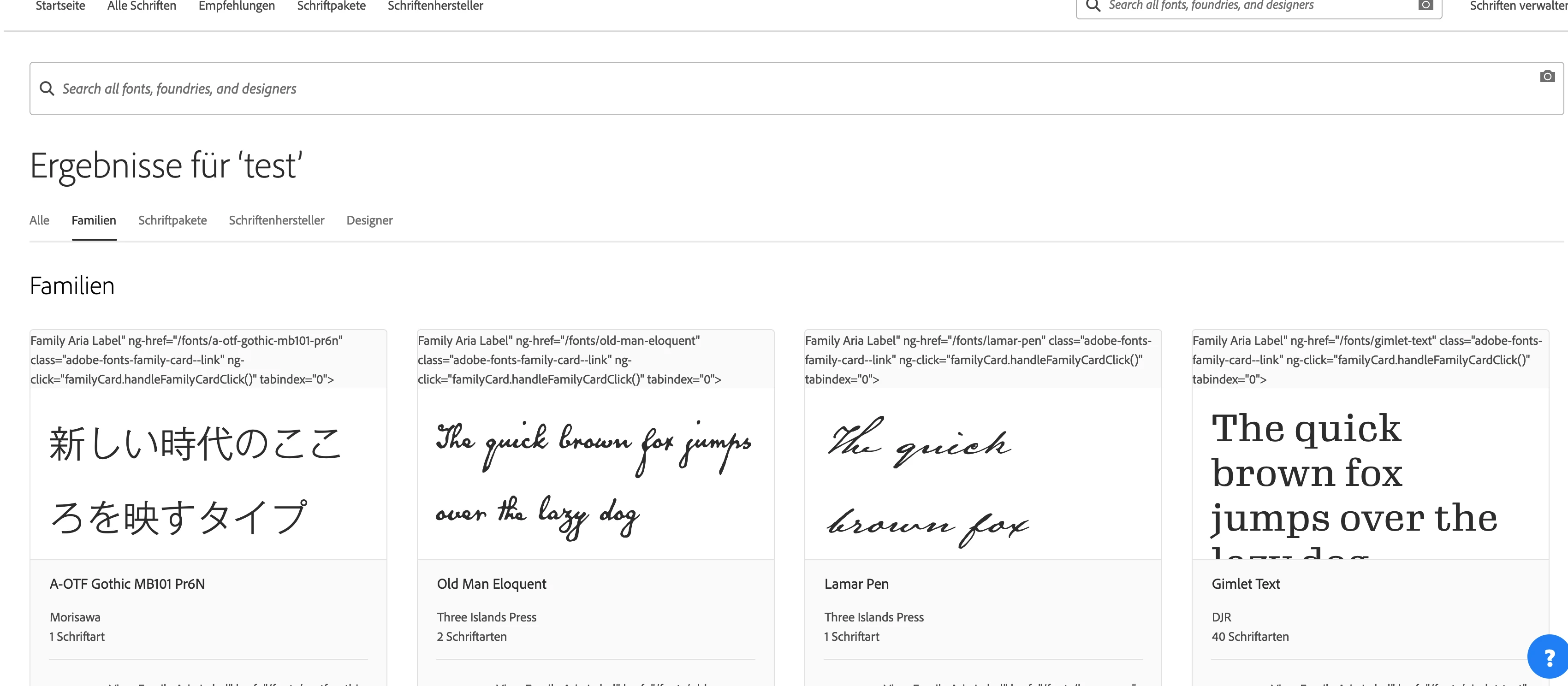


Edit: moved to Adobe Support Community No Idea why I posted it here.   


This post is no longer active and is closed to new replies. Need help? Start a new post to ask your question.

2 replies

Level 2
March 21, 2023

Just tested some more and I realized it depends on the language you are setting. 

Bug appears in all other languages except English

Level 2
March 21, 2023

Looks like the string that is used for missing translations on fonts is using a special character that escapes translation missing: 


Correct HTML Element: (English)


<a aria-label="View family Roboto" ng-href="/fonts/roboto" class="adobe-fonts-family-card--link" ng-click="familyCard.handleFamilyCardClick()" tabindex="0" href="/fonts/roboto"> </a>


Escaping HTML Element: (all other Languages)


<a aria-label="<span class=" translation_missing"="" title="translation missing: de_DE.neue.families.variations.family_aria_label, name: Roboto">Family Aria Label" ng-href="/fonts/roboto" class="adobe-fonts-family-card--link" ng-click="familyCard.handleFamilyCardClick()" tabindex="0"&gt; </a>


nitesh_kumar-1
Adobe Employee
Adobe Employee
March 21, 2023

Hi @yanisdeplazes ,


I don't see this issue with 

Safari Version 16.2 (18614.3.7.1.5)
MacOS Ventura Version 13.1 (22C65) (Intel)


You can reach out to this community for better support on this:- https://community.adobe.com/t5/adobe-fonts/ct-p/ct-fonts?page=1&sort=latest_replies&lang=all&tabid=all 


Hope this helps!


Regards,

Nitesh

Level 2
March 21, 2023

Hi @nitesh_kumar-1 , I was just testing around a bit and found the problem and possible fix: 


https://experienceleaguecommunities.adobe.com/t5/adobe-experience-manager/fonts-adobe-com-bug-showing-html-code/m-p/580953/highlight/true#M37227

If you need any help or more infos HMU.


I created a new post on adobe fonts discussion. 


Regards
Yanis