Fetch Page title, description, thumbnail image of one page in Another page through dialog. | Community
Skip to main content
Level 4
July 18, 2022
Solved

Fetch Page title, description, thumbnail image of one page in Another page through dialog.

  • July 18, 2022
  • 3 replies
  • 2693 views

Hello all, 

I have created a component which should accept only page path through cq:dialog. When I select the page and click submit through dialog then it should print all the page properties like title, description& image or image url . Is it possible ??

 Here is my component dialog:


This post is no longer active and is closed to new replies. Need help? Start a new post to ask your question.
Best answer by DEBAL_DAS

1. Page path field in Component touch ui dialog editor -
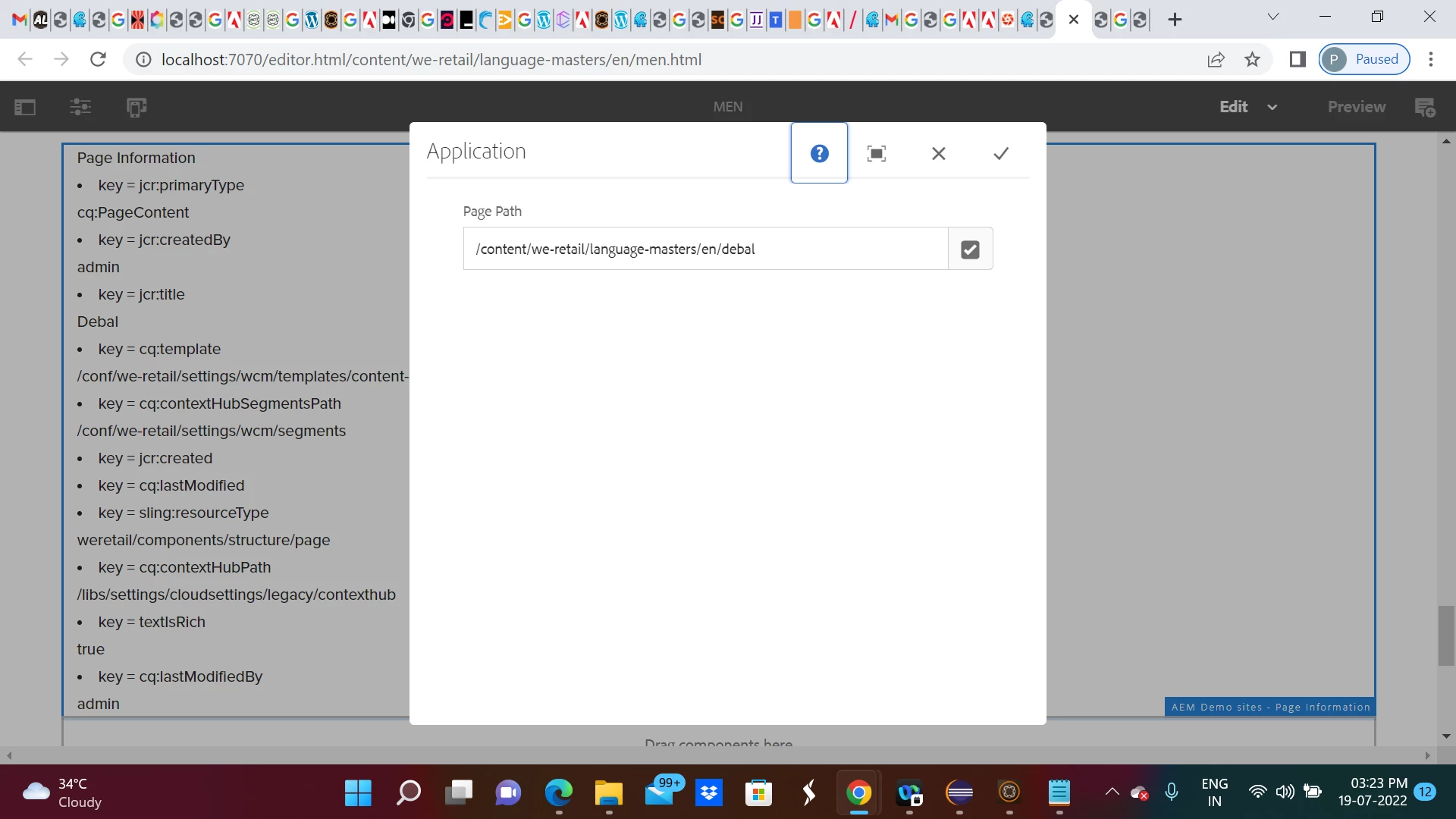
 

2. Sling model -

package com.aem.demo.core.models;

import java.util.Map;

import javax.annotation.PostConstruct;

import org.apache.sling.api.resource.Resource;
import org.apache.sling.api.resource.ResourceResolver;
import org.apache.sling.api.resource.ValueMap;
import org.apache.sling.models.annotations.DefaultInjectionStrategy;
import org.apache.sling.models.annotations.Model;
import org.apache.sling.models.annotations.injectorspecific.SlingObject;
import org.apache.sling.models.annotations.injectorspecific.ValueMapValue;

import com.day.cq.wcm.api.Page;
import com.day.cq.wcm.api.PageManager;


@Model(adaptables = Resource.class , defaultInjectionStrategy = DefaultInjectionStrategy.OPTIONAL)
public class PagePropertydetailModel {

	@ValueMapValue
	private String pagepath;
	
	@SlingObject
    private ResourceResolver resourceResolver;
	
	private Map<String,Object> pageProperties;
	
	@PostConstruct
	protected void init() {
		
		
		PageManager pageManager = resourceResolver.adaptTo(PageManager.class);
		Page page = pageManager.getPage(pagepath);
		pageProperties = page.getProperties();


	}

	public Map<String, Object> getPageProperties() {
		return pageProperties;
	}
}

3. Htl code -

Page Information</br>

<div data-sly-use.map="com.aem.demo.core.models.PagePropertydetailModel">

  <sly data-sly-list="${map.pageProperties.keySet.iterator}">

     <li>key = ${item}</li>    
      ${map.pageProperties[item]}


   </sly>

</div>

4. Rendered data as shown below  -
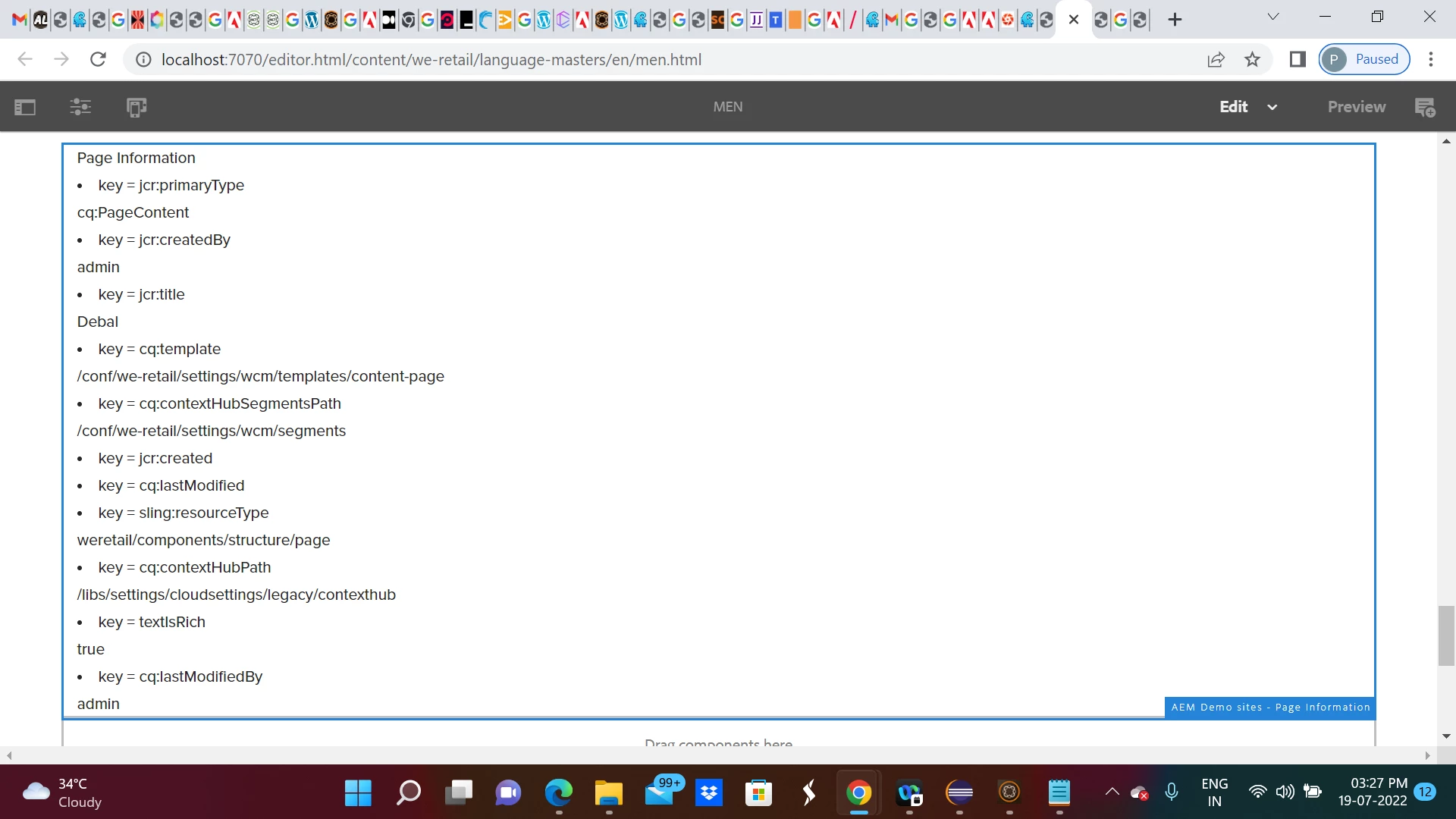
Just shared the idea. I will update logic for Date field like jcr:created and cq:lastModified
 

3 replies

Sachin_Arora_
Community Advisor
Community Advisor
July 18, 2022

You can write a sling model for custom component. Using resource resolver you can get resource and adapt to Page. Once you adaptTo Page, you can iterate all properties. Please refer below links for more details.


Manu_Mathew_
Community Advisor
Community Advisor
July 18, 2022

@tessa_learner1 Yes its possible to do in the sling model.


@Model(adaptable=Resource.class)

public class TestClass {

@Self

Resource resource;

@PostConstruct

public void init() {

  PageManager pm = resource.getResourceResolver().adaptTo(PageManager.class);

  Page containingPage = pm.getContainingPage (resource);

  ValueMap pageProperties = containingPage.getProperties();

}

}


map the properties to variables and then use it in the HTL.

DEBAL_DAS
DEBAL_DASAccepted solution
New Member
July 19, 2022

1. Page path field in Component touch ui dialog editor -


2. Sling model -

package com.aem.demo.core.models;

import java.util.Map;

import javax.annotation.PostConstruct;

import org.apache.sling.api.resource.Resource;
import org.apache.sling.api.resource.ResourceResolver;
import org.apache.sling.api.resource.ValueMap;
import org.apache.sling.models.annotations.DefaultInjectionStrategy;
import org.apache.sling.models.annotations.Model;
import org.apache.sling.models.annotations.injectorspecific.SlingObject;
import org.apache.sling.models.annotations.injectorspecific.ValueMapValue;

import com.day.cq.wcm.api.Page;
import com.day.cq.wcm.api.PageManager;


@Model(adaptables = Resource.class , defaultInjectionStrategy = DefaultInjectionStrategy.OPTIONAL)
public class PagePropertydetailModel {

	@ValueMapValue
	private String pagepath;
	
	@SlingObject
    private ResourceResolver resourceResolver;
	
	private Map<String,Object> pageProperties;
	
	@PostConstruct
	protected void init() {
		
		
		PageManager pageManager = resourceResolver.adaptTo(PageManager.class);
		Page page = pageManager.getPage(pagepath);
		pageProperties = page.getProperties();


	}

	public Map<String, Object> getPageProperties() {
		return pageProperties;
	}
}

3. Htl code -

Page Information</br>

<div data-sly-use.map="com.aem.demo.core.models.PagePropertydetailModel">

  <sly data-sly-list="${map.pageProperties.keySet.iterator}">

     <li>key = ${item}</li>    
      ${map.pageProperties[item]}


   </sly>

</div>

4. Rendered data as shown below  -

Just shared the idea. I will update logic for Date field like jcr:created and cq:lastModified


Debal Das, Senior AEM Consultant
Level 4
July 19, 2022

Hi @debal_das  Thank you for the help. I just need to elaborate my query actually I'm having an article page with title, description & image. So when I configure that article page path in dialog it should get the corresponding title, description & image(thumbnail image if it's have ) Can I do this with the above code ??

DEBAL_DAS
New Member
July 19, 2022

Please correct me after configuring the article page in dialog editor , you want to get the corresponding title, description & image(thumbnail image if it's have ) in dialog editor right?

Debal Das, Senior AEM Consultant