Editable Template | Community
Skip to main content
Level 3
September 4, 2020
Solved

Editable Template

  • September 4, 2020
  • 5 replies
  • 1833 views

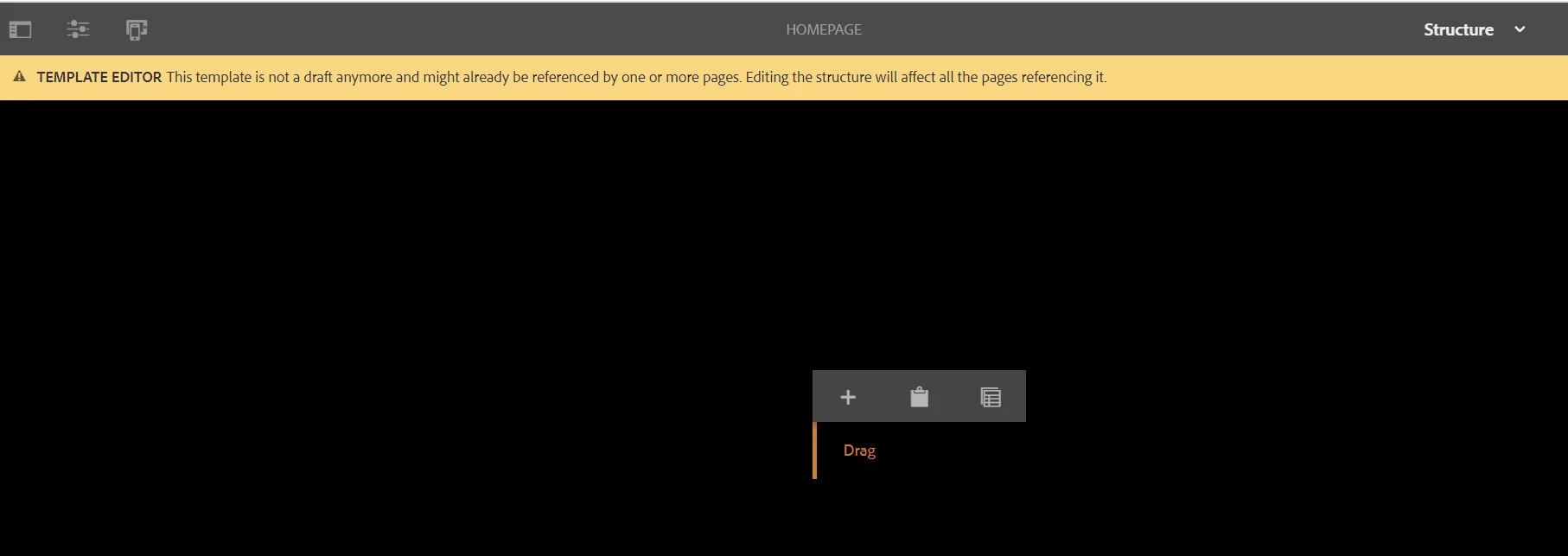
I was creating website pages by using the Editable template but suddenly my editable template background changes to black and drop components box size also changed, not able to find how it got affected. Please suggest.


Thanks,

Heena
This post is no longer active and is closed to new replies. Need help? Start a new post to ask your question.
Best answer by Surabhi_Katiyar

Check the browser console if there are any errors related to coral objects not found in core.js. If yes then restart the instance or rebuild the client libraries from the below URL:


http://[host]:[port]/libs/granite/ui/content/dumplibs.rebuild.html


If after this also the same issue persists, check for error in the AEM error.log file.


5 replies

BrianKasingli
Community Advisor and Adobe Champion
September 4, 2020

@heena06,

To better understand your situation, we will need to debug your existing environment...

Can you please provide us with:

  1. Browser underTest
  2. Browser's console log (if there are any errors or there may be a conflict with a chrome plugin)
  3. Error.log (if there are any exceptions)

Thanks.

Nupur_Jain
Adobe Employee
Adobe Employee
September 4, 2020

Hi @heena06 


Can you check if there is no clientlibs included which is setting the background to black color and affecting other elements?


Thanks!

Nupur

Surabhi_Katiyar
Adobe Employee
Surabhi_KatiyarAdobe EmployeeAccepted solution
Adobe Employee
September 6, 2020

Check the browser console if there are any errors related to coral objects not found in core.js. If yes then restart the instance or rebuild the client libraries from the below URL:


http://[host]:[port]/libs/granite/ui/content/dumplibs.rebuild.html


If after this also the same issue persists, check for error in the AEM error.log file.


sunjot16
Adobe Employee
Adobe Employee
September 7, 2020

* Do you see the same behavior, when you close all currently opened tabs & windows, clear browser cache & cookies, open a new browser in Incognito mode?

* Do you see any errors in the Console tab of Developer Tools?

* Did you install any custom/third-party bundle/package, after which you started seeing this issue? Try uninstalling/disabling & removing them, perform the below step and then verify whether the issue still exists:

Try recompiling JSPs, invalidating clientlibs cache & rebuilding clientlibs via File System. [1]


Hope it helps !!


[1] https://helpx.adobe.com/experience-manager/kb/How-to-force-a-recompilation-of-all-Sling-scripts-jsps-java-sightly-on-AEM-6-4.html

Nikhil-Kumar
Community Advisor
Community Advisor
September 8, 2020

@heena06 

By any chance did you customized the responsiveGrid ? 

I suspect there are some custom CSS added to the Page Policy which is hampering this. You can try clearing the cache once or try in Incognito window.

Thanks,
Nikhil Kumar