Create cache for /etc/cloudsettings.kernel.js file | Community
Skip to main content
This post is no longer active and is closed to new replies. Need help? Start a new post to ask your question.
Best answer by paulojorgemtava

Hi @del27634,


below the screenshots:


3 replies

Asutosh_Jena_
Community Advisor
Community Advisor
March 24, 2021

Hi @paulojorgemtava 

You can add the below highlighted rule in your farms any file under rules section and it will cache the file.


/rules
{
/0000 { /glob "*" /type "deny" }
/0001 { /glob "/etc/cloudsettings.kernel.js" /type "allow" }
}


Please refer the rules section here priovided by Adobe:

https://experienceleague.adobe.com/docs/experience-manager-dispatcher/using/configuring/dispatcher-configuration.html?lang=en#configuring-load-balancing-statistics


Hope this helps!
Thanks!

Asutosh_Jena_
Community Advisor
Community Advisor
March 24, 2021

@paulojorgemtava 

If you see the below examples:

http://localhost:4502/etc/cloudsettings.kernel.js/libs/settings/cloudsettings/legacy/contexthub - This is the file which will deliver the content which does not have any extension which will not be cached.
http://localhost:4502/etc/cloudsettings.kernel.js - This has an extension but it does not deliver any content.


There is another way to cache the file by applying a rewrite rule but for that the incoming URL needs to be updated and should have an extension which I am not sure if it will be possible in your case as you might not be able to change the incoming URL such as:

Request URL: http://localhost:4502/etc/cloudsettings.kernel.js/something.js -> Rewrite to http://localhost:4502/etc/cloudsettings.kernel.js/libs/settings/cloudsettings/legacy/contexthub

which will serve the content as well as cache the content with something.js name.


Thanks!

paulojorgemtava
paulojorgemtavaAuthorAccepted solution
Level 2
August 2, 2021

Hi @del27634,


below the screenshots:


August 2, 2021
MaciejMajchrzak
March 7, 2022

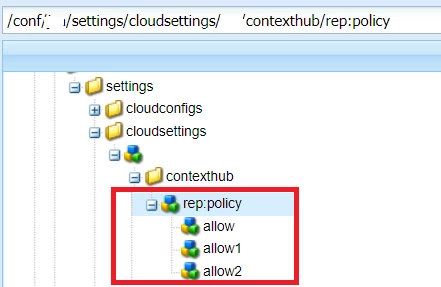
The problem is related to URL structure and the fact that the suffix for the original resource (/etc/cloudsettings.kernel.js/conf/xxx/settings/cloudsettings/default/contexthub) does not have any extension. Dispatcher ignores such requests. Sadly, It looks like a dead end... However, with a bit of trick you can force the dispatcher to cache it. If you name your contexthub configuration in a way which ends with an extension, i.e. /conf/xxx/settings/cloudsettings/default/contexthub.js, then the full request will become cacheable (/etc/cloudsettings.kernel.js/conf/xxx/settings/cloudsettings/default/contexthub.js).

After you rename the configuration, you need to remember about updating the references in content, like on the screenshot: