core components not resolved | Community
Skip to main content
Level 2
November 17, 2022
Solved

core components not resolved

  • November 17, 2022
  • 2 replies
  • 9463 views

Hi All,


I'm facing an strange issue that the core components are not getting resolved after installing the project which has react integration. Below are the specs I'm using.


AEM - 6.5 with SP-6.5.14.0

Java - 1.11

Mvn - 3.8.6


Steps I tried to fix:


1) Tried updating the uber jar from 6.5.0 to 6.5.14

2) updated the dependency version from 2.13.0 to 2.3.2 & 2.8.0

<dependency>
<groupId>com.adobe.cq</groupId>
<artifactId>core.wcm.components.core</artifactId>
<type>jar</type>
<version>2.3.2</version>
<scope>provided</scope>
</dependency>

3) The current core components of version is 2.13.0 com.adobe.cq.core.wcm.components.core

4) As an last option I tried restarting AEM and restarted the core components bundles.


whereas the core components is getting resolved in my another project. Below are the screenshots of the resolved bundle and not resolved one. Can someone please share your inputs to fix this?
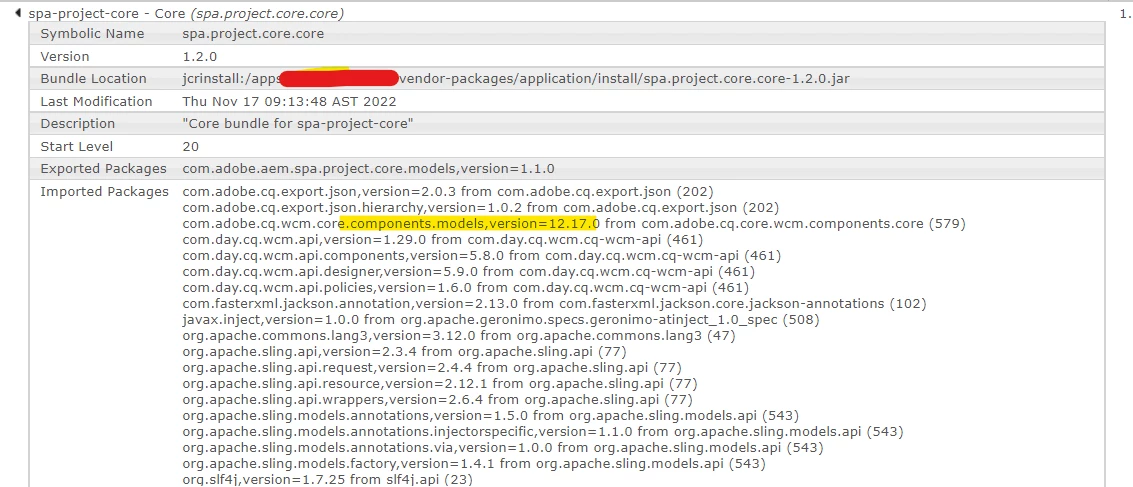
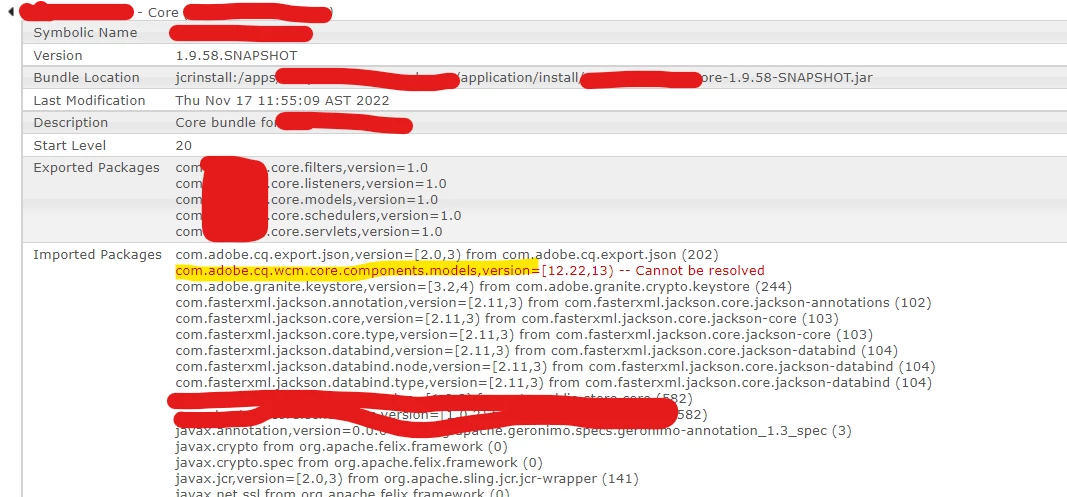


below is the core component,
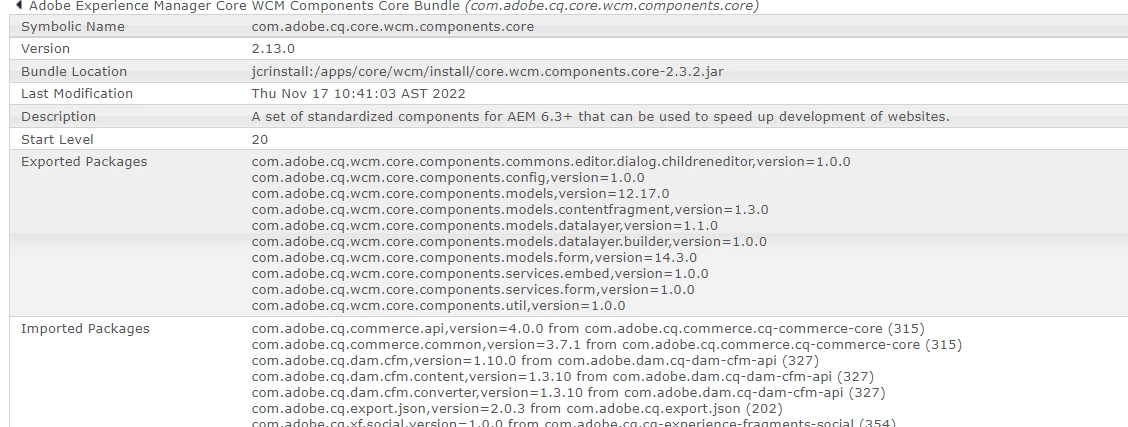
 

@vijayalakshmi_s @kautuk_sahni @debal_das @ratna_kumar 


Regards,

Vijay



This post is no longer active and is closed to new replies. Need help? Start a new post to ask your question.
Best answer by SantoshSai

Hi @vijayselvas1 ,

It seems you missed core.wcm.components.all, Please try below steps 

1) Edit pom.xml and add the following dependencies in the <dependencies> section:

<dependencies>
...
 
<dependency>
    <groupId>com.adobe.cq</groupId>
    <artifactId>core.wcm.components.core</artifactId>
    <version>2.21.0</version>
    <scope>provided</scope>
</dependency>
<dependency>
    <groupId>com.adobe.cq</groupId>
    <artifactId>core.wcm.components.all</artifactId>
    <type>zip</type>
    <version>2.21.0</version>
    <scope>provided</scope>
</dependency>
 
...
</dependencies>

2) Edit core/pom.xml. Add the core.wcm.components.core dependency to the dependency list. Notice that it is not necessary to specify a version, as the version is managed at the Parent pom. It is a best practice to always manage dependency versions within the Parent pom.

//core/pom.xml
 
<dependencies>
...
 
<dependency>
    <groupId>com.adobe.cq</groupId>
    <artifactId>core.wcm.components.core</artifactId>
</dependency>
...
</dependencies>

3) Edit ui.apps/pom.xml. Add the core.wcm.components.all zip as a dependency in the dependency list.

//ui.apps/pom.xml
 
<dependencies>
...
 
<dependency>
   <groupId>com.adobe.cq</groupId>
    <artifactId>core.wcm.components.all</artifactId>
    <type>zip</type>
</dependency>
...
</dependencies>

4) Edit ui.apps/pom.xml. Include core.wcm.components.all zip as a sub-package. This will deploy the Core Components package along with your custom code each time. Beneath the embedded tag add a new tag for subPackages and specify the core.wcm.components.all artifactId.

//ui.apps/pom.xml
<plugins>
...
 
<plugin>
    <groupId>com.day.jcr.vault</groupId>
    <artifactId>content-package-maven-plugin</artifactId>
    <extensions>true</extensions>
    <configuration>
        <group>aem-guides/wknd</group>
        <filterSource>src/main/content/META-INF/vault/filter.xml</filterSource>
        <properties>
              <acHandling>merge_preserve</acHandling>
        </properties>
        <embeddeds>
            <embedded>
                <groupId>com.adobe.aem.guides</groupId>
                <artifactId>wknd-sites-guide.core</artifactId>
                <target>/apps/wknd/install</target>
            </embedded>
            </embeddeds>
 
            <subPackages>
                <subPackage>
                    <groupId>com.adobe.cq</groupId>
                <artifactId>core.wcm.components.all</artifactId>
                    <filter>true</filter>
                </subPackage>
            </subPackages>
    <targetURL>http://${crx.host}:${crx.port}/crx/packmgr/service.jsp</targetURL>
    </configuration>
</plugin>
...
</plugins>

5) To verify that it works, go to the Package Manager. You should see listed three new items:

  • core.wcm.components.content-2.21.0.zip
  • core.wcm.components.config-2.21.0.zip
  • core.wcm.components.all-2.21.0.zip

Hope that helps!

Regards,

Santosh

2 replies

SantoshSai
Community Advisor
SantoshSaiCommunity AdvisorAccepted solution
Community Advisor
November 17, 2022

Hi @vijayselvas1 ,

It seems you missed core.wcm.components.all, Please try below steps 

1) Edit pom.xml and add the following dependencies in the <dependencies> section:

<dependencies>
...
 
<dependency>
    <groupId>com.adobe.cq</groupId>
    <artifactId>core.wcm.components.core</artifactId>
    <version>2.21.0</version>
    <scope>provided</scope>
</dependency>
<dependency>
    <groupId>com.adobe.cq</groupId>
    <artifactId>core.wcm.components.all</artifactId>
    <type>zip</type>
    <version>2.21.0</version>
    <scope>provided</scope>
</dependency>
 
...
</dependencies>

2) Edit core/pom.xml. Add the core.wcm.components.core dependency to the dependency list. Notice that it is not necessary to specify a version, as the version is managed at the Parent pom. It is a best practice to always manage dependency versions within the Parent pom.

//core/pom.xml
 
<dependencies>
...
 
<dependency>
    <groupId>com.adobe.cq</groupId>
    <artifactId>core.wcm.components.core</artifactId>
</dependency>
...
</dependencies>

3) Edit ui.apps/pom.xml. Add the core.wcm.components.all zip as a dependency in the dependency list.

//ui.apps/pom.xml
 
<dependencies>
...
 
<dependency>
   <groupId>com.adobe.cq</groupId>
    <artifactId>core.wcm.components.all</artifactId>
    <type>zip</type>
</dependency>
...
</dependencies>

4) Edit ui.apps/pom.xml. Include core.wcm.components.all zip as a sub-package. This will deploy the Core Components package along with your custom code each time. Beneath the embedded tag add a new tag for subPackages and specify the core.wcm.components.all artifactId.

//ui.apps/pom.xml
<plugins>
...
 
<plugin>
    <groupId>com.day.jcr.vault</groupId>
    <artifactId>content-package-maven-plugin</artifactId>
    <extensions>true</extensions>
    <configuration>
        <group>aem-guides/wknd</group>
        <filterSource>src/main/content/META-INF/vault/filter.xml</filterSource>
        <properties>
              <acHandling>merge_preserve</acHandling>
        </properties>
        <embeddeds>
            <embedded>
                <groupId>com.adobe.aem.guides</groupId>
                <artifactId>wknd-sites-guide.core</artifactId>
                <target>/apps/wknd/install</target>
            </embedded>
            </embeddeds>
 
            <subPackages>
                <subPackage>
                    <groupId>com.adobe.cq</groupId>
                <artifactId>core.wcm.components.all</artifactId>
                    <filter>true</filter>
                </subPackage>
            </subPackages>
    <targetURL>http://${crx.host}:${crx.port}/crx/packmgr/service.jsp</targetURL>
    </configuration>
</plugin>
...
</plugins>

5) To verify that it works, go to the Package Manager. You should see listed three new items:

  • core.wcm.components.content-2.21.0.zip
  • core.wcm.components.config-2.21.0.zip
  • core.wcm.components.all-2.21.0.zip

Hope that helps!

Regards,

Santosh

Santosh Sai
Level 2
November 21, 2022

Thanks for the inputs @santoshsai . It's worked!

August 12, 2024

Hi ,
my bundle is failing with this error can you help.
com.adobe.cq.wcm.core.components.models,version=[12.29,13) -- Cannot be resolved