
Annotations when Editing a Page is Not working. AEM6.5 | Community
Skip to main content
tushaar_srivastava
Level 6
September 21, 2020
Solved

Annotations when Editing a Page is Not working. AEM6.5

  • September 21, 2020
  • 3 replies
  • 2186 views

Hi Team,


For some page in edit mode I am not able to add annotation.

Like suppose for a page, having a some component example a Hero component and I am trying to give annotation, but it is not taking annotation.

also for some page only single annotation is available and then not able to add another Annotation.
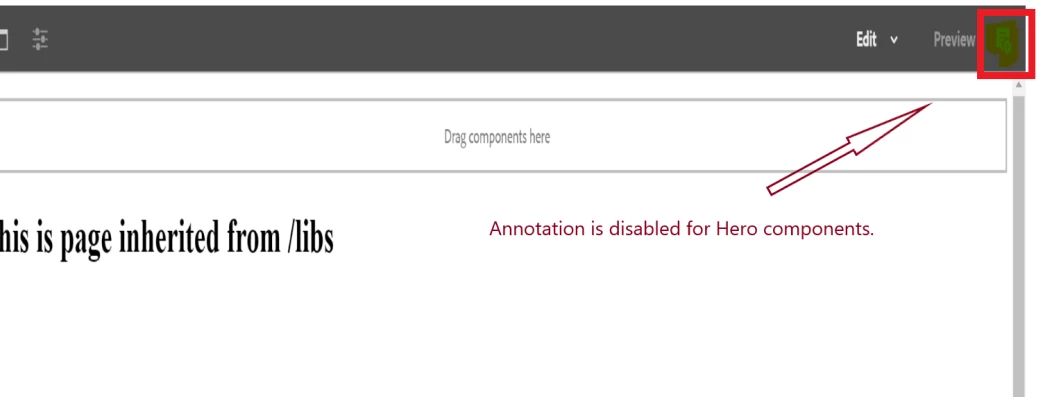
 

 I am not sure how to make available annotation for any pages if it is restricted.


Current observation: Annotation is disabled for some components.

Expected Behavior: We should be able to annotate over some components in Page.


Scenario : is like in a page under /content example: homepage we have some custom components like hero component and resoucesbar component, global component  and here in Hero component if we are trying to add Annotation like we see in above image.

I am not able to add annotation for some component like in homepageHero not able to add, instead if we try to add on resourceBar or gloal we are able to add. and we can see cq:annotations is adding up in those nodes.


How to get those annotation active or available for all components.


Thanks,

 

@kautuk_sahni  @vijayalakshmi_s  @arunpatidar 

This post is no longer active and is closed to new replies. Need help? Start a new post to ask your question.
Best answer by Vijayalakshmi_S

Hi @tushaar_srivastava,

Following the solution from the thread shared by @varun_shakya, below is the equivalent latest link

https://helpx.adobe.com/experience-manager/6-5/sites/developing/using/reference-materials/javadoc/com/day/cq/wcm/api/components/EditAction.html

Enum Constant Summary section lists all possible cq:actions on cq:editConfig node. You can try using "EDITANNOTATE"

3 replies

vanegi
Adobe Employee
Adobe Employee
September 21, 2020

I am unable to reproduce the issue in a vanilla OOTB set up. Please confirm if the behavior is the same on an OOTB setup or could be recreated on an OOTB setup. In case yes, please share detailed steps with the package to recreate the scenario at my end on an OOTB setup.

tushaar_srivastava
Level 6
September 22, 2020

Hi @vanegi I have updated the scenario where I am facing issue, please check in above question, I am not getting for some component in a page if I am trying to add annotation it is not taking up, not sure why this is happening, do we need to add some dialog property or some other property maybe which I am missing for some specific component or what could be the possibility to restrict or allow the annotation in page so that I can get the cq:annotation node in any components

Varun_Shakya
Community Advisor
Community Advisor
September 22, 2020
tushaar_srivastava
Level 6
September 22, 2020
do we have any latest link, because in this thread, following old links which are not available
Vijayalakshmi_S
Vijayalakshmi_SAccepted solution
Level 10
September 22, 2020

Hi @tushaar_srivastava,

Following the solution from the thread shared by @varun_shakya, below is the equivalent latest link

https://helpx.adobe.com/experience-manager/6-5/sites/developing/using/reference-materials/javadoc/com/day/cq/wcm/api/components/EditAction.html

Enum Constant Summary section lists all possible cq:actions on cq:editConfig node. You can try using "EDITANNOTATE"