After Updating to AEM 6.5.10 the Create Page option is not appearing for some pages | Community
Skip to main content
Level 2
December 1, 2021
Solved

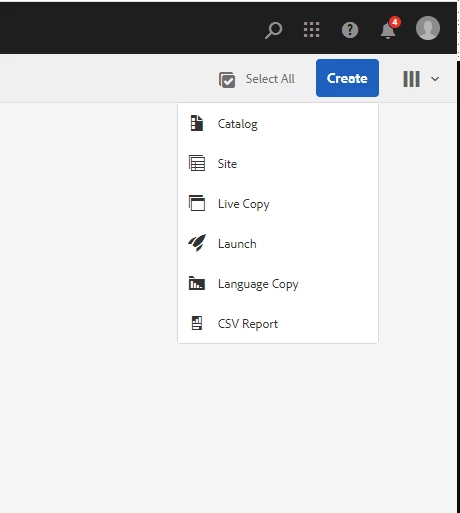
After Updating to AEM 6.5.10 the Create Page option is not appearing for some pages

  • December 1, 2021
  • 2 replies
  • 4305 views

After Updating to AEM 6.5.10 the Create Page option is not appearing for some pages

I have see some post saying missing jcr:content node can cause this problem but our pages all have this.  Can you please help if someone is facing such issues. 
This post is no longer active and is closed to new replies. Need help? Start a new post to ask your question.
Best answer by krishna_garikapati

Hello, Mahaboob.

Have a you created any new template and added to the root page under page Advanced settings.
If so check if path to the template is correct and no typo's in it. 

Make sure you didn't have a typo like ..../wcm/templates./* as it should be wcm/templates/.*

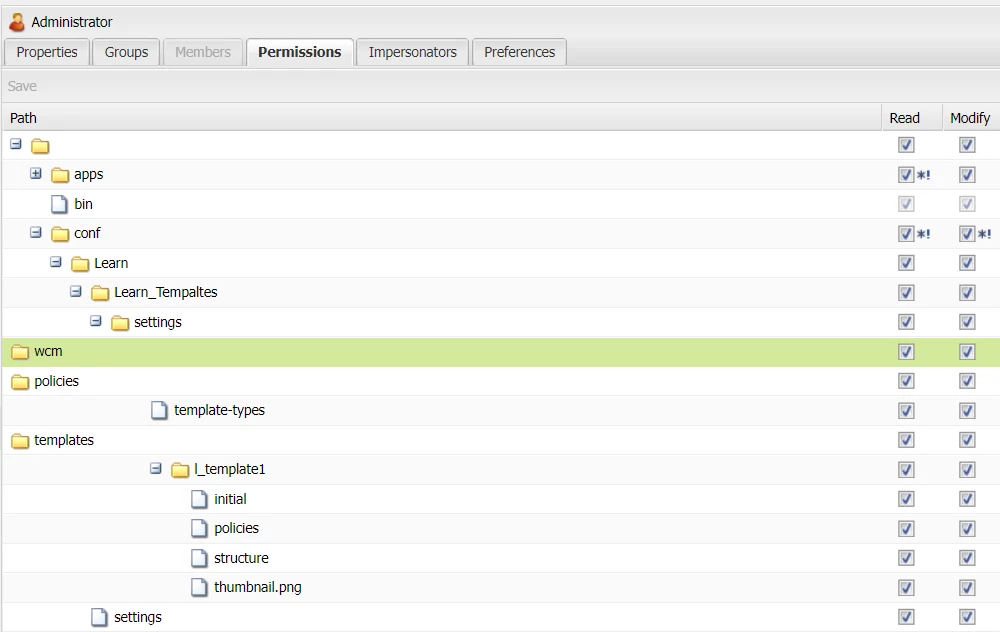
Make sure the admin user has Modify privileges to the complete path. By default i noticed that Modify is disabled for WCM and Templates folder. 


2 replies

Kiran_Vedantam
Community Advisor
Community Advisor
December 2, 2021

Hi @mahaboob 


Can you check

  1. if the root page has some templates allowed to create the page on first place?
  2. if the person who is trying to create have required access?
  3. Is it happening under all the pages?
  4. Whats logs saying?

Thanks,

Kiran Vedantam.

Level 2
December 2, 2021

Hi @kiran_vedantam ,

thanks for the hints. When it comes your #1 tip, what if the page I'm trying to create is the root page? (I have exactly same issue as shown in the original post). 
I share the same symptom-description picture as in the original post.
Plus below is how it looks in my CRXDE, where under /sites I do have jcr:content

Thanks!

mahaboobAuthor
Level 2
December 5, 2021

Hello @kiran_vedantam @infiniteshi ,


 I found out from trail and error that one of the template that was allowed in the page is having this problem. Sice not clear why only this template is having this problem but not with others. We are still investigating.

@kiran_vedantam  Answer to your questions
 We also have this problem with root page and templates are available. 

  Even admin is not able to create

  Not all as i told you before some and those which have a specific template included
  Not much is there in AEM logs for this i think the show and hide of this button is happening with script intenally.


Thanks,

Mahaboob.

krishna_garikapati
krishna_garikapatiAccepted solution
Level 3
May 29, 2023

Hello, Mahaboob.

Have a you created any new template and added to the root page under page Advanced settings.
If so check if path to the template is correct and no typo's in it. 

Make sure you didn't have a typo like ..../wcm/templates./* as it should be wcm/templates/.*

Make sure the admin user has Modify privileges to the complete path. By default i noticed that Modify is disabled for WCM and Templates folder.