AEM6.5 - Not able to see Experience Fragment Template(OOTB) in touch-UI | Adobe Higher Education
Skip to main content
Level 2
February 15, 2021
Respondido

AEM6.5 - Not able to see Experience Fragment Template(OOTB) in touch-UI

  • February 15, 2021
  • 2 respostas
  • 1616 Visualizações

Hi,

I am able to create Experience Fragment using Experience fragment template(OOTB) in Classic UI.
But, I am not able to see Experience Fragment template when I try to create Experience Fragment in touch UI.

Also, I am able to create Experience fragments inside Experience fragments in ClassicUI but in touchUI I am able to create only variations inside Experience fragments.

Can anyone please help me on this?


@kautuk_sahni@Theo_Pendle @Arun_Patidar @Himanshu_Singhal  @vanegi @Vijayalakshmi_S @Andrei_Dantsou
Este tópico foi fechado para respostas.
Melhor resposta por Kiran_Vedantam

Hi @abirami_sd,


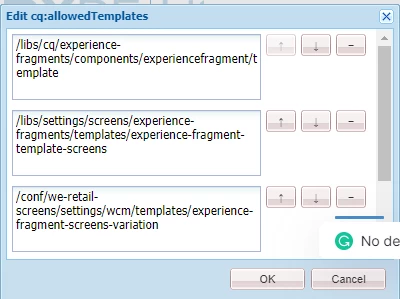
In CRXDE, go to /content/experience-fragments and check the "cq:allowedTemplates" property


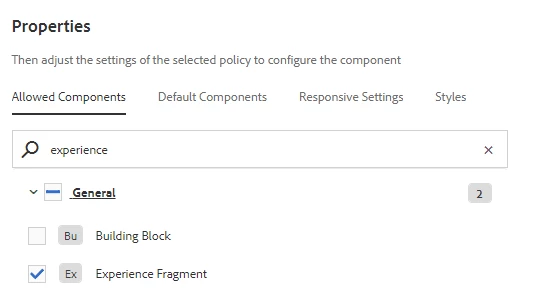
Also to add an experience fragment inside an experience fragment, edit the template and add the "Experience fragments" in the Layout container policy. This is similar to adding the allowed components in the container policy.


Also, it is recommended to try all these in touch UI as they are the latest functionalities by adobe.


Hope this helps.


Thanks,

Kiran Vedantam

2 Respostas

arunpatidar
Community Advisor
Community Advisor
February 15, 2021

you need to add your template in allowed template property in experience fragment

you can try adding from configuration as in screenshot below


Arun Patidar
Level 2
February 15, 2021
Hi @arunpatidar, I have already checked the allowed template property and this OOTB template path(/libs/cq/experience-fragments/components/experiencefragment/template) is present. But I am not able to see this Experience Fragment Template when I create XF in touch UI.
Kiran_Vedantam
Community Advisor
Community Advisor
February 15, 2021

Hi @abirami_sd,


In CRXDE, go to /content/experience-fragments and check the "cq:allowedTemplates" property


Also to add an experience fragment inside an experience fragment, edit the template and add the "Experience fragments" in the Layout container policy. This is similar to adding the allowed components in the container policy.


Also, it is recommended to try all these in touch UI as they are the latest functionalities by adobe.


Hope this helps.


Thanks,

Kiran Vedantam