
AEM 6.5 Show Hide fields dropdown in Multifield
Hi Team,
I need help regarding show hide dropdown field inside multifield
where there are 4 fields in the dropdown.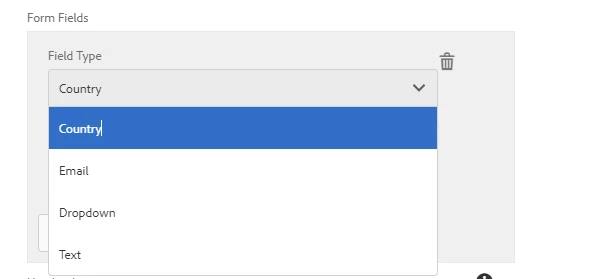
case 1: [1st field in Dropdown] if we click on the Country dropdown with Variable ID field
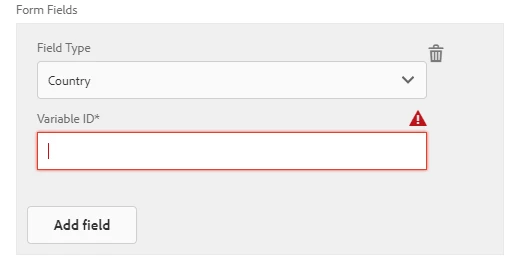
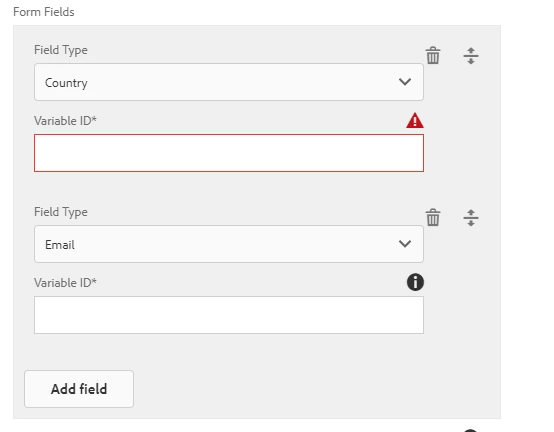
case 2: [2nd field in Dropdown] Add field and add Email where Email contains the same field as Country with Variable ID field
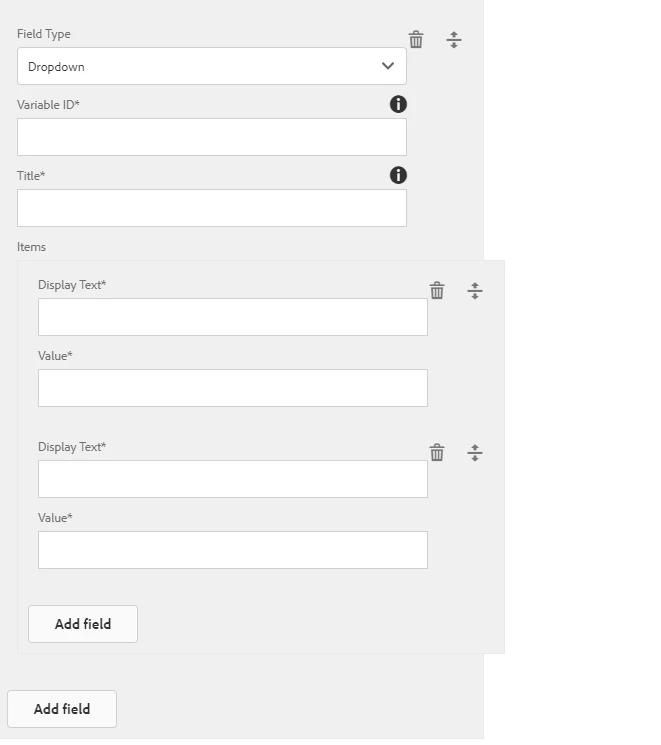
Case 3: [3rd field in Dropdown] a dropdown with some Additional "Title" field and nested field "Display Text" and "value", with Variable ID field.
Case3: [4th field in Dropdown] a Text with some additional "Title" field as compared to cases 1, 2, and like case 3 without nested items.
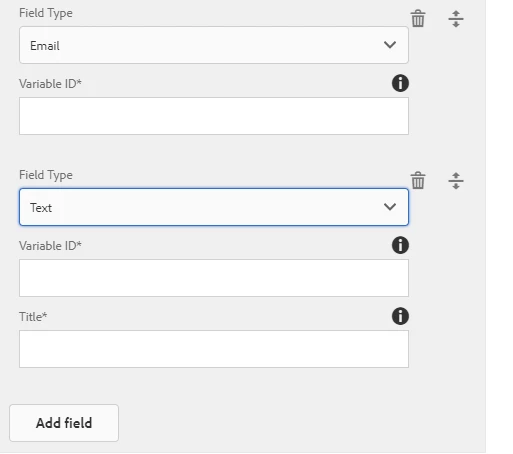
Now the problem here I am facing I have written a customer JS for Show Hide fields, between these drop-down selections. but let say when we try to delete one or more of the fields in the component and save it, the field does not get deleted on the author page. We can still see it when we open the component.
<formFields1
                                    jcr:primaryType="nt:unstructured"
                                    sling:resourceType="granite/ui/components/foundation/form/multifield"
                                    class="full-width formField"
                                    eaem-multi-nested=""
                                    fieldLabel="Form Fields"
                                    maxLimit="12">
	<field
                                        jcr:primaryType="nt:unstructured"
                                        sling:resourceType="granite/ui/components/foundation/form/fieldset"
                                        name="./formFields">
		<layout
                                            jcr:primaryType="nt:unstructured"
                                            sling:resourceType="granite/ui/components/foundation/layouts/fixedcolumns"
                                            method="absolute"/>
		<items jcr:primaryType="nt:unstructured">
			<column
                                                jcr:primaryType="nt:unstructured"
                                                sling:resourceType="granite/ui/components/foundation/container"
                                                fieldLabel="Items">
				<items jcr:primaryType="nt:unstructured">
					<field
                                                        jcr:primaryType="nt:unstructured"
                                                        sling:resourceType="granite/ui/components/foundation/form/select"
                                                        class="cq-dialog-rightRaildropdown-showhide"
                                                        fieldLabel="Field Type"
                                                        id="drop1"
                                                        name="./field"
                                                        value="">
						<items jcr:primaryType="nt:unstructured">
							<country
                                                                jcr:primaryType="nt:unstructured"
                                                                text="Country"
                                                                value="country"
                                                                width="250"/>
							<email
                                                                jcr:primaryType="nt:unstructured"
                                                                text="Email"
                                                                value="email"
                                                                width="250"/>
							<dropDown
                                                                jcr:primaryType="nt:unstructured"
                                                                text="Dropdown"
                                                                value="dropDown"
                                                                width="250"/>
							<text
                                                                jcr:primaryType="nt:unstructured"
                                                                text="Text"
                                                                value="text"
                                                                width="250"/>
						</items>
					</field>
					<variableId
                                                        jcr:primaryType="nt:unstructured"
                                                        sling:resourceType="granite/ui/components/foundation/form/textfield"
                                                        fieldDescription="Enter the 'HTML Name' form field"
                                                        fieldLabel="Variable ID*"
                                                        id="variableId1"
                                                        name="./variableId"
                                                        required="{Boolean}true"/>
					<fieldTitle
                                                        jcr:primaryType="nt:unstructured"
                                                        sling:resourceType="granite/ui/components/foundation/form/textfield"
                                                        fieldDescription="Under 45 characters recommended"
                                                        fieldLabel="Title*"
                                                        id="title1"
                                                        name="./fieldTitle"
                                                        required="{Boolean}true"/>
					<ddItems
                                                        jcr:primaryType="nt:unstructured"
                                                        sling:resourceType="custom/touchui/custommultifield"
                                                        class="full-width"
                                                        eaem-multi-nested=""
                                                        fieldLabel="Items"
                                                        id="ddItems1">
						<field
                                                            jcr:primaryType="nt:unstructured"
                                                            sling:resourceType="granite/ui/components/foundation/form/fieldset"
                                                            name="./ddItems">
							<items jcr:primaryType="nt:unstructured">
								<ddText
                                                                    jcr:primaryType="nt:unstructured"
                                                                    sling:resourceType="granite/ui/components/foundation/form/textfield"
                                                                    fieldLabel="Display Text*"
                                                                    name="./ddText"
                                                                    required="{Boolean}true"/>
								<ddValue
                                                                    jcr:primaryType="nt:unstructured"
                                                                    sling:resourceType="granite/ui/components/foundation/form/textfield"
                                                                    fieldLabel="Value*"
                                                                    name="./ddValue"
                                                                    required="{Boolean}true"/>
							</items>
						</field>
					</ddItems>
				</items>
			</column>
		</items>
	</field>
</formFields1>
Can anyone help me with the sample snippet using the OOB show hide feature with the same requirement
I tried to create but when I used the OOB show hide feature while authoring the fir 2 dropdown field let say first as text dropdown, and another as email dropdown and now try to author the 3rd dropdown as the dropdown value, in that case, it breaks the functionality of case 1 when I selected text.
Dialog XML which I tried:
<?xml version="1.0" encoding="UTF-8"?>
<jcr:root xmlns:sling="http://sling.apache.org/jcr/sling/1.0" xmlns:cq="http://www.day.com/jcr/cq/1.0" xmlns:jcr="http://www.jcp.org/jcr/1.0" xmlns:nt="http://www.jcp.org/jcr/nt/1.0"
jcr:primaryType="nt:unstructured"
jcr:title="Right Rail"
sling:resourceType="cq/gui/components/authoring/dialog"
height="1000"
width="1000">
<content
jcr:primaryType="nt:unstructured"
sling:resourceType="granite/ui/components/foundation/container"
class="richtextfullscreen">
<layout/>
<items
jcr:primaryType="nt:unstructured"
id="showhideTabs">
<general/>
<optIn
jcr:primaryType="nt:unstructured"
jcr:title="Form"
sling:resourceType="granite/ui/components/foundation/container"
id="optinTab">
<layout/>
<items jcr:primaryType="nt:unstructured">
<columns
jcr:primaryType="nt:unstructured"
sling:resourceType="granite/ui/components/foundation/container">
<items jcr:primaryType="nt:unstructured">
<formType/>
<note1/>
<enableSalesContactOptin/>
<labelText/>
<formName/>
<childFormName/>
<formFields1/>
<heading/>
<description/>
<optinUseCase/>
<overrideText/>
<owner/>
<privacyApprovalDate/>
<primaryCTA/>
<secondaryCTA/>
<showhideMultifield
jcr:primaryType="nt:unstructured"
sling:resourceType="granite/ui/components/foundation/form/multifield"
eaem-multi-nested=""
fieldLabel="Test Form Fields"
maxLimit="12">
<field
jcr:primaryType="nt:unstructured"
sling:resourceType="granite/ui/components/foundation/form/fieldset"
name="./formFields">
<layout
jcr:primaryType="nt:unstructured"
sling:resourceType="granite/ui/components/foundation/layouts/fixedcolumns"
method="absolute"/>
<items jcr:primaryType="nt:unstructured">
<column
jcr:primaryType="nt:unstructured"
sling:resourceType="granite/ui/components/foundation/container"
fieldLabel="Items">
<items jcr:primaryType="nt:unstructured">
<field
jcr:primaryType="nt:unstructured"
sling:resourceType="granite/ui/components/foundation/form/select"
class="cq-dialog-dropdown-showhide"
cq-dialog-dropdown-showhide-target=".dropdown-text-hide-show"
fieldLabel="Field Type"
id="drop1"
name="./field"
value="">
<items jcr:primaryType="nt:unstructured">
<country
jcr:primaryType="nt:unstructured"
text="Country"
value="country"
width="250"/>
<email
jcr:primaryType="nt:unstructured"
text="Email"
value="email"
width="250"/>
<dropDown
jcr:primaryType="nt:unstructured"
text="Dropdown"
value="dropDown"
width="250"/>
<text
jcr:primaryType="nt:unstructured"
text="Text"
value="text"
width="250"/>
</items>
</field>
<variableId
jcr:primaryType="nt:unstructured"
sling:resourceType="granite/ui/components/foundation/form/textfield"
fieldDescription="Enter the 'HTML Name' for the form field"
fieldLabel="Variable ID*"
id="variableId1"
name="./variableId"
required="{Boolean}true"/>
<dropdownTitle
jcr:primaryType="nt:unstructured"
sling:resourceType="granite/ui/components/foundation/container"
class="hide dropdown-text-hide-show"
showhidetargetvalue="dropDown">
<items jcr:primaryType="nt:unstructured">
<well
jcr:primaryType="nt:unstructured"
sling:resourceType="granite/ui/components/foundation/container">
<layout
jcr:primaryType="nt:unstructured"
sling:resourceType="granite/ui/components/foundation/layouts/well"/>
<items jcr:primaryType="nt:unstructured">
<fieldTitle
jcr:primaryType="nt:unstructured"
sling:resourceType="granite/ui/components/foundation/form/textfield"
fieldDescription="Under 45 characters recommended"
fieldLabel="Title*"
id="title1"
name="./fieldTitle"
required="{Boolean}true"/>
</items>
</well>
</items>
</dropdownTitle>
<dropdown
jcr:primaryType="nt:unstructured"
sling:resourceType="granite/ui/components/foundation/container"
class="hide dropdown-text-hide-show"
showhidetargetvalue="dropDown">
<items jcr:primaryType="nt:unstructured">
<well
jcr:primaryType="nt:unstructured"
sling:resourceType="granite/ui/components/foundation/container">
<layout
jcr:primaryType="nt:unstructured"
sling:resourceType="granite/ui/components/foundation/layouts/well"/>
<items jcr:primaryType="nt:unstructured">
<ddItems
jcr:primaryType="nt:unstructured"
sling:resourceType="custom/touchui/custommultifield"
class="full-width"
eaem-multi-nested=""
fieldLabel="Items"
id="ddItems1">
<field
jcr:primaryType="nt:unstructured"
sling:resourceType="granite/ui/components/foundation/form/fieldset"
name="./ddItems">
<items jcr:primaryType="nt:unstructured">
<ddText
jcr:primaryType="nt:unstructured"
sling:resourceType="granite/ui/components/foundation/form/textfield"
fieldLabel="Display Text*"
name="./ddText"
required="{Boolean}true"/>
<ddValue
jcr:primaryType="nt:unstructured"
sling:resourceType="granite/ui/components/foundation/form/textfield"
fieldLabel="Value*"
name="./ddValue"
required="{Boolean}true"/>
</items>
</field>
</ddItems>
</items>
</well>
</items>
</dropdown>
<title
jcr:primaryType="nt:unstructured"
sling:resourceType="granite/ui/components/foundation/container"
class="hide dropdown-text-hide-show"
showhidetargetvalue="text">
<items jcr:primaryType="nt:unstructured">
<well
jcr:primaryType="nt:unstructured"
sling:resourceType="granite/ui/components/foundation/container">
<layout
jcr:primaryType="nt:unstructured"
sling:resourceType="granite/ui/components/foundation/layouts/well"/>
<items jcr:primaryType="nt:unstructured">
<fieldTitle
jcr:primaryType="nt:unstructured"
sling:resourceType="granite/ui/components/foundation/form/textfield"
fieldDescription="Under 45 characters recommended"
fieldLabel="Title*"
id="title1"
name="./fieldTitle"
required="{Boolean}true"/>
</items>
</well>
</items>
</title>
</items>
</column>
</items>
</field>
</showhideMultifield>
</items>
</columns>
</items>
</optIn>
<confirmation/>
<links/>
<linksWithImage/>
<hiddenVariableSection/>
</items>
</content>
</jcr:root>
@vijayalakshmi_s @arunpatidar @briankasingli @theo_pendle @kautuk_sahni @himanshu_singhal
Thanks