Access to Web Console Configurations | Community
Skip to main content
February 5, 2021
Solved

Access to Web Console Configurations

  • February 5, 2021
  • 4 replies
  • 1481 views

I am falling to access web console configurations manger. This is the link:http://10.11.202.254:8080/lc/system/consule/configMgr. The following is the error message


Resource at '/system/consule/configMgr' not found: No resource found

Cannot serve request to /lc/system/consule/configMgr in /libs/sling/servlet/errorhandler/404.jsp


This post is no longer active and is closed to new replies. Need help? Start a new post to ask your question.
Best answer by BrianKasingli

@alfredmboyane,

Like what all others say, use http://10.11.202.254:8080/lc/system/console/configMgr instead. Consule is not a valid path.

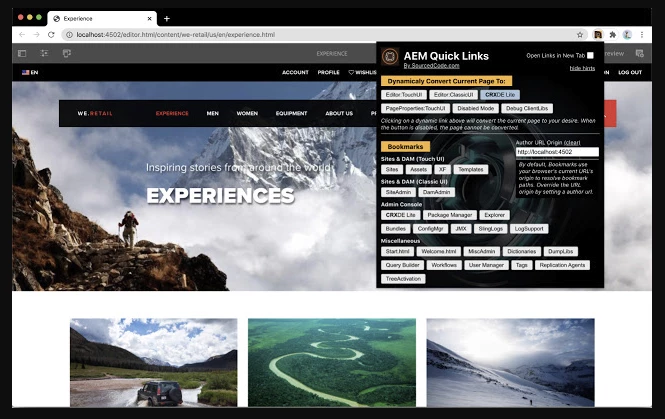
On a quick note, try this AEM Quick Links Google Chrome Extension Tool, where you can easily navigate around AEM https://chrome.google.com/webstore/detail/aem-quick-links/ebhapiodakbafkjhegnfcmohjccfedkm


4 replies

Sanket_Kumbharkhane
Level 4
February 5, 2021

Hi @alfredmboyane ,

I may be confused here but isn't the correct path should be

 https://:<authorHost>:<authorPort>/lc/system/console/configMgr

Kiran_Vedantam
Community Advisor
Community Advisor
February 5, 2021

Hi @alfredmboyane,


As mentioned by @sanket_kumbharkhane, the URL seems a little confusing. Generally, the port will either be 4502[author] or 4502 [publish]. In your case, it is 8080. I am assuming that it is changed as per your project requirement.


The expected URL would be https://hostname:port/system/console/configMgr. Please also check the spelling.


Coming to your error, it could have been caused due to below reasons:

  1. Not having access - Check with your administrator
  2. URL is wrong - Check for the proper URL [make sure you are spelling it correctly]
  3. Not enabled for the view - Generally, in production systems, these URLs will be disabled. please check with your adminsitrator.

Hope this helps.


Thanks,

Kiran Vedantam.


kautuk_sahni
Community Manager
Community Manager
February 5, 2021

Check the spelling of console. It is written as consule.

That could be the reason for this issue.


-Kautuk

Kautuk Sahni
BrianKasingli
Community Advisor and Adobe Champion
BrianKasingliCommunity Advisor and Adobe ChampionAccepted solution
Community Advisor and Adobe Champion
February 5, 2021

@alfredmboyane,

Like what all others say, use http://10.11.202.254:8080/lc/system/console/configMgr instead. Consule is not a valid path.

On a quick note, try this AEM Quick Links Google Chrome Extension Tool, where you can easily navigate around AEM https://chrome.google.com/webstore/detail/aem-quick-links/ebhapiodakbafkjhegnfcmohjccfedkm