What those icons stand for in graphQL query editor | Community
Skip to main content
September 13, 2024
Question

What those icons stand for in graphQL query editor

  • September 13, 2024
  • 3 replies
  • 955 views

Hi, I'm using AEM graphiQL query editor on Experience Manager.

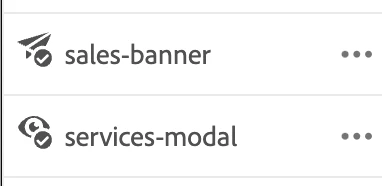
After publish the query, I saw this icon the next to query name but not sure what those icon stands for and condition why it's shown.


Paper plane and Eye icon.

Does anyone know that?


This post is no longer active and is closed to new replies. Need help? Start a new post to ask your question.

3 replies

sarav_prakash
Community Advisor
Community Advisor
September 13, 2024

@azusata ,

 - Paper plane icon - Indicates query publish status. If tick under plane is published and x under plane is unpublished.


 - Eye icon - Trying to reproduce. I dont see in AEMaaCS

partyush
Community Advisor
Community Advisor
September 13, 2024

Hi @azusata 

In the AEM GraphiQL query editor, the icons you see next to the query name typically represent specific actions or statuses. Here's what the icons you mentioned stand for:

1. Paper Plane Icon (Send/Publish)
- This icon usually indicates that the query has been sent or executed. It's the action icon for running the query, similar to a "submit" button. Once you publish or send the query, this icon may appear to confirm that the action was performed successfully.

2. Eye Icon (View/Preview):
- This icon usually represents the ability to view or preview the results of your query. It suggests that you can inspect the data that has been fetched or view the outcome of the executed query.

The icons are meant to indicate the action taken (paper plane) and the ability to review or observe the results (eye).

AzusaTaAuthor
September 13, 2024

Thank you @sarav_prakash @partyush 🙂
Do these icons disappear after status change?(such as a few hours later)
Icons are only showing up on a few queries

sarav_prakash
Community Advisor
Community Advisor
September 13, 2024

Yes. I too have noticed icons drop after few hrs. Dono exact logic or its TTL. Generally next day icons are lost. 

March 28, 2025

In AEM GraphiQL Query Editor:

  • Paper Plane Icon: This indicates the query has been published or executed successfully.
  • Eye Icon: This represents that the query is viewable or available for inspection, showing that the results or schema can be previewed.

These icons help you quickly understand the status of your queries and whether they have been executed or are available for viewing.