webhook - Adobe Console I/O and Adobe Runtime I/O | Community
Skip to main content
Luca_Lattarini
Level 9
May 6, 2021

webhook - Adobe Console I/O and Adobe Runtime I/O

  • May 6, 2021
  • 2 replies
  • 2938 views

hello guys,


How can I use webhook with Adobe Console I/O and Adobe Runtime I/O ?

And how can I be enabled?

Thanks


This post is no longer active and is closed to new replies. Need help? Start a new post to ask your question.

2 replies

Level 3
May 6, 2021

@luca_lattarini  

Adobe I/O events can be configured invoke webhook or I/O runtime function. Refer below document from Adobe

https://experienceleague.adobe.com/docs/experience-platform/observability/notifications/subscribe.html?lang=en#getting-started


Thanks

K Chaitanya


Adobe Employee
May 6, 2021

@luca_lattarini - when you configure your I/O Events integration, you have 2 options of event delivery: webhook and Runtime action.

If you want Runtime action, it's important that it should respond to a "challenge" request. The action should also have "require-adobe-auth: false" if you deploy it with aio app.

Here is an example of a Runtime action handling webhook calls: https://github.com/AdobeDocs/adobeio-samples-firefly-basics/blob/master/actions/event-handler/index.js.

Luca_Lattarini
Level 9
May 7, 2021

Hello


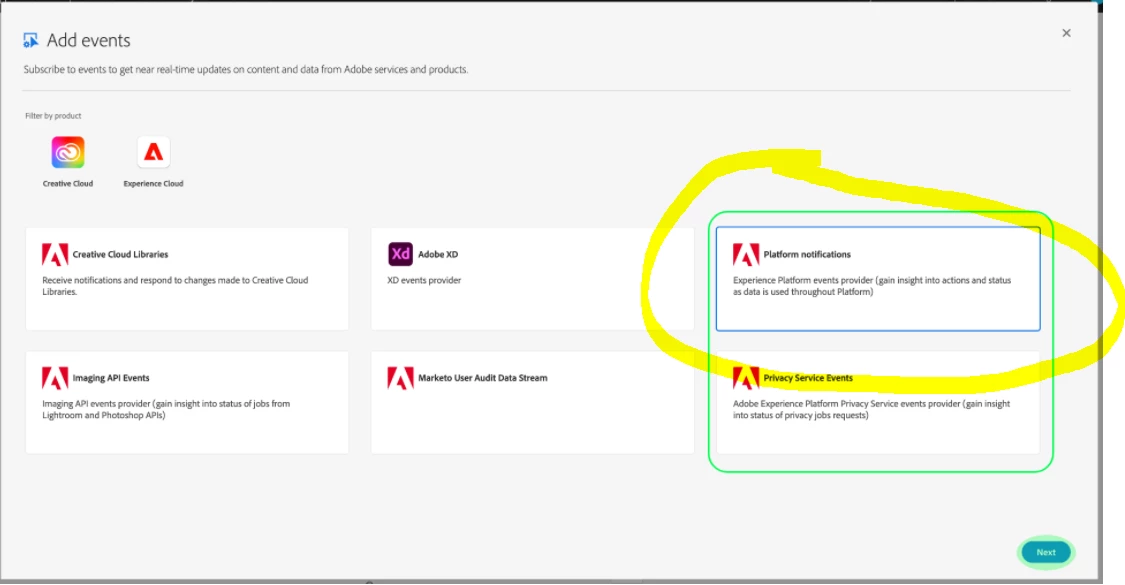
I am trying to create an event but I cannot see this choice? Shall I ask to be enabled?

Thanks


Adobe Employee
May 7, 2021

@luca_lattarini - the options you see here are the source of events. You could select CC Libraries, Adobe XD, AEP, etc. If you have an external source of events, you could also try out Custom Events as part of Project Firefly. Here is a codelab showing how to set it up: https://adobeio-codelabs-custom-events-adobedocs.project-helix.page/.

The webhook, Runtime actions and Journaling API are options for delivery of events. You will see them in a later step of this configuration wizard.