How to disable/hide Quick publish option for Sites | Community
Skip to main content
Level 2
September 22, 2023
Solved

How to disable/hide Quick publish option for Sites

  • September 22, 2023
  • 2 replies
  • 1362 views

Hi All,

I have a use case where we have to hide/disable the "Quick Publish" option from the console in site manager. our use case is all the live pages has to go through the normal publish process which we get in editer window  for publishing.

Thanks in advance.

Regards 

Abhishek A
This post is no longer active and is closed to new replies. Need help? Start a new post to ask your question.
Best answer by Mahedi_Sabuj

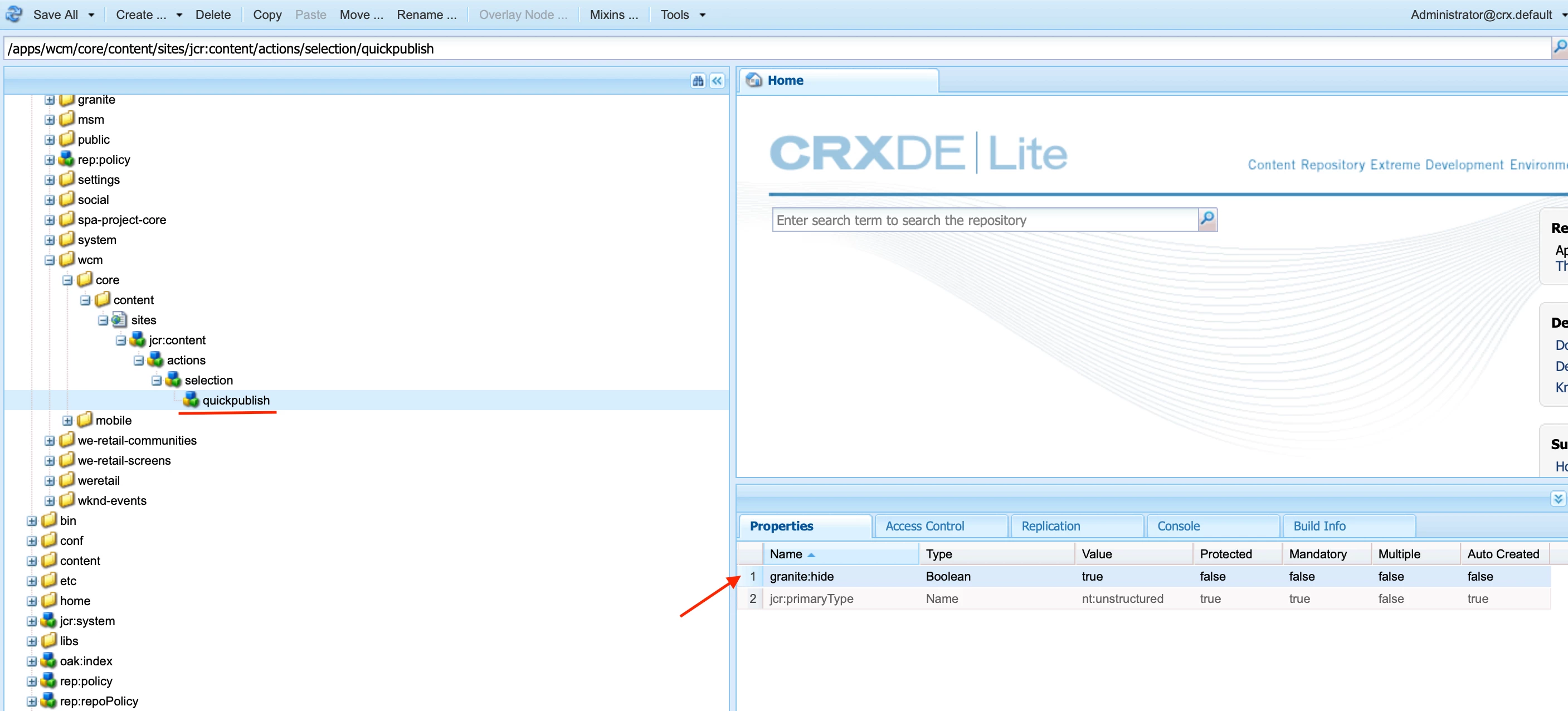
To hide the "Quick Publish" from Sites, you should start by overlaying the node "/libs/wcm/core/content/sites/jcr:content/actions/selection/quickpublish" into the "/apps" node. Then, add the property "granite:hide" with a value of "{Boolean}true" to the "quickpublish" node. This will hide "Quick Publish" in the Sites Console.

2 replies

Mahedi_Sabuj
Community Advisor
Mahedi_SabujCommunity AdvisorAccepted solution
Community Advisor
September 26, 2023

To hide the "Quick Publish" from Sites, you should start by overlaying the node "/libs/wcm/core/content/sites/jcr:content/actions/selection/quickpublish" into the "/apps" node. Then, add the property "granite:hide" with a value of "{Boolean}true" to the "quickpublish" node. This will hide "Quick Publish" in the Sites Console.

Mahedi Sabuj
Level 2
October 27, 2023

Thank you @mahedi_sabuj . this way works but we can also handle this through User/Groups ACL's

kautuk_sahni
Community Manager
Community Manager
September 28, 2023

@abhishek16 Did you find the suggestion from @mahedi_sabuj helpful? Please let us know if more information is required. Otherwise, please mark the answer as correct for posterity. If you have found out solution yourself, please share it with the community.

Kautuk Sahni
Level 2
October 27, 2023

Yeah its helpful @kautuk_sahni Thank you.