
Error The path argument must be of type string - Headless app | Community
Skip to main content
Anil_Umachigi
Adobe Employee
Adobe Employee
March 22, 2022
Solved

Error The path argument must be of type string - Headless app

  • March 22, 2022
  • 1 reply
  • 2601 views

Hey Guys! 

@dbenge 

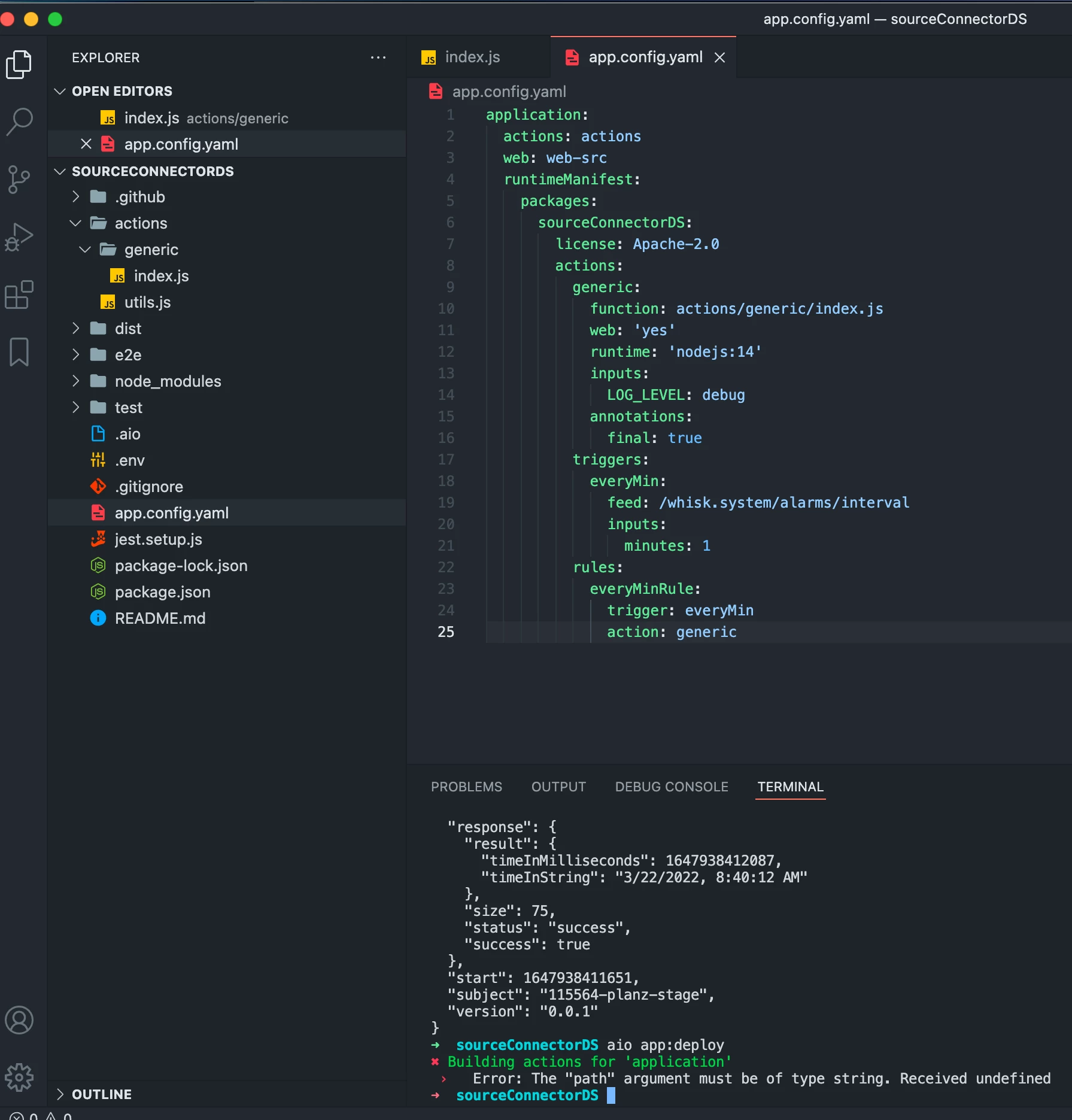
This one is new tried both on mac and windows, i get the error 

Error: The "path" argument must be of type string. Received undefined. 

I get this when i'm trying to create simple headless app from the codelab --> https://developer.adobe.com/app-builder/docs/resources/cron-jobs/ 

This happens only when i addd the triggers and rules to the yaml. 

triggers:
everyMin:
feed: /whisk.system/alarms/interval
inputs:
minutes: 1
rules:
everyMinRule:
trigger: everyMin
action: generic

The build works fine without it. 


What could be the cause? Here's a screenshot and aio info 

aio INFO 
System:
OS: macOS 12.0.1
CPU: (10) x64 Apple M1 Pro
Memory: 20.02 MB / 16.00 GB
Shell: 5.8 - /bin/zsh
Binaries:
Node: 14.18.1 - ~/.nvm/versions/node/v14.18.1/bin/node
Yarn: Not Found
npm: 6.14.15 - ~/.nvm/versions/node/v14.18.1/bin/npm
Virtualization:
Docker: 20.10.8 - /usr/local/bin/docker
npmGlobalPackages:
@61380/aio-cli: Not Found

Proxies:
http: (not set)
https: (not set)
CLI plugins:
core:
@61380/aio-cli 8.2.0
@61380/aio-cli-plugin-app 8.3.0
@61380/aio-cli-plugin-auth 2.5.0
@61380/aio-cli-plugin-certificate 0.3.0
@61380/aio-cli-plugin-config 2.3.0
@61380/aio-cli-plugin-console 3.4.2
@61380/aio-cli-plugin-events 1.1.5
@61380/aio-cli-plugin-info 2.1.0
@61380/aio-cli-plugin-runtime 5.1.0
@oclif/plugin-autocomplete 0.3.0
@oclif/plugin-help 2.2.3
@oclif/plugin-not-found 2.2.0
@oclif/plugin-plugins 1.10.1
@oclif/plugin-warn-if-update-available 1.7.0
user:
link:

This post is no longer active and is closed to new replies. Need help? Start a new post to ask your question.
Best answer by dbenge

I can see your issue. 

that yaml config file is space sensitive 

your package is sourceConnectorDS

It has Actions, Triggers, and Rules

all three are TOP level package items so they need to be at the same indentation level

sourceConnectorDS

   actions:...

   rules:...

   triggers:...


Above you have rules and triggers as sub-properties of actions so it thinks they are action definitions. 

Does that make sense for you?

1 reply

Anil_Umachigi
Adobe Employee
Adobe Employee
March 22, 2022

@dbenge Would really appreciate your help here! Thank you

dbengeAdobe EmployeeAccepted solution
Adobe Employee
March 22, 2022

I can see your issue. 

that yaml config file is space sensitive 

your package is sourceConnectorDS

It has Actions, Triggers, and Rules

all three are TOP level package items so they need to be at the same indentation level

sourceConnectorDS

   actions:...

   rules:...

   triggers:...


Above you have rules and triggers as sub-properties of actions so it thinks they are action definitions. 

Does that make sense for you?

Anil_Umachigi
Adobe Employee
Adobe Employee
March 22, 2022

phew thank you! I had a feeling that is it. 

I blindly followed the codelab, which might have caused the issue. 

The indentation needs to be updated here --> https://developer.adobe.com/app-builder/docs/resources/cron-jobs/lesson2/