Adobe is deprecating the Service Account (JWT) credentials in favor of the OAuth Server-to-Server credentials | Community
Skip to main content
May 16, 2024
Question

Adobe is deprecating the Service Account (JWT) credentials in favor of the OAuth Server-to-Server credentials

  • May 16, 2024
  • 2 replies
  • 1371 views

Curranty we are using JWT credentials in our project to extract content from pdf to xlsx. Its working as expected.
However we now got a new OAuth credentials to migrate from jwt to OAuth. But its not working as previous functionality, Because in jwt credentials when i given a 50 page of pdf to extract it will give result of single xlsx with all details. But in OAuth credentials if i given only single page of pdf also its result as multiple xlsx. Not able to extract single xlsx like previous, 
I don't know iam i doing anything wrong, I did all properly and got a response properly. But the response is not like jwt, Any one please help on this?
Iam using dotnet and postman also i got same response.
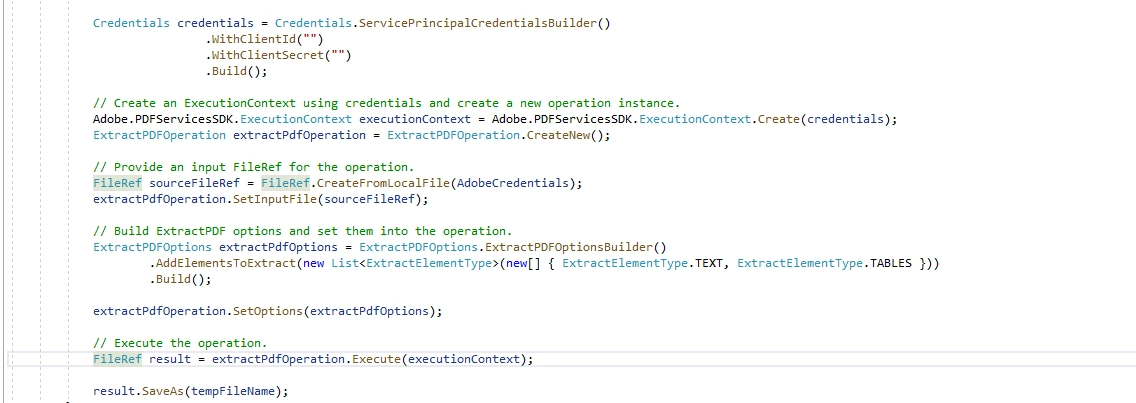
The code which i used is attached. I used valid client id and client secret.
 

This post is no longer active and is closed to new replies. Need help? Start a new post to ask your question.

2 replies

abhinavpuri
Community Advisor and Adobe Champion
May 16, 2024

Hi @vishalv1,

Technically, JWT to OAuth migration should not have any impact on existing functionality, the only change in migration is towards the authentication setup to generate "access_token" post that everything should be working as expected. Structurally only "access_token" generation setup is changed and all app code should work as-is.

VishalV1Author
May 16, 2024

Hello @abhinavpuri 
As you mentioned technically no changes. When used jwt token we can able to select ExportPDFTargetFormat.XLSX. Example following screenshot.
For this we have already used Adobe.PDFServicesSDK 2.2.1 version.


But when we changed this oauth we updated the Adobe.PDFServicesSDK version from 2.2.1 to 3.4.0. Also in new method we cant able to select the xlsx as output directly. We can able to select only tables. For example following screenshot. 

Is that iam doing anything wrong.???

VishalV1Author
May 21, 2024

@abhinavpuri  any update on this? We are struggling to extract the pdf as single excel.

Adobe Employee
May 29, 2024

FYI, the team behind Acrobat Services doesn't monitor posts here, please post here: https://community.adobe.com/t5/acrobat-services-api/ct-p/ct-Document-Cloud-SDK?page=1&sort=latest_replies&lang=all&tabid=all


Note that this is for unofficial support. If you have an enterprise contract with us, you can get direct technical support.