DMP Trait via API | Community
Skip to main content
razai22062698
Level 2
June 13, 2017
Solved

DMP Trait via API

  • June 13, 2017
  • 21 replies
  • 16737 views

Hey Guys,

It's Raza from Bank of Montreal Canada, I am a part of Personalization team here. We are working on something and we need some help. Do anybody have idea about creating a DMP Trait using API. What are prerequisites and other things ?

As of current scenario I have created a tool to generate DMP ruleset and then we copy that ruleset and manually apply that to Adobe Audience Manager(AAM). And In a future iteration of this tool, i'd like to use the AAM APIs within tool to automatically create that rule in AAM once someone clicks the "generate button".  But first we need to investigate how to use the API

This post is no longer active and is closed to new replies. Need help? Start a new post to ask your question.
Best answer by unnikrishnanv18

$base64_code = base64_encode($client_id.":".$client_secret);

$ch = curl_init();

$request_headers = array();

$request_headers[] = 'Content-Type: application/x-www-form-urlencoded';

$request_headers[] = 'Accept: application/json';

$request_headers[] = 'Authorization: Basic '.$base64_code;

$data_to_post = "grant_type=password&username=$username&password=$password";

curl_setopt($ch, CURLOPT_URL, "https://api.demdex.com/oauth/token");

curl_setopt($ch, CURLOPT_RETURNTRANSFER,true);

curl_setopt($ch, CURLOPT_HTTPHEADER, $request_headers);

curl_setopt($ch, CURLOPT_POST, 1);

curl_setopt($ch, CURLOPT_POSTFIELDS, $data_to_post);

curl_setopt($ch, CURLOPT_SSL_VERIFYPEER, false);

$result = curl_exec($ch);

$res = json_decode($result,true);

$access_token = $res['access_token'];

21 replies

ParitMittal
Level 10
June 13, 2017

Hi Raza,

This query seems to be more related to Adobe Audience Manager . Hence moving the query to Audience Manager Community.

Regards

Parit

DSRehan
Level 2
June 13, 2017

Hi Raza,

Here's the link to documentation for Audience Manager's REST APIs​.

Trait API Methods​ have been rewritten with Swagger.

Hope this helps.

Regards,

Devinder Rehan

razai22062698
Level 2
June 13, 2017

Hey, Thank you so much Dev I already checked these links and they are really helpful. I am working on a javascript to create DMP trait in AAM and below is so far what I have created, can you please have look and suggest.

var Data = '[{ "pid": 0, "name": "TestData", "description": "TestData", "integrationCode": "TestData", "comments": "TestData", "traitType": "TestData", "status": "TestData", "dataSourceId": 0, "folderId": 0, "traitRule": "TestData", "type": 0, "categoryId": 0, "crUID": 0, "upUID": 0, "createTime": 0, "updateTime": 0 }]';

    var xhttp = new XMLHttpRequest();

    xhttp.open("POST", "https://api.demdex.com/v1/traits/", false);

    xhttp.setRequestHeader("Content-type", "application/json");

    xhttp.send(Data);

    var response = JSON.parse(xhttp.responseText);

console.log(xhttp.status);
console.log(xhttp.statusText);
console.log(response);
razai22062698
Level 2
June 13, 2017

Thank you Parit hoping great answers in new community as well

Gaurang-1
Level 9
June 15, 2017

Hey Raza,

Your code seems to be fine while using the AAM traits API. Were you able to solve your use case?

Best,

Gaurang

razai22062698
Level 2
June 16, 2017

Hi Gaurang,

I am facing authorization issue while using this code, do you have any idea how to setup authorization as given in this link ? I have Client ID and Client secret

DSRehan
Level 2
June 16, 2017

Hi Raza,

You will need to generate an access_token to make API requests. You will need to make an API request to request the access_token.

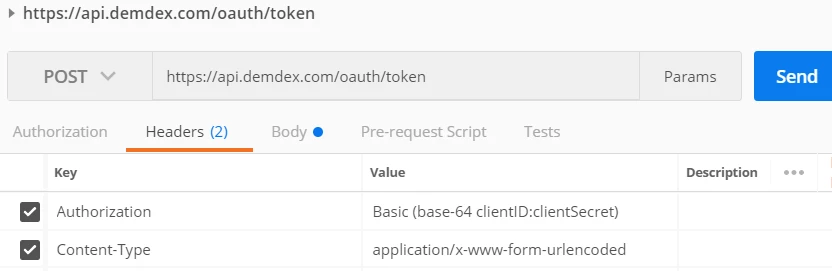
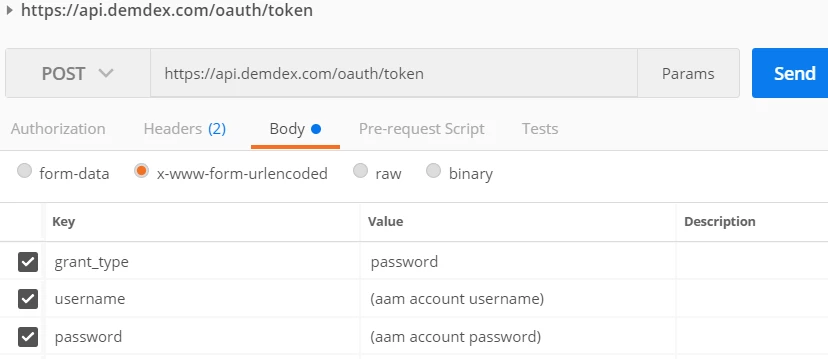
I am pasting the screenshots below from my demo setup to show how the call should look like:

Header Configuration:

Body Configuration:

The most important part that people tend to miss out on is encoding the Client ID & Secret to Base64 string.

razai22062698
Level 2
June 19, 2017

Hey,

I have done just like this, still receiving the unauthorized error . Please check the code below (Note : I am running this code from a local HTML file, I have not published anything yet on the http):

$.get( {

    url: 'https://api-beta.demdex.com/oauth/token',

    type: 'POST',

    dataType : "jsonp",

    data: { content: 'grant_type=password&username=<My AudienceManager user name>&password=<My AudienceManager password>' },

    beforeSend : function( xhr ) {

        xhr.setRequestHeader( "Authorization", "Basic <base-64 clientID:clientSecret>" );

        xhr.setRequestHeader( "Content-Type", "application/x-www-form-urlencoded" );

    },

    success: function( response ) {

  //response

    }

} );

Adobe Employee
June 19, 2017

Hello Razai,

Can you please give a sample request with dummy data (please use dummy values for user or account specific information)?

Regards,

Unni

razai22062698
Level 2
June 19, 2017

Hi Unni,

Please find sample request below :

$.get( {

    url: 'https://api-beta.demdex.com/oauth/token',

    type: 'POST',

  dataType : "jsonp",

    data: { content: 'grant_type=password&username=ABCDEFHG&password=XOXOX1234' },

    beforeSend : function( xhr ) {

        xhr.setRequestHeader( "Authorization", "Basic Ym1vZW5jam1vZWFsLW1bXQ6NjRn3djlrN211nbXQ6NjRcWc5YmhwZmIyYjlmVwbzRtcmJpbaTF0" );

  xhr.setRequestHeader( "Content-Type", "application/x-www-form-urlencoded" );

    },

    success: function( response ) {

  var responseData = JSON.parse(response);

  console.log(responseData);

    }

} );