
Solved
Visit Number Validity
I did not find any Adobe Docs URL which explains validity of Visit Number. Can you explain how number is incremented. Can i use Visit Number as one session?
Kindly share if you have any reference docs URL.
I did not find any Adobe Docs URL which explains validity of Visit Number. Can you explain how number is incremented. Can i use Visit Number as one session?
Kindly share if you have any reference docs URL.
Here is the documentation for the visits metric: Visits | Adobe Analytics
There are several things that impact the visit count, such as clearing cookies, changing browsers/devices. This is from the documentation page.
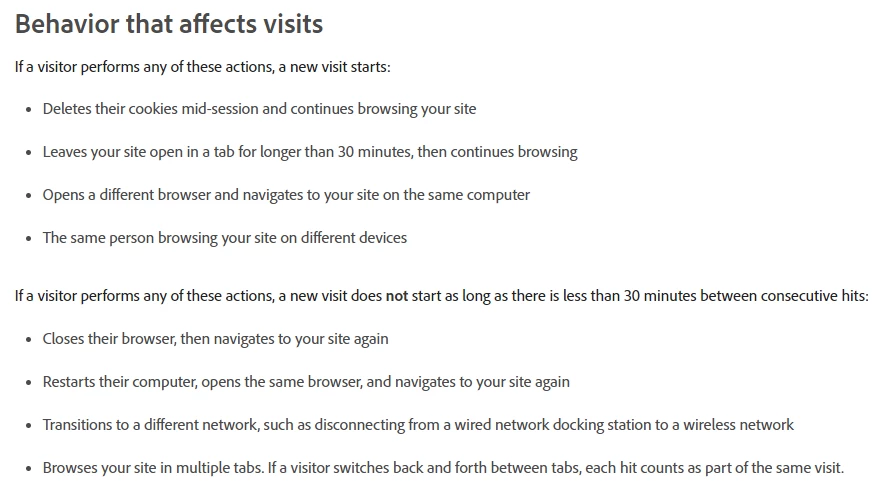
So, in a way, the action itself is less important than the time spent between actions. The 30-minute time out is the most important factor when counting visits.
@giteshsharma wrote:
Scenario 1: Login for the first time in a website so Visit Number will be Visit Number 1. I have checked few pages and then logged out and close the browser window. So Next day when i will login what will be the visit number?
In this scenario, when you come back the next day, as long as you haven't cleared your cookies and are using the same browser, your visit number will increment. So, if you have 1 visit on the first day, the next visit when you come back the next day would be visit 2.
@giteshsharma wrote:
Scenario 2: I logged in but i did not log out and browser window is still open for a day. Next day i opened the same page What will be the visit Number?
In this scenario, although the browser is still open, you've been inactive. Adobe basically looks at the timestamps between interactions, if it's less than 30 minutes, it's the same visit. In this case, it would be more than 30 minutes, so when you return it would be a new visit, so visit 2.
@giteshsharma wrote:
Scenario 3: Already i am logged in, i opened the same page in new tab what will be the Visit Number?
This scenario is a bit vague. If you mean, you have an active session in one tab, and within the 30 minute window you open a second tab and continue browsing there - that would be the same visit. Adobe doesn't consider separate tabs (as long as they are in the same browser) as separate visits. So you could view tab 1, then a page on tab 2, and then go back to tab 1, and your page views for the visit would increment as if they are all in the same session. Tab 1 would be visit page 1, tab 2 would be visit page 2, and then back to tab 1 would be visit page 3 - so all the same visit number.
Enter your E-mail address. We'll send you an e-mail with instructions to reset your password.