Time Comparison QTD Last Year vs. QTD This Year | Community
Skip to main content
July 27, 2022
Solved

Time Comparison QTD Last Year vs. QTD This Year

  • July 27, 2022
  • 1 reply
  • 1271 views

I am looking for a way compare my data using the following time ranges:

Fiscal QTD Last Year (Aug - Oct) vs. Fiscal QTD This Year (Aug - Oct) 


How can I set this up?

Help much appreciated.

This post is no longer active and is closed to new replies. Need help? Start a new post to ask your question.
Best answer by Jennifer_Dungan

You can create some permanent custom date ranges that support your needs:
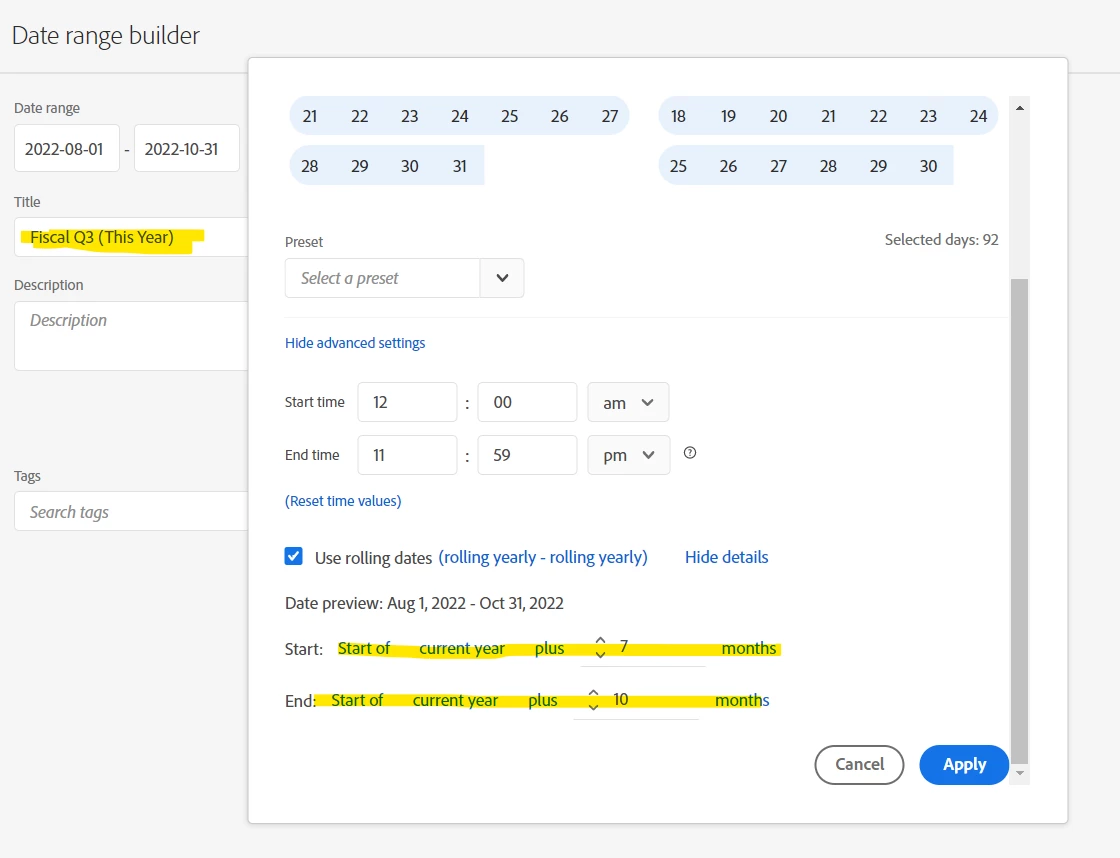


You will probably want to set up 4 such Date Ranges, your custom 4 quarters for this year, and last year (rolling) so that you can re-use these for multiple reports.

1 reply

Jennifer_Dungan
Community Advisor and Adobe Champion
Jennifer_DunganCommunity Advisor and Adobe ChampionAccepted solution
Community Advisor and Adobe Champion
July 27, 2022

You can create some permanent custom date ranges that support your needs:


You will probably want to set up 4 such Date Ranges, your custom 4 quarters for this year, and last year (rolling) so that you can re-use these for multiple reports.

July 27, 2022

Hi Jennifer,

thank you. But there is probably no way to hard-code this into the AA UI, correct?


Regards,

Marc

Jennifer_Dungan
Community Advisor and Adobe Champion
August 9, 2022

Customising the calendar doesn't change the quarter options, just the start-of-week/year options. https://experienceleague.adobe.com/docs/analytics/admin/admin-tools/custom-calendar.html?lang=en


@schimmelreiter I know this thread is a bit old, but for other users who stumble across this... Not sure if maybe in the past changing your calendar didn't affect quarter definitions, but it does now... I was working on a presentation and played around with a dev suite:


Quarters DO change their definitions when you change your Suite's Calendar options!