Text Values for Events | Community
Skip to main content
Level 2
May 3, 2022
Solved

Text Values for Events

  • May 3, 2022
  • 1 reply
  • 2862 views

Hello,

If I register an event 

event1=fizzbuzz

on a click, and later on a different click,

event1=buzzfizz

will I get metrics for each value passed in the event? Is that how the text string option works?


Thanks.


mp

This post is no longer active and is closed to new replies. Need help? Start a new post to ask your question.
Best answer by Jennifer_Dungan

Hi,


I am going to assume you are asking about event id serialization? (https://experienceleague.adobe.com/docs/analytics/implementation/vars/page-vars/events/event-serialization.html?lang=en)


Events are counters, they aren't "text", but you can append text, not with an equals (=) sign, but with a colon (:).
 

  • event1=x (this is used for events set up as "numerical" or "currency" to pass a custom numerical value to count by - example, let's say I wanted to track the number of search results returned on a page, and 8 results were returned, I could track event1=8 and for that one page view, my custom counter would show 8, or whatever number I actually passed)
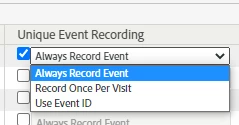
  • event1:fizzbuzz (this creates an "event id", no matter how many times I send "event1:fizzbuzz" only the first one will count. That is because Event Serialization is set up with the Unique Event Recording settings: 


    To "always" record the event, to record once per visit, or once per unique id passed. This is handy for tracking things like user registrations where you are afraid the user may refresh the page, or go backwards and trigger multiple times, or for things like purchases/subscriptions/etc that have a unique reference code)


If you are trying to get events counted per "value" (i.e. buzzfizz got 140, and fizzbuzz got 97) then there are a few ways to go...


IF on the trigger you will only every have one value, you can just use a prop or evar to hold the value. Then in your reports you can use your event1 metric and breakdown by your prop or evar to get the counts per value.


IF your trigger is passing multiple values, but the counts are always 1 per... then you can use a prop (set up as a list variable) or use one of your three list variables to pass each of the values you want counted, and just like above, use your event1 metric and break down by your dimension to get your individual counts.


IF your trigger is passing multiple values and the counts are different per value, this gets complicated (not impossible, I do this frequently) to make sure that the count but it does require using your one and only s.product (yes this is technically supposed to be use for shopping cart purchases, but it's the ability to explicitly connect a metric (with a specific counter) to a value (without impacting the other value)...

For instance (and sorry for the code if you aren't familiar)

[optionalCat];buzzfizz;;;event1=2,[optionalCat];fizzbuzz;;;event1=1

in this case, buzzfizz will be given a count of 2 while fizzbuzz will only get a count of 1 (separate counts for separate values). In this case, the event1 must be configured to be numerical (not a counter), so that it will take the = notation to pass a specific value

1 reply

Jennifer_Dungan
Community Advisor and Adobe Champion
Jennifer_DunganCommunity Advisor and Adobe ChampionAccepted solution
Community Advisor and Adobe Champion
May 3, 2022

Hi,


I am going to assume you are asking about event id serialization? (https://experienceleague.adobe.com/docs/analytics/implementation/vars/page-vars/events/event-serialization.html?lang=en)


Events are counters, they aren't "text", but you can append text, not with an equals (=) sign, but with a colon (:).


  • event1=x (this is used for events set up as "numerical" or "currency" to pass a custom numerical value to count by - example, let's say I wanted to track the number of search results returned on a page, and 8 results were returned, I could track event1=8 and for that one page view, my custom counter would show 8, or whatever number I actually passed)
  • event1:fizzbuzz (this creates an "event id", no matter how many times I send "event1:fizzbuzz" only the first one will count. That is because Event Serialization is set up with the Unique Event Recording settings: 


    To "always" record the event, to record once per visit, or once per unique id passed. This is handy for tracking things like user registrations where you are afraid the user may refresh the page, or go backwards and trigger multiple times, or for things like purchases/subscriptions/etc that have a unique reference code)


If you are trying to get events counted per "value" (i.e. buzzfizz got 140, and fizzbuzz got 97) then there are a few ways to go...


IF on the trigger you will only every have one value, you can just use a prop or evar to hold the value. Then in your reports you can use your event1 metric and breakdown by your prop or evar to get the counts per value.


IF your trigger is passing multiple values, but the counts are always 1 per... then you can use a prop (set up as a list variable) or use one of your three list variables to pass each of the values you want counted, and just like above, use your event1 metric and break down by your dimension to get your individual counts.


IF your trigger is passing multiple values and the counts are different per value, this gets complicated (not impossible, I do this frequently) to make sure that the count but it does require using your one and only s.product (yes this is technically supposed to be use for shopping cart purchases, but it's the ability to explicitly connect a metric (with a specific counter) to a value (without impacting the other value)...

For instance (and sorry for the code if you aren't familiar)

[optionalCat];buzzfizz;;;event1=2,[optionalCat];fizzbuzz;;;event1=1

in this case, buzzfizz will be given a count of 2 while fizzbuzz will only get a count of 1 (separate counts for separate values). In this case, the event1 must be configured to be numerical (not a counter), so that it will take the = notation to pass a specific value

nyambolAuthor
Level 2
May 3, 2022

Hello,


Thank you for the prompt and detailed reply. I'm tasked with tracking a large number of disparate user interactions that all occur within the umbrella of a specific company program, all of which occur in modals or page assets, not on pages themselves. I'm also tasked with using as few variables as possible. 😉 I want to be able to create reports that group together events that occur within the same modal. e.g., one modal has 7 possible event values (always one at a time), another has 4, and so on. Most of these events occur on a click event. Taking your suggestion to put the value in the eVar and using the event as a counter, it seems I could create these reports by segmenting with the name of the modal, which is captured in a prop. Does that seem workable?


Thanks.


mp 

Jennifer_Dungan
Community Advisor and Adobe Champion
May 4, 2022

Right so I have an implementation on my side where we need to collect the application attribute details which sometimes can be over 20 at a time. I have the same restriction as you where I should only use minimum amount of variables, in my case one.


The best solution is to use an eVar as you can set up to 250char, we will put a concatenated value of key=value pairs delimited by a pipe "|". Each key will be an ID instead of the full name to limit the char usage. I then use Classification rule builder using Regex to split each key/pair values into their own reports. I can also create calculated metrics based on the values to get the individual metrics.


Also as it seems you have modals then you would use s.tl instead of s.t call so we will provide a custom name for each interaction in s.tl which result in new line item in the custom link report.


So lets say per your example we want to track type of component (i.e modal or page asset), type of interaction, etc..


s.eVarX = "loc=modal|ev=CLICK|item=BUTTON|value=myvalue123"


What we want is to create dynamic values so if a key does not have a value we do not want to put, use this code to achieve this:


Data Element code: 

/**
 * The mapping value can either be a function, hard co
 */
function builKeyValue(key, config) {
    try {
        var value = '';

        if (!config[key]) {
            return '';
        }
        //get value
        if (typeof config[key] == 'function') {
            value = config[key]();
        } else {
            value = _satellite.getVar(config[key]);
        }

        //transform value    
        if (typeof value == 'boolean') {
            value = value ? 1 : 0;
        }

        if (value instanceof Array && value.length > 0) {
            value = value.toString();
        }
        return value ? key + '=' + value + '|' : '';
    } catch (e) {
        _satellite.logger.error('[Build string from map] Failed to build key/value for key ', key);
        return '';
    }
}

function buildStringFromMap(config) {
    try {
        var output = '';

        for (var key in config) {
            output += builKeyValue(key, config)
        }

        return output;
    } catch (e) {
        _satellite.logger.error('Failed to build string from map -- ', e);
    }
}

var mapping = {
    "loc": "componentDataElement",
    "ev": "eventDataElement",
    "item": "itemDataElement",
    "value": "valueDataElement"
}

return buildStringFromMap(mapping);

For the rule builder create the classification in advance and then in the classification rule builder create a rule based on regex:

Rule type: Regular expression

Match criteria: ^.*loc=([^\|]+)\|.*$

Classification: Select the target classification report name

To: $1


Hope this helps


Yes! Rocking the concatenated values and classification rules is a great solution if you need to track multiple values while minimizing the number of parameters (just make sure you don't exceed 250 characters).


If you are afraid of that, if you build in an "end identifier" (yes this will take a few more characters away), then you can watch for this value, and where missing create an alert or some rules to indicate that some data is lost.