some page name value was corrected as page url | Community
Skip to main content
Level 2
December 23, 2021
Solved

some page name value was corrected as page url

  • December 23, 2021
  • 4 replies
  • 1415 views

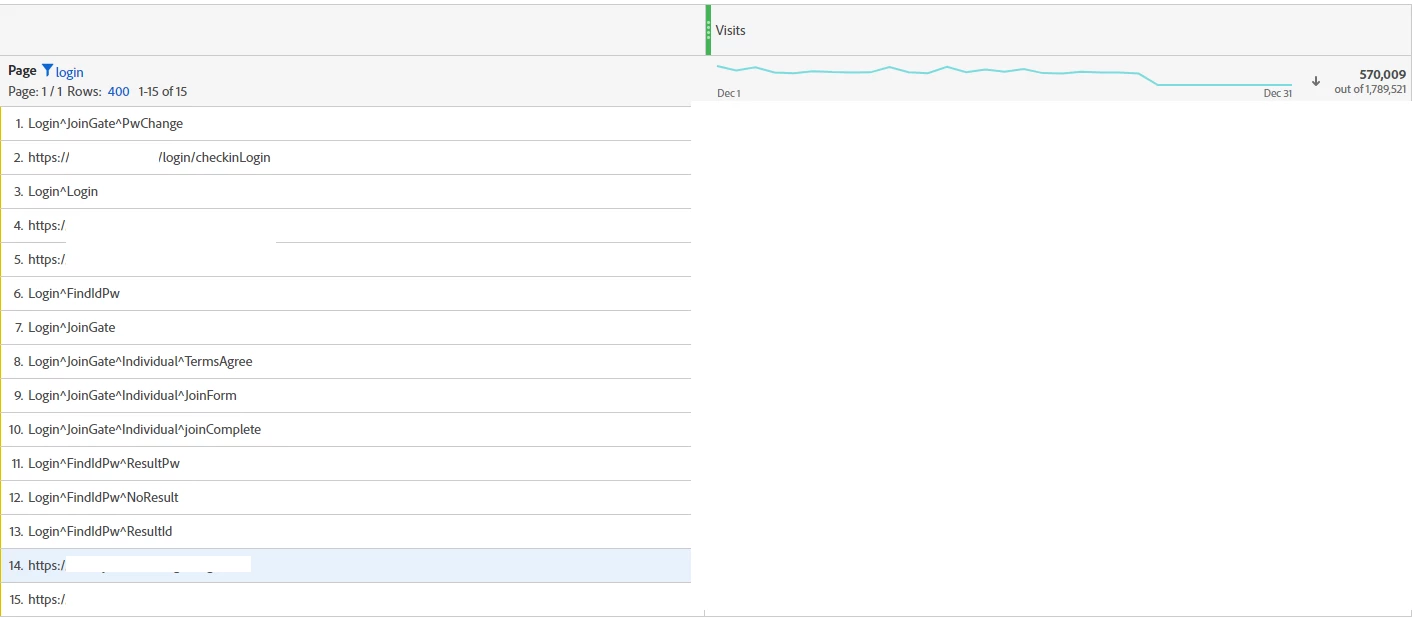
even though that's a same page url, such as https://sitename.com/login/login, 

when I drop page value and visits, page URL shows together. 


the problem is 3rd value (login^login) and 14th (https://sitename.com/login/login) value is actually same login page. 


is there any reason why some of data couldn't catch page name and showed as page URL? 


any props value didn't showed under the 14th page value.  


This post is no longer active and is closed to new replies. Need help? Start a new post to ask your question.
Best answer by Pablo_Childe

By chance is your website an Angular or Ajax based site?


This looks like you have SPA based issues where your tagging is firing incorrectly and as users naviagate back and forth your tagging rules do capture things correctly.


Are you using Direct call rules?

4 replies

khurshid
Adobe Employee
Adobe Employee
December 23, 2021

This looks to be an implementation issue. How are you capturing the s.pageName value? 

Pablo_Childe
Community Advisor
Pablo_ChildeCommunity AdvisorAccepted solution
Community Advisor
December 23, 2021

By chance is your website an Angular or Ajax based site?


This looks like you have SPA based issues where your tagging is firing incorrectly and as users naviagate back and forth your tagging rules do capture things correctly.


Are you using Direct call rules?

Kishore_Reddy
Community Advisor
Community Advisor
December 29, 2021

In case it's a single page application (SPA) framework based website, this could arise as an issue.

Level 4
February 4, 2022

Hey @hyeran  - If you didn't set the s.PageName variable, Adobe will automatically take URL as the Page Name.


Also, you should request a data warehouse export for "page URL" and "pagename" and check the data. Also, check if there are any processing rules for setting the Page variable.


I am not sure if this is a Single Page Application(SPA)? If that is the case, it would be beneficial to check the Direct Call Rules(DCR) as they work very well for state changes.


Here is a document about setting pagenames : https://experienceleague.adobe.com/docs/analytics/implementation/vars/page-vars/pagename.html?lang=en