Expand my Community achievements bar.

Get ready! An upgraded Experience League Community experience is coming in January.

Mark Solution

This conversation has been locked due to inactivity. Please create a new post.

SOLVED

Setting up a site sections report

Avatar

Level 1

How do you go about configuring launch so that it populates the site section report in adobe analytics?  I've tried to configure the global variables (eVars) in the Adobe Analytics Extension, but was unsuccessful in getting the report to populate in Adobe Analytics' Site Section report.  I've also tried configuring the eVars on page load, but that also isn't working.  Can someone point me to a step-by-step instruction on how to configure an eVar that will populate a report in Adobe Analytics? 


Thank you,


Patrick
1 Accepted Solution

Avatar

Correct answer by
Community Advisor and Adobe Champion

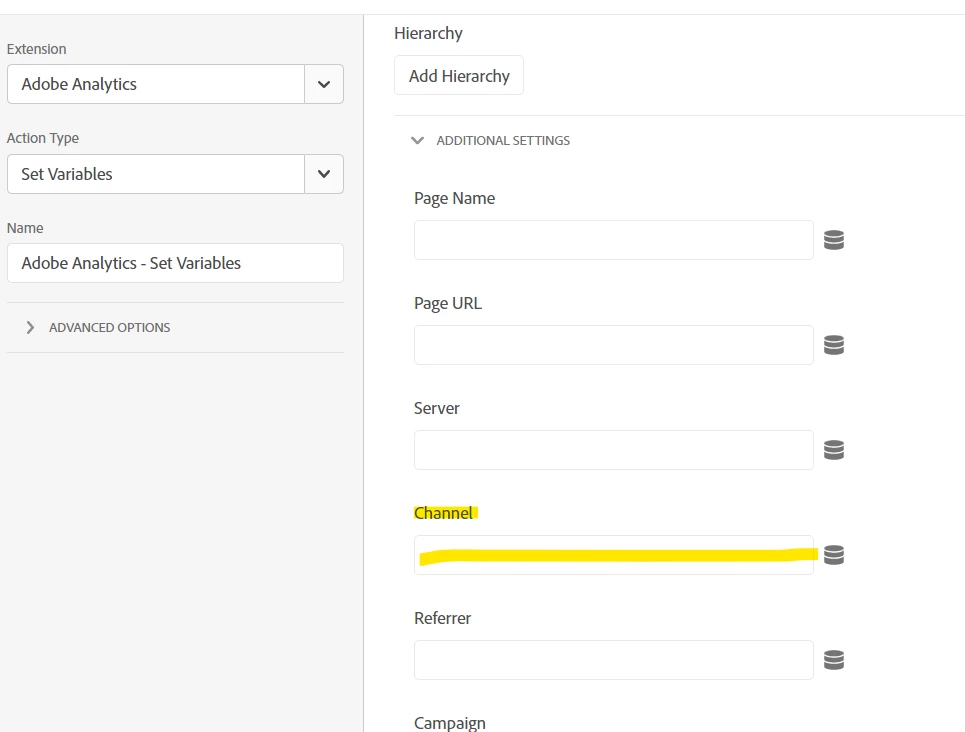
Site Section (if you are talking about the standard "Site Section" dimension in Adobe), is set during tracking into the Channel field.


Jennifer_Dungan_1-1685483040286.png


View solution in original post

1 Reply

Avatar

Correct answer by
Community Advisor and Adobe Champion

Site Section (if you are talking about the standard "Site Section" dimension in Adobe), is set during tracking into the Channel field.


Jennifer_Dungan_1-1685483040286.png