Segments showing incorrect data | Community
Skip to main content
December 30, 2022
Solved

Segments showing incorrect data

  • December 30, 2022
  • 2 replies
  • 1770 views

I created a very simple HIT based segment:

Site Name 3 (prop3) <> mdedge

Site Name 3 (prop3) <> fmc-mdedge

page starts with mdedge
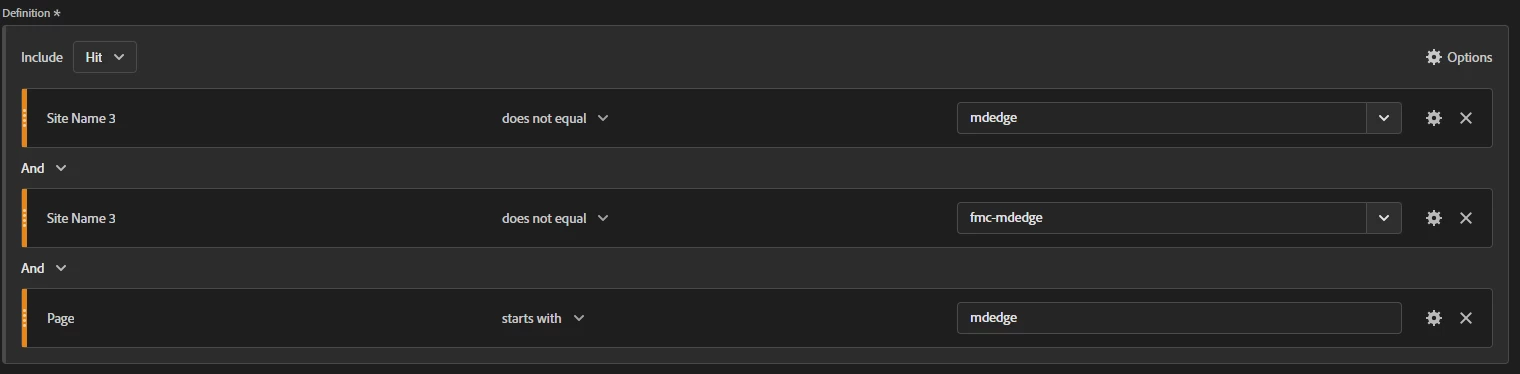


When i apply this segment to workspace and pull "page" into a freeform table i get only 1 row that matches and the rest do not
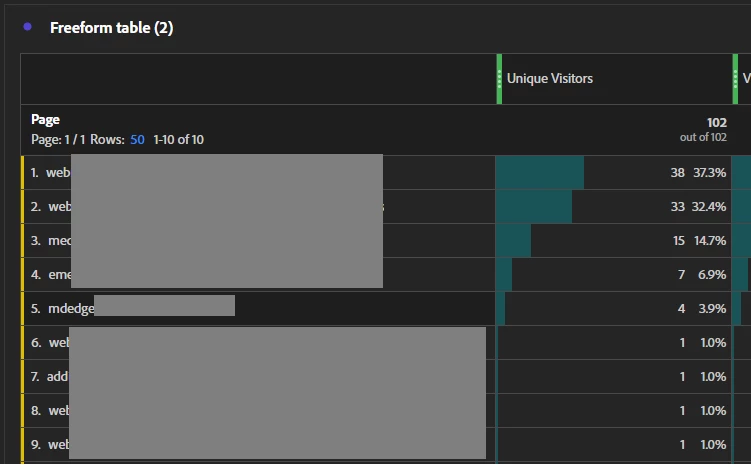
 

This is such a simple segment that i'm not even sure where to look next. Any ideas?


Adding details: Adobe uses an ID for page name behind the scene. There used to be an occasional issue where an ID was reused. So the id would be mdedge but an old page name would show up in the report. The greater the volume in a variable, the more likely this would happen. Perhaps this is the same issue? @kainth @jennifer_dungan 

This post is no longer active and is closed to new replies. Need help? Start a new post to ask your question.
Best answer by Jennifer_Dungan

Hi @andrewz_webmd you might be right, this might be a hash collision  (that page id you are talking about).... Your segment looks like it should work... being hit based and all...


The one thing you could try is checking one piece at a time....


As in, start with just your "page starts with mdedge" and see what is returned... you can also try breaking down the results by prop3 to see what values are recorded.


Then add in the next "Site Name 3 (prop3) <> mdedge" and see what values come back after that....


But IF there is a hash collision, I know that Client Care can force a refresh of the hashes to try and fix the issues.... but who knows if it will hold (based on how many pages you have collected in your data).


This is strange though... since the "page starts with" portion of your segment should be doing most of the heavy lifting... 

2 replies

Jennifer_Dungan
Community Advisor and Adobe Champion
Jennifer_DunganCommunity Advisor and Adobe ChampionAccepted solution
Community Advisor and Adobe Champion
December 31, 2022

Hi @andrewz_webmd you might be right, this might be a hash collision  (that page id you are talking about).... Your segment looks like it should work... being hit based and all...


The one thing you could try is checking one piece at a time....


As in, start with just your "page starts with mdedge" and see what is returned... you can also try breaking down the results by prop3 to see what values are recorded.


Then add in the next "Site Name 3 (prop3) <> mdedge" and see what values come back after that....


But IF there is a hash collision, I know that Client Care can force a refresh of the hashes to try and fix the issues.... but who knows if it will hold (based on how many pages you have collected in your data).


This is strange though... since the "page starts with" portion of your segment should be doing most of the heavy lifting... 

January 3, 2023

Leaning more towards a hashing issue at this point....


I created 2 new segments:

site <> fmc-mdedge


page starts with mdedge


While the results do show some pages that qualify there are still plenty of pages that do not start with mdedge...


Jennifer_Dungan
Community Advisor and Adobe Champion
January 4, 2023

Yeah, that's looking rather suspicious...

PratheepArunRaj
Community Advisor and Adobe Champion
January 3, 2023

Hello Andrew,

I think the segment is not ideal. You should try the below.

(Site Name 3 <> mdedge OR Site Name 3 <> fmc-mdedge) AND page starts with mdedge

Note that Site Names have to be in the container.

Thank You, Pratheep Arun Raj B (Arun) | NextRow DigitalTerryn Winter Analytics

January 3, 2023

Hey Paratheep


I updated the segment as follow:


This will not solve the issue. Having the "OR" in the container leave its open to undesired results:


PratheepArunRaj
Community Advisor and Adobe Champion
January 3, 2023

Yeah Andrewz,

I understood your point. Does not equal always work in a different way for the Visit or Visitor container. However, it should be fine for HIT, just thinking!

Can you use EXCLUDE Segment and see?

Thank You, Pratheep Arun Raj B (Arun) | NextRow DigitalTerryn Winter Analytics