Report Builder Excel Add-in Login issue | Community
Skip to main content
Level 2
November 11, 2024
Question

Report Builder Excel Add-in Login issue

  • November 11, 2024
  • 3 replies
  • 895 views

Hi, 


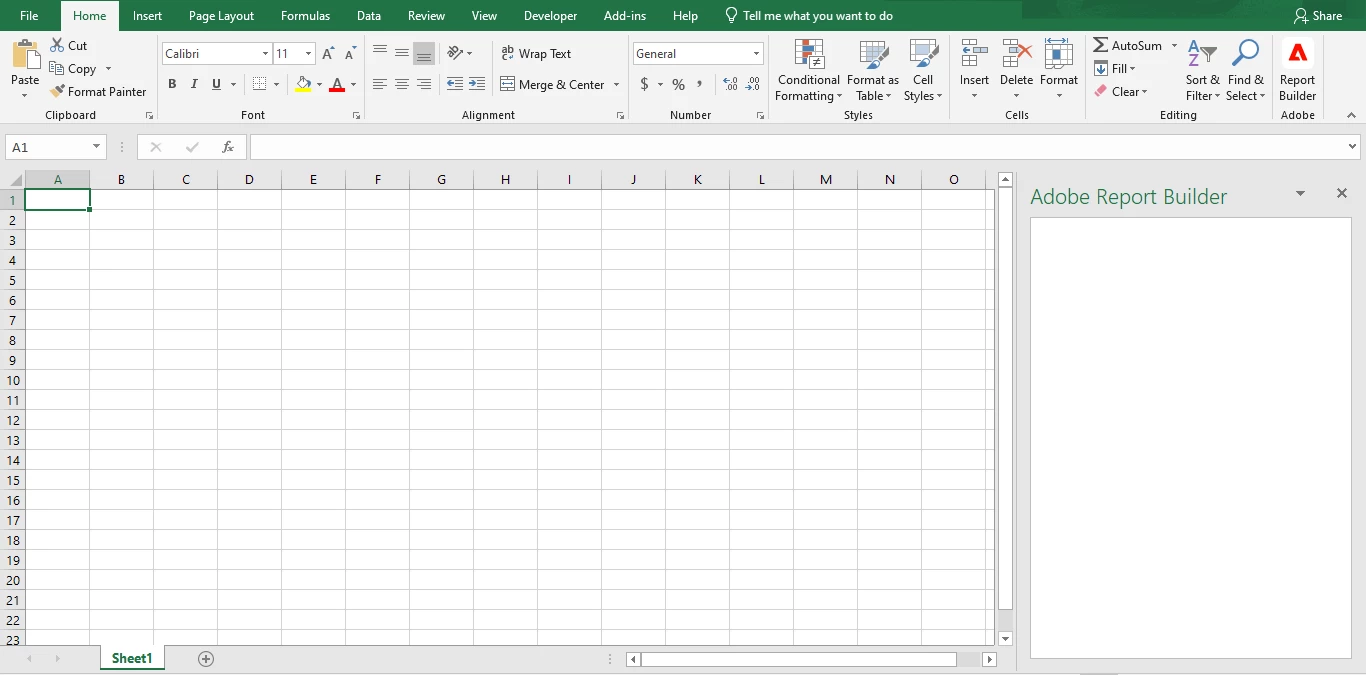
I have installed the 'Report Builder Excel Add-in' in Microsoft Excel to use the new Report Builder for Adobe Analytics. However, I cannot see the Login button for the Report Builder.


Report builder setup article - https://experienceleague.adobe.com/en/docs/analytics/analyze/report-builder/report-builder-setup


Could you please assist me in resolving this issue?


Issue snapshot for reference:
 

Regards,

Sivateja

This post is no longer active and is closed to new replies. Need help? Start a new post to ask your question.

3 replies

FarazHusain
Adobe Employee
Adobe Employee
November 11, 2024


You need to go to Add-In Section (if you're using the older version), and then you will see an option to Sign In -

Please see below:


FarazHusain
Adobe Employee
Adobe Employee
November 11, 2024

If you're using the new version, ideally, this right-side page should load; maybe try restarting the Excel or try disabling and re-enabling the plugin. 

Jennifer_Dungan
Community Advisor and Adobe Champion
November 11, 2024

Interesting... you're right, you should see the login option there:


This however is basically an "iframe" to a website...


Can you see if you can load the URL https://reportbuilder.an.adobe.com/taskpane.html


This should give you an error since its loaded outside of Excel... but if you can't even see this, then maybe your company internet is blocking something? Or maybe there is ongoing maintenance that is interfering with this add on?

Jagpreet_Singh_
Community Manager
Community Manager
November 18, 2024

@sivateja_raju Did you find the suggestion helpful? Please let us know if you require more information. Otherwise, please mark the answer as correct for posterity. If you've discovered a solution yourself, we would appreciate it if you could share it with the community. Thank you!