Paid Search Detection | Community
Skip to main content
November 21, 2025
Solved

Paid Search Detection

  • November 21, 2025
  • 1 reply
  • 69 views

How to set Paid Search Detection in Adobe Analytics?

Best answer by Jennifer_Dungan

Hi @shibinsvk,


The configuration for paid search detection can be found in the settings for each Report Suite; so:


Admin > Report Suites > (select suite) > Edit Settings > General > Paid Search Detection


I am not sure how familiar you are with the tool (or for others finding this thread), these settings are also used for the Marketing Channel "Paid" and "Natural" search rules (instead of you needing to keep both this and Marketing Channels up to date with the same query string identifiers.


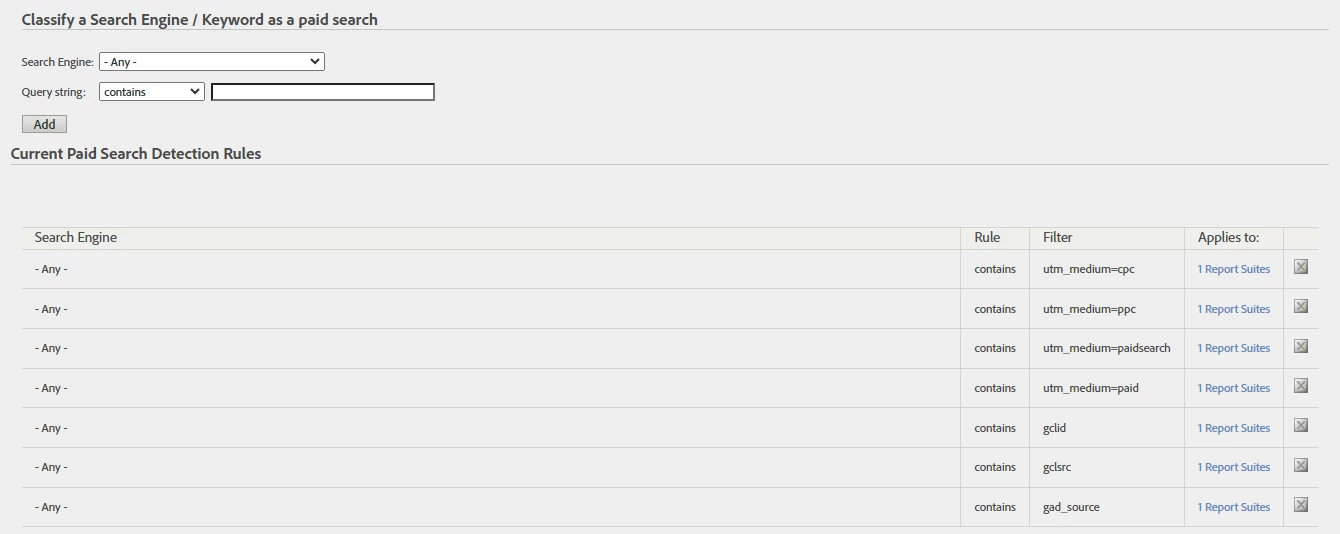
Here you can set rules for all "search engines", or set rules for specific Search Engines.


1 reply

Jennifer_Dungan
Community Advisor and Adobe Champion
Jennifer_DunganCommunity Advisor and Adobe ChampionAccepted solution
Community Advisor and Adobe Champion
November 21, 2025

Hi @shibinsvk,


The configuration for paid search detection can be found in the settings for each Report Suite; so:


Admin > Report Suites > (select suite) > Edit Settings > General > Paid Search Detection


I am not sure how familiar you are with the tool (or for others finding this thread), these settings are also used for the Marketing Channel "Paid" and "Natural" search rules (instead of you needing to keep both this and Marketing Channels up to date with the same query string identifiers.


Here you can set rules for all "search engines", or set rules for specific Search Engines.