eVars not showing as option in Reports | Community
Skip to main content
bobc76334831
Level 2
February 16, 2022
Solved

eVars not showing as option in Reports

  • February 16, 2022
  • 3 replies
  • 1858 views

I have defined a series of custom eVars and can see them in the debugger, however they are not available as an option in Reports. What am I missing?

This post is no longer active and is closed to new replies. Need help? Start a new post to ask your question.
Best answer by RaawiMahendru

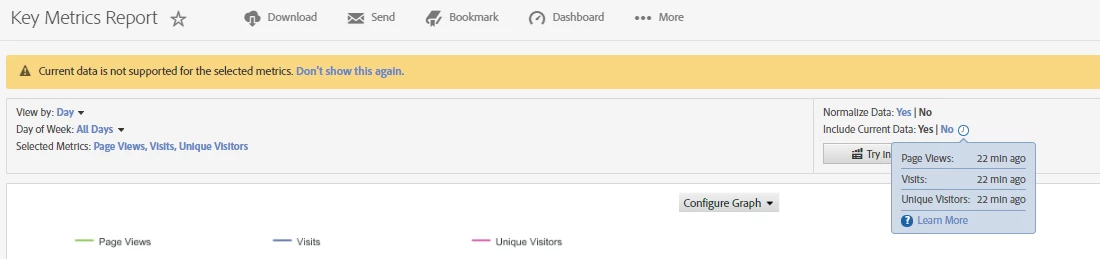
Hey @bobc76334831 - Can you double check if the evars are enabled in the report suite ? Sometimes it is enabled in the dev report suites and disabled in prod, may be this is a basic check, but didn't want to assume. Also, lyou can go to Key Metrics report and check the actual latency for the report suite in question, as seen below.
 

3 replies

nilotpal
Adobe Employee
Adobe Employee
February 16, 2022

Hi @bobc76334831,

The custom eVar values that you see in the debugger is not immediately available in Analytics Workspace and Reports.

It can take upto 2 hours to reflect in the reporting depending on the latency on your report suite.


Other things that you should consider checking:

  • if correct tracking server is configured
  • if the data is being sent to the correct report suite
  • if the eVar is enabled for that report suite

Hope this helps! 


Adobe Employee
February 16, 2022

Hi @bobc76334831! Generally, a variable (prop or evar) need up to 90 minutes for appear in report. However, if you want the value immediately, please confirm on Report & Analytics with "Include Current Data". 

Please confirm below URL about Current Data as well.


- Current Data

https://experienceleague.adobe.com/docs/analytics/analyze/reports-analytics/current-data.html?lang=en


Thanks!

RaawiMahendruAccepted solution
Level 4
February 16, 2022

Hey @bobc76334831 - Can you double check if the evars are enabled in the report suite ? Sometimes it is enabled in the dev report suites and disabled in prod, may be this is a basic check, but didn't want to assume. Also, lyou can go to Key Metrics report and check the actual latency for the report suite in question, as seen below.