Erro saving request message | Adobe Higher Education
Skip to main content
March 28, 2024
Répondu

Erro saving request message

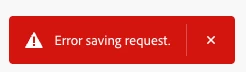
I'm getting this message after I hit Save Request. I created the exact same report in a different report suite with no issues, but now getting this message every time. The error message doesn't offer any additional information and there is no link attached to it.

Anybody know what could cause this to happen in one report suite and not happen in another?


Ce sujet a été fermé aux réponses.
Meilleure réponse par FarazHusain

Hey @hankal1 if you're still getting this might be related to permission. Try to check the network call failing in the browser console when clicking on save button, I believe you will see "Unauthorized" in the failed request response. If this is the case, then check the following - 

- The report suite, dimensions, metrics and DW permission should be under same product profile. For example let us say you have two product profile : Profile A and Profile B.


Profile A - Has a report suite A, with all dimensions, metrics, and DW Tool permissions 


Profile B - Has a report suite B, with all dimensions and metrics but this doesn't includes the DW Tool permission. 


So, here you should be able to save DW request for report suite A, but when trying to work report suite B, it might result in this particular error.


Hence, it is suggested to have a single product profile, which includes all report suite you required access to, along DW Tool access within the same product profile. 


Also, if you're a product admin, this should bypass these check and you should be able to save the request. 


3 commentaires

Josh Stephens
Community Advisor
Community Advisor
March 29, 2024

Hi @hankal1 , is this for Data Warehouse?  If so, you might read through this thread to see if it helps.

HankAl1Auteur
March 29, 2024

Hi Josh,


The issue for the user from that thread is that they didn't have an account and location set up in Report Destination.


I cannot screenshot for security reasons but I do have these set up. I saved an identical report in a different report suite as well.


Still looking for a solution.

Josh Stephens
Community Advisor
Community Advisor
March 29, 2024

Do both report suites have the components you're using?  It might be worth while to try saving a report in the troublesome report suite with OOTB metrics and dimensions (and no segments) and see if that gives you an error too.

Otherwise, it might be time to open a support ticket.

pradnya_balvir
Community Advisor
Community Advisor
April 1, 2024

Hi @hankal1 , We can see this message when the internet connection is poor/bad.

This is not related to report suite.


You can create support ticket, if you have access to adobe support.

https://adminconsole.adobe.com/D206123F524450F50A490D45@AdobeOrg/support


HankAl1Auteur
April 1, 2024

Hello,


Looks like I don't have Support access. I'll try and find someone who does.


Thanks

pradnya_balvir
Community Advisor
Community Advisor
April 1, 2024

Yes, you can check with your colleague.

FarazHusain
Adobe Employee
FarazHusainAdobe EmployeeRéponse
Adobe Employee
April 5, 2024

Hey @hankal1 if you're still getting this might be related to permission. Try to check the network call failing in the browser console when clicking on save button, I believe you will see "Unauthorized" in the failed request response. If this is the case, then check the following - 

- The report suite, dimensions, metrics and DW permission should be under same product profile. For example let us say you have two product profile : Profile A and Profile B.


Profile A - Has a report suite A, with all dimensions, metrics, and DW Tool permissions 


Profile B - Has a report suite B, with all dimensions and metrics but this doesn't includes the DW Tool permission. 


So, here you should be able to save DW request for report suite A, but when trying to work report suite B, it might result in this particular error.


Hence, it is suggested to have a single product profile, which includes all report suite you required access to, along DW Tool access within the same product profile. 


Also, if you're a product admin, this should bypass these check and you should be able to save the request.