Different Financial Year than the Calendar Year | Community
Skip to main content
Level 2
July 7, 2020
Solved

Different Financial Year than the Calendar Year

  • July 7, 2020
  • 1 reply
  • 974 views

I'm creating a dashboard that covers the Financial year 2021 to be July 1, 2020 to June 2021.


I have created a report that gets the overall visits for the whole current Financial Year FYTD = (July 1 2020 (rolling yearly) to end of current day (rolling daily). I have set my date duration from Jul 2020-June 2021. 


My issue is that since my financial year is not the same as the Calendar year. I cannot set it to always get the first date of the Financial Year


For 2020, FYTD custom date duration is from July 1 2019-June 2020. 

Then, when the current date is July 1 2020, The FYTD custom date duration should be from July 1 2020-June 2021. 

Then on July 1, 2021, the FYTD custom date duration should be from July 1 2021 - June 2022. 


Is there a way to set this is rolling dates that the Start of Financial year will dynamically change based on the current day and not the current year. 


Or is there a way to set the date duration depending on the chosen date duration. So If I set my date duration to Dec 2019-Mar 2020, the custom date for FYTD be set to July 2019-Jun2020?


This post is no longer active and is closed to new replies. Need help? Start a new post to ask your question.
Best answer by kainth

Hi  @cheenee_deleon 

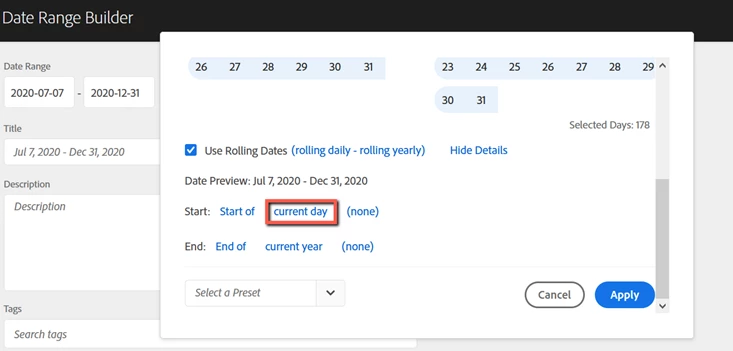
If you want to change the start date of the financial year to the current day then this is something which you can do using the custom date range & set the Start Date as the start of the current day as shown below.


For more information on the custom date range, you can refer to the below documentation link.

Link: https://docs.adobe.com/content/help/en/analytics/analyze/analysis-workspace/components/calendar-date-ranges/custom-date-ranges.html


Also, in case you want to change the calendar dates at the report suite level. You can do that by following the steps mentioned in the below link.

Link: https://docs.adobe.com/content/help/en/analytics/admin/admin-tools/custom-calendar.html

Note: Customizing the calendar changes the way data is processed (i.e. the definition of weekly and monthly unique visitors). When a calendar's definition of weeks and months changes, historical data is not altered.

Hope this helps.

Regards,

Abhinav


1 reply

kainthAccepted solution
Level 6
July 7, 2020

Hi  @cheenee_deleon 

If you want to change the start date of the financial year to the current day then this is something which you can do using the custom date range & set the Start Date as the start of the current day as shown below.


For more information on the custom date range, you can refer to the below documentation link.

Link: https://docs.adobe.com/content/help/en/analytics/analyze/analysis-workspace/components/calendar-date-ranges/custom-date-ranges.html


Also, in case you want to change the calendar dates at the report suite level. You can do that by following the steps mentioned in the below link.

Link: https://docs.adobe.com/content/help/en/analytics/admin/admin-tools/custom-calendar.html

Note: Customizing the calendar changes the way data is processed (i.e. the definition of weekly and monthly unique visitors). When a calendar's definition of weeks and months changes, historical data is not altered.

Hope this helps.

Regards,

Abhinav