Datawarehouse csv empty data | Community
Skip to main content
zhengquanz32073
Level 3
January 12, 2018
Solved

Datawarehouse csv empty data

  • January 12, 2018
  • 4 replies
  • 2866 views

Hi guys,

I have some questions with the csv data aggregate format from datawarehouse:

1. when I select "Mobile Device Type, Operation System Type, Browser Type" and "Page Views", the output format is like this:
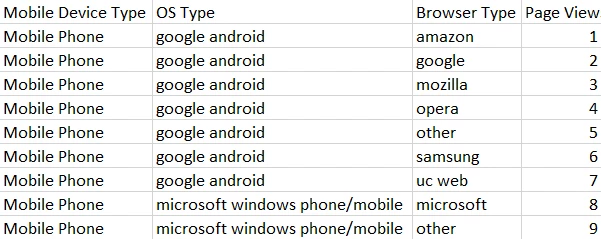
We can see that there list what we want.

2. However, when I add "Pages" as another break down, I get format like follows:
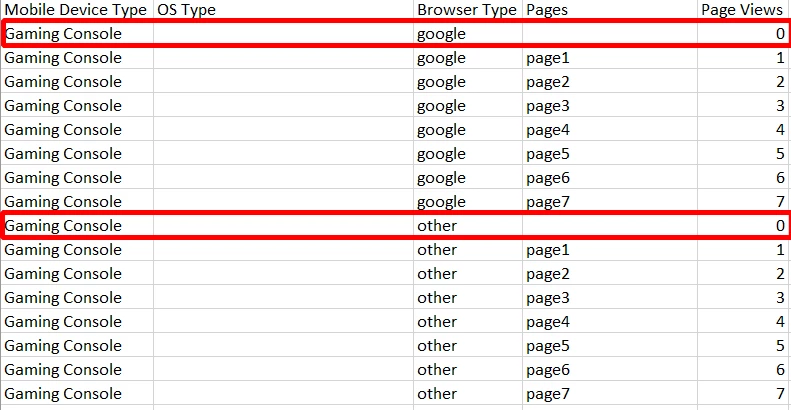
We can see that there is a row with no content, does that mean "the page view number for device=gaming console, os=null, browser=google, pages=null is 0"?

This post is no longer active and is closed to new replies. Need help? Start a new post to ask your question.
Best answer by PratheepArunRaj

Dear Zhen,

If Page Views = 0, then it is from s.tl() call i.e. Download link, external link, custom link etc.

Thank You!

Arun

4 replies

PratheepArunRaj
Community Advisor and Adobe Champion
PratheepArunRajCommunity Advisor and Adobe ChampionAccepted solution
Community Advisor and Adobe Champion
January 12, 2018

Dear Zhen,

If Page Views = 0, then it is from s.tl() call i.e. Download link, external link, custom link etc.

Thank You!

Arun

Thank You, Pratheep Arun Raj B (Arun) | Xerago | Terryn Winter Analytics
zhengquanz32073
Level 3
January 15, 2018

thanks for your answer, but I'm still wondering what's the true meaning for my question.

Best,

Zhen

zhengquanz32073
Level 3
January 15, 2018

TanmayM

could you please check this one? I'm really wondering why sometimes there would be "0" pageview row with empty "Pages".

Gigazelle
Adobe Employee
Adobe Employee
January 20, 2018

Arun is spot on here. You can validate this by adding another metric besides page views, such as visits. Custom link calls do not collect pagename, nor do they count towards page views. The data still technically exists though, and it needs a row to display that data.