Custom Date range doesn't work with Average Time on Site | Community
Skip to main content
April 12, 2023
Solved

Custom Date range doesn't work with Average Time on Site

  • April 12, 2023
  • 1 reply
  • 1380 views

Hi all,


I've created some custom date ranges, however it doesn't seem to work with Average Time on Site in a Freeform Table. It only seems to work when I use the custom range for a whole panel, but it's quite a lot of custom ranges and I need them in one table.

The other Key Metrics like Uniques and Visits and other custom calculated metrics (incl. time spent metrics) work fine, so I don't know where the issue is.

Help would be appreciated 🙂


Thanks
This post is no longer active and is closed to new replies. Need help? Start a new post to ask your question.
Best answer by Jennifer_Dungan

While I don't use Adobe's Time Metrics much... the Data from "Time Spent per Visit (seconds)" and "Time Spent per Visitor (seconds)" seems to match...


I did two tables, one broken down by "standard" week, then created a custom "Last Week" date range... the numbers match...


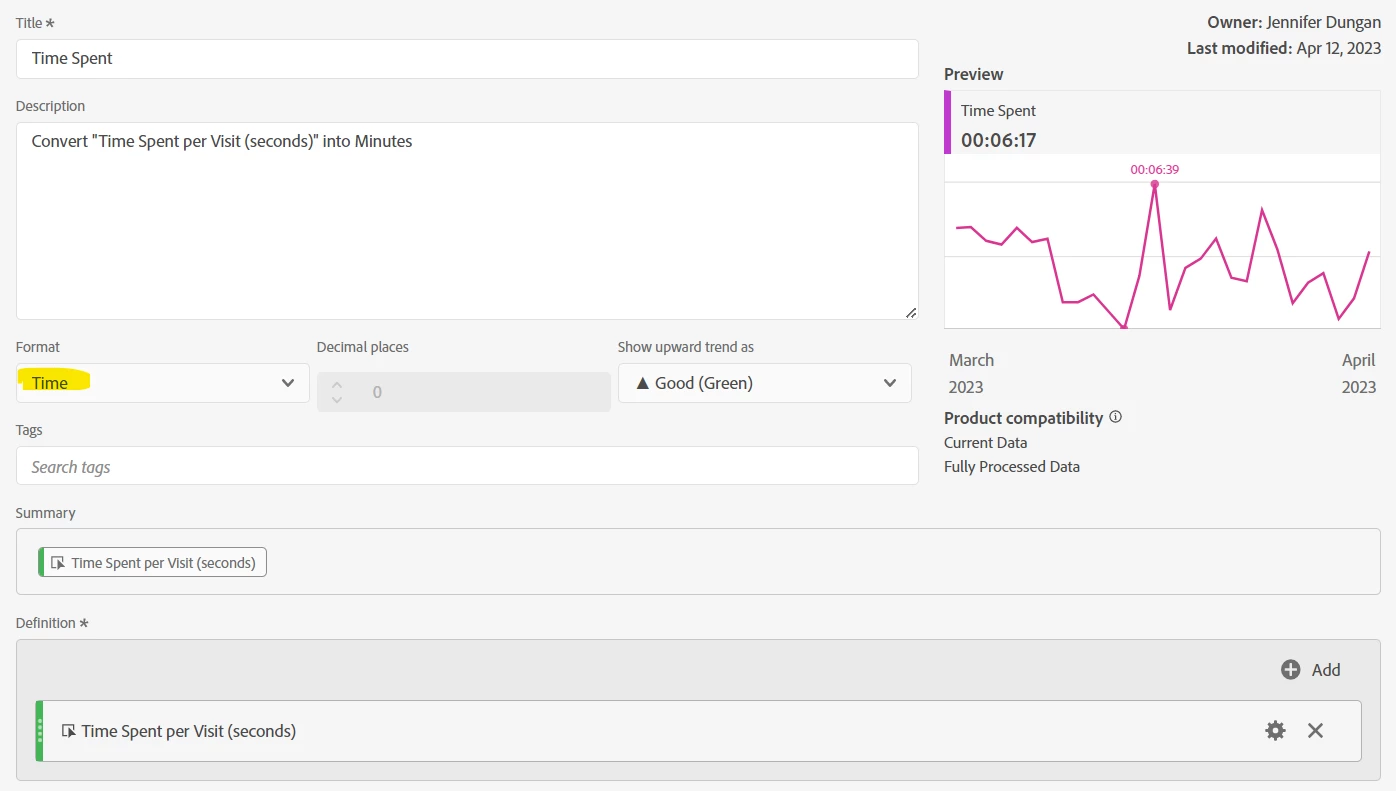
If I convert the "Time Spent per Visit (seconds)" into Minutes, it matches the "Average Time on Site" value...

So you can create a custom metric to see in minutes like this to use instead of "Average Time on Site":


1 reply

Jennifer_Dungan
Community Advisor and Adobe Champion
Jennifer_DunganCommunity Advisor and Adobe ChampionAccepted solution
Community Advisor and Adobe Champion
April 12, 2023

While I don't use Adobe's Time Metrics much... the Data from "Time Spent per Visit (seconds)" and "Time Spent per Visitor (seconds)" seems to match...


I did two tables, one broken down by "standard" week, then created a custom "Last Week" date range... the numbers match...


If I convert the "Time Spent per Visit (seconds)" into Minutes, it matches the "Average Time on Site" value...

So you can create a custom metric to see in minutes like this to use instead of "Average Time on Site":


Krishna_Musku
Community Advisor
Community Advisor
April 12, 2023

@jennifer_dungan This is really great, it helps converting the seconds to minutes directly in the report. Learned something new today. Thanks!

Jennifer_Dungan
Community Advisor and Adobe Champion
April 12, 2023

Yeah.. it's so much better than "divide by 60"  😛 

(then trying to figure out what 0.2 of a minute is in seconds)