
Segmentation in flow visualizations feedback | Community
Skip to main content
Gigazelle
Adobe Employee
Adobe Employee
July 19, 2019

Segmentation in flow visualizations feedback

  • July 19, 2019
  • 5 replies
  • 25262 views

Hi everyone!

Recently, an issue was reported to Adobe regarding how segments are applied to flow reports. I wanted to get your feedback around if you find value around its current functionality, or around how we intend to change it.

How it currently works

When you apply a segment to a flow report, it first does all the pathing calculations, then applies the segment after. This image provides an excellent example:
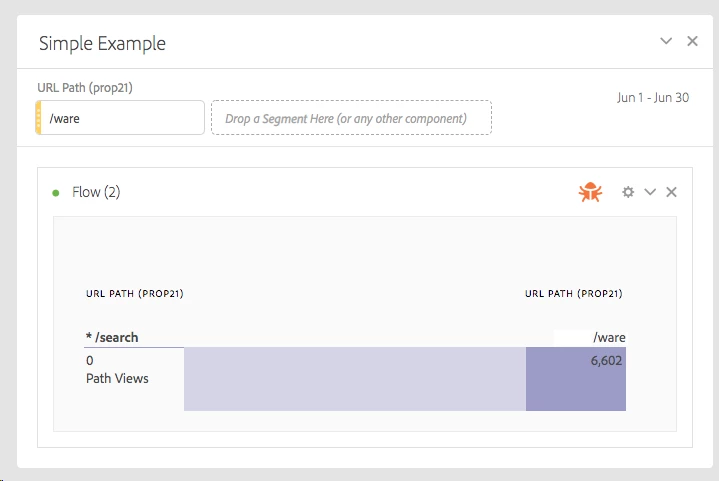
Using the above image, first it calculates all paths from /search to /ware, then it applies the segment (hits where pages = /ware). What you end up with is a report that doesn't make a lot of sense.

What Adobe plans to change

Instead of applying the segment after paths are calculated, Adobe plans to apply the segment to each part of the path.

For example, instead of:

(/search then /ware) applied segment

It would be:

(/search with applied segment) then (/ware with applied segment)

If the above data was used, this specific example would show 0 for the entire report. Since /search had zero hits match the segment, naturally there would be no subsequent path instances.

We want your feedback!

This is where we want to hear from you.

  • How do you expect segments applied to flow visualizations to work?
  • Are there any scenarios where applying a segment after pathing data is calculated would be valuable?

We want to make sure that the planned changes are a direct upgrade to getting value out of flow reports. Please let us know!

This post is no longer active and is closed to new replies. Need help? Start a new post to ask your question.

5 replies

Level 7
July 23, 2019

Or when drag & drop a prop onto the "segment" area, deafult set it in "visit" level?

Or when user select a page from Prop dimension drag & drop to the segment area of a Flow, ask user it's a Before or After sequential, or "logic group", during a visit.

It seems to me "hit" level will not make sense at "segment" area on top of the "FLOW", unless it can be applied inside of a flow stage.

Gigazelle
Adobe Employee
GigazelleAdobe EmployeeAuthor
Adobe Employee
July 23, 2019

Using a visit level segment would definitely make more sense, and what I would consider a best practice. However, I don't think we want to limit the segment container used in this context, because you could still get some value out of using a hit level segment.

The ability to control segments on each stage of the flow (similar to fallout) was discussed, and might warrant additional discussion in the future. Thank you for your feedback!

Level 7
September 6, 2019

I'd recommend creating a new thread for this, as this thread's purpose is for individuals to post feedback on upcoming changes Adobe plans to make to segmenting flow reports.

However, to briefly answer your question, click the clock icon so it says 'Then within 1 hits'. I believe that should give you the sequential segment you're looking for.


Gigazelle,

thanks for your reply.

When I set the within 1 hit, or 2 hits, nothing will listed in the report table.

I did started a new post, unfortunately, I cannot get one reply.

Fallout / Fallthrough: How to get the real report for the NEXT HIT  - in this post, I do post screen capture that in AA fall-out report, the "Help" tells me it should be the "immediate" hit AFTER touch point, which means to me the "touchpoint" itself should not be included in the report.

What does "Breakthrough Fallout/Fallthrough" exactly mean?

WHY THIS IS CRUCIAL?

We rely on the Adobe Fallout report to see user behaviour after a SEARCH behaviour.

So, if "Search Page" itself is included, we cannot identify whehter user do another search immediately after last search but not click anything or not.

In a word, if it's the "immediate" click "AFTER" search, we can say our search performance is not good, otherwise, we are mislead by the data because it lists not the immediate click AFTER search, but included the search itself.

Thank you.

H

Level 7
July 30, 2019

Gigazelle ,

Thanks for your inputs and further explanations.

I carefully checked the definition of "Sequential Segment" and tried creating "Hits" level Sequential Segment, now I fully understand the sequential segment can also work in Hit level.

Best,

H

Level 7
August 28, 2019

Also, it seems the FLOW does not work when Sequential Segment applied.

Could you please help to clarify as well?

Million thanks!

David_Jerome
Level 6
September 2, 2019

Hi Gigazelle​,

I have always found the flows and segments very confusing.

I would expect what Adobe are proposing to be the logical way that a flow should work.

Hopefully we will see it soon.

Thanks

Dave

November 11, 2019

Thanks for the explanation Gigazelle,

We have a similar problem when we create a Flow Chart.

When we put different variables at the same Flow Chart we have an elevate % of “entries” path names.

When ONLY use one variable in all fields, I don’t have this % of  strange “entries”

I investigated more deeply and I thing that the problem is when you combine distinct PROPS. For example:

If not combine any PROP, We don’t have missing entries

  • P31 Page Name

When we combine some PROPS

  • P44 Contenido 2
  • P31 Page Name

We have this % of missing Page Names


I verificated that all of the Page Name at First example have associate a P44 Contenido, for that is strange for us this “missing entries”


Why it could be happen?

Thanks for all,