Negative Time Values in Adobe Analytics | Community
Skip to main content
frederikw694537
March 4, 2020

Negative Time Values in Adobe Analytics

  • March 4, 2020
  • 2 replies
  • 12660 views

Hey Guys,


I cam across a strange behavior in Analytics. It seems like it is not able to render negative values in time format correctly, at least in Analysis Workspace.


To reproduce, I created two calculated metrics, one with a static value of "30" and one with "-30". Then I formatted them both as time. In Workspace, they look like this:
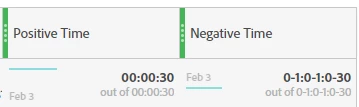
 

Clearly, the negative value is broken. We need this to compare time spent on specific pages with the average, but it does not work right now. The expected result would be "-00:00:30".


Best regards,

Frederik

This post is no longer active and is closed to new replies. Need help? Start a new post to ask your question.

2 replies

Andrey_Osadchuk
March 4, 2020

Frederik,


I wonder what a negative value in the time format means? Could you share a use case?

Pablo_Childe
Community Advisor
Community Advisor
March 4, 2020

I think its a case of creating 3 calculated metrics.


1 avg time spent on page per visit

2 overall avg time spent on all pages per visit

3 the difference of 1-2(or vice versa)


All are positives except the last one which (could be negative)


Andrey_Osadchuk
March 4, 2020

What question does the 3rd metric answer?

Pablo_Childe
Community Advisor
Community Advisor
March 5, 2020

Hey @andrey_osadchuk and @pablo_childe,

well explained, @pablo_childe! That is one of the usecases. This is not only limited to the page dimension, but any other dimension as well. For example, we could compare the time spent per visit across device types compared to the average. That way we could easily see, that our mobile users are spending 3 minutes less on our page than the average over all devices. This is also interesting for marketing campaigns or entry page reports.

For a media company like us, there is even one more case: We have a lot of videos and need to compare the watchtime per video start across videos to the average as well. Things like "video a is watched 2 minutes less than average" are very important to us!

Does this clear things up a bit? 🙂


I like the metric just be careful as time on page can be influenced if your users do alot of idling.(leave page open for the 30 mins)


Videos you should also ensure you capture video tracking metrics if not done so. That will be a much more accurate way to see video engagement. Esp if you have your own player. Embedded is tricker.


Glad it made sense! GLTU