How to set default values to properties in meta-data-schema applied to certain aem dam folder | Community
Skip to main content
sdk60873563
Level 2
March 23, 2019
Solved

How to set default values to properties in meta-data-schema applied to certain aem dam folder

  • March 23, 2019
  • 6 replies
  • 6443 views

Hi,

I have certain custom properties defined in meta data schema (resourceTypes ex.text fields, tags, date etc).

I want to set default values to certain properties having resource type  tagpicker and textfields. How shall i set default values to these fields.

While editing any asset, these fields should be pre filled.(using aem 6.3)
This post is no longer active and is closed to new replies. Need help? Start a new post to ask your question.
Best answer by arunpatidar

Hi,

It's gonna be manual step to set default value.

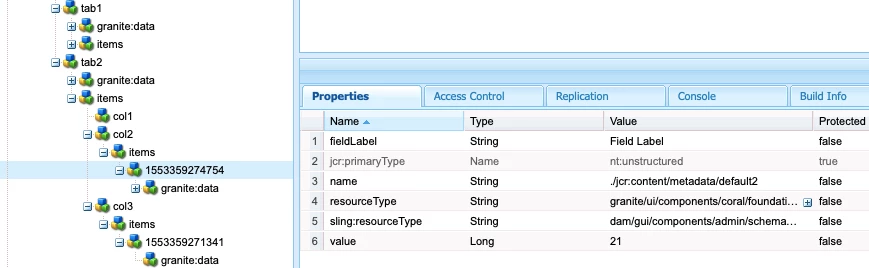
you need to go to CRXDE, locate your schema and set default value to field using value property.

6 replies

arunpatidar
Community Advisor
arunpatidarCommunity AdvisorAccepted solution
Community Advisor
March 23, 2019

Hi,

It's gonna be manual step to set default value.

you need to go to CRXDE, locate your schema and set default value to field using value property.

Arun Patidar
smacdonald2008
Level 10
March 23, 2019

Great response Arun!

sdk60873563
Level 2
March 25, 2019

Thank you for response Arun.

I have already tried this approach , it works for all others except tagpicker. Any thoughts on tagspicker ?

arunpatidar
Community Advisor
Community Advisor
March 25, 2019

what value you set for tagfield?

It should be type of String[]

e.g. we-retail:apparel/footwear

Arun Patidar
sdk60873563
Level 2
March 25, 2019

correct, i am doing same way. some how i do not see it working.

arunpatidar
Community Advisor
Community Advisor
March 25, 2019

yes, I tried , its not working to tag.

Arun Patidar
Adobe Employee
May 11, 2022

Is it still an issue? I have the similar requirement. I need to pre-populate one of the asset metadata property (tag type).


Thanks,

Raja