ウェブパーソナライズの【ウェブキャンペーン】表示エラー | Community
Skip to main content
Level 1
June 18, 2026
Solved

ウェブパーソナライズの【ウェブキャンペーン】表示エラー

  • June 18, 2026
  • 1 reply
  • 22 views

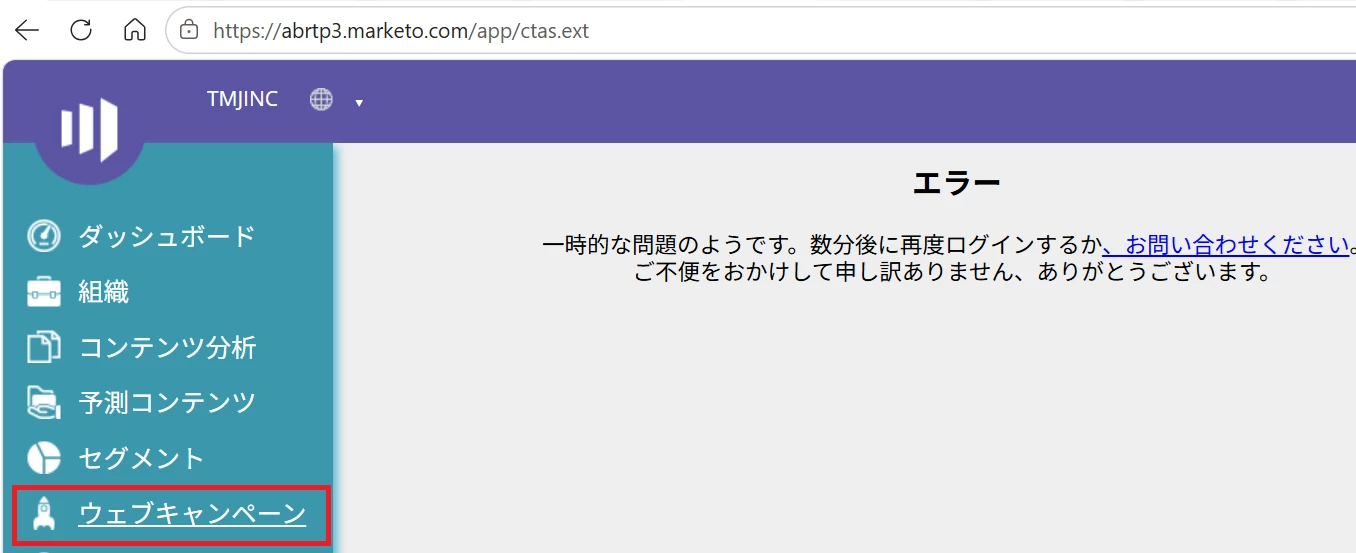
Marketoのウェブパーソナライズの【ウェブキャンペーン】がエラーとなり、

表示されません。


こちらご確認をお願いできませんでしょうか。


お手数をおかけいたします。


    Best answer by adesrala1

    Based on the screenshot this is an administrative UI crash inside the platform, not a live public website bug. When the Web Campaign menu throws a catastrophic error page, it points to either a browser token conflict or a localized database glitch.

    Step 1: Run a Quick Data Center Status Check

    Your workspace URL prefix abrtp3 means your account is hosted in the Ashburn data center on Real-Time Personalization (RTP) Pod 3.

    • Go to status.adobe.com.

    • Check Adobe Marketo Engage under the Marketo Ashburn region to verify if there are any active alerts specifically for RTP Pod 3 or Web Personalization.

    Step 2: Try a Clean Session Reset

    If the global status page is completely green, the culprit is likely a corrupted local authentication token.

    • Test in an Incognito/Private Window: Log in using a private browser session. This instantly rules out conflicting extensions (like heavy ad-blockers) or corrupt cookies dropping the page script.

    • Force a Refresh: Log out entirely, wait 5 minutes to let the backend session expire, clear your browser cookies for marketo.com, and log back in.

    Step 3: Open a Adobe Support Ticket Directly

    If you check the status page and it is green, but the error still persists even in an Incognito window, your specific account partition has a database glitch.

    Next step is to open a direct ticket with Adobe Support so an engineer can help from backend. 

    hopefully this helps!

    1 reply

    adesrala1Accepted solution
    Level 2
    June 18, 2026

    Based on the screenshot this is an administrative UI crash inside the platform, not a live public website bug. When the Web Campaign menu throws a catastrophic error page, it points to either a browser token conflict or a localized database glitch.

    Step 1: Run a Quick Data Center Status Check

    Your workspace URL prefix abrtp3 means your account is hosted in the Ashburn data center on Real-Time Personalization (RTP) Pod 3.

    • Go to status.adobe.com.

    • Check Adobe Marketo Engage under the Marketo Ashburn region to verify if there are any active alerts specifically for RTP Pod 3 or Web Personalization.

    Step 2: Try a Clean Session Reset

    If the global status page is completely green, the culprit is likely a corrupted local authentication token.

    • Test in an Incognito/Private Window: Log in using a private browser session. This instantly rules out conflicting extensions (like heavy ad-blockers) or corrupt cookies dropping the page script.

    • Force a Refresh: Log out entirely, wait 5 minutes to let the backend session expire, clear your browser cookies for marketo.com, and log back in.

    Step 3: Open a Adobe Support Ticket Directly

    If you check the status page and it is green, but the error still persists even in an Incognito window, your specific account partition has a database glitch.

    Next step is to open a direct ticket with Adobe Support so an engineer can help from backend. 

    hopefully this helps!