Adobe Target Web SDK implementation for SPA | Community
Skip to main content
Level 1
June 16, 2026
Question

Adobe Target Web SDK implementation for SPA

  • June 16, 2026
  • 2 replies
  • 27 views

I have a specific query on Adobe target implementation through Web SDK for React Single Page Application.

I am using Adobe Client Data Layer to send data to AEP, AA and AT. ACDL DataElement change event "pageName" triggers on every SPA page of my react application.

On "page view" xdm, I am setting the viewName parameter as shown in below screenshot.

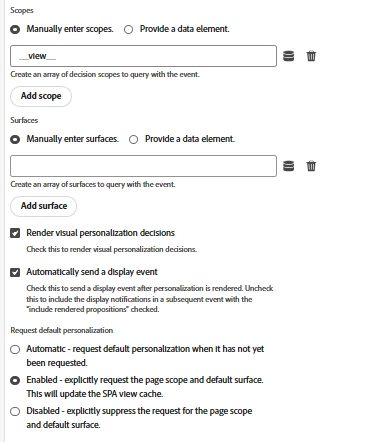
On page view send event action, I am using both the checkboxes related to AT (Render visual personalization decisions and automatically send a display event)

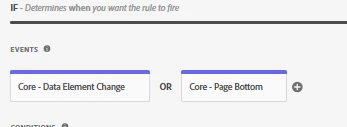
Screenshots of the rule and action configs are below.
I have flight-search page and flights page. Users will land on home page and can navigate to flight search page to search the flight once search completed user will land flights page where it listing available flight option. I have created the recommendation activity to show some recommendation in flights page. I can see the viewName being set properly. However, when the recommendation is not visible when navigate from flight-search page to flights page.  If I manually reload the page I can see the recommendation and this issue is for other activities too..

2 replies

Adobe Employee
June 16, 2026

@gopiraj8  Let me know if you have updated the aep web sdk extension to it’s latest version

DineshK
Level 2
June 19, 2026

Hi ​@gopiraj8 

The root cause is timing — your Core - Data Element Change event fires the moment pageName changes in the data layer, which happens during the React route transition before the component has finished rendering. Target gets the sendEvent call, tries to inject the recommendation, but the DOM isn't ready yet. Hard reload works because the full page load gives React enough time to render before Target runs.

Here's the complete fix in Tags UI:

Step 1 — Update your existing page view rule

Keep your existing rule but add a condition to it:

  • Condition type: Core - Custom Code
  • Add this check:


return document.readyState === 'complete' && 
document.querySelector('[data-view="flights"]') !== null;

Replace [data-view="flights"] with an actual DOM selector that exists on your flights page component — a container div, a class, anything that only renders when the React component has mounted. This forces the rule to only proceed once the view is actually in the DOM.

Step 2 — Check your Send Event action configuration

In your Send Event action, verify these settings:

  • Render visual personalization decisions — checked
  • Automatically send a display event — checked
  • Request default personalization — set to Enabled
  • Scopes — confirm __view__ is present
  • XDM viewName — must match exactly what you used in Target VEC when creating the recommendation activity. Case sensitive — flights and Flights are treated as different views

Step 3 — Verify in Target

Go into your recommendation activity in Target and check the view name defined in VEC. It must be an exact string match with what your data element is passing in web.webPageDetails.viewName. This is the most common silent failure — no error, recommendation just doesn't render.

To debug before and after:

Open browser console and run:


_satellite.setDebug(true)

Then navigate from flight-search to flights and watch which rules fire and when. If your rule fires before the flights component DOM exists, the timing fix is needed. If the rule fires at the right time but recommendations still don't show, the issue is the viewName mismatch in Target.

One assumption to flag: The custom code condition approach works reliably for most React SPAs, but if your flights component renders asynchronously (e.g. data fetching before render), the DOM selector may exist before the full component tree is ready. In that case you'd need a small adjustment — but start with this and test first.