
Details are not fully migrated | Community
Skip to main content
Vinay_Kumar
Community Advisor
Community Advisor
January 30, 2026
Solved

Details are not fully migrated

  • January 30, 2026
  • 4 replies
  • 119 views

Hi Team,


My Community Level, ideas and solved questions details are not fully migrated. Can you please check once?


Thanks,

Vinay

Best answer by jon_chen

Hi ​@Vinay_Kumar ​@Sant_Singh_Rath ​@Dave_Roberts Thanks for your questions. Regarding your ideas, solved questions, and other content, please note that a portion of community content published between late November 2025 to mid-January 2026 has not fully migrated to the new Community. We are working to resolve this with the platform team.


As for levels - we did a restructuring of our gamification model as part of the migration which removes level visibility for our advocates (including Community Advisors and Adobe Champions). 


Lastly, accessing your profile contributions and badges can be done by clicking on your avatar on any post, as Dave confirmed. You can also access your profile by hovering over your avatar dropdown at the top right of any page and selecting “My Community profile.” From there, please click on any of the underlined tabs “Topics”, “Replies”, or “Solved”, to view your filtered contributions. Please see the photo for details.
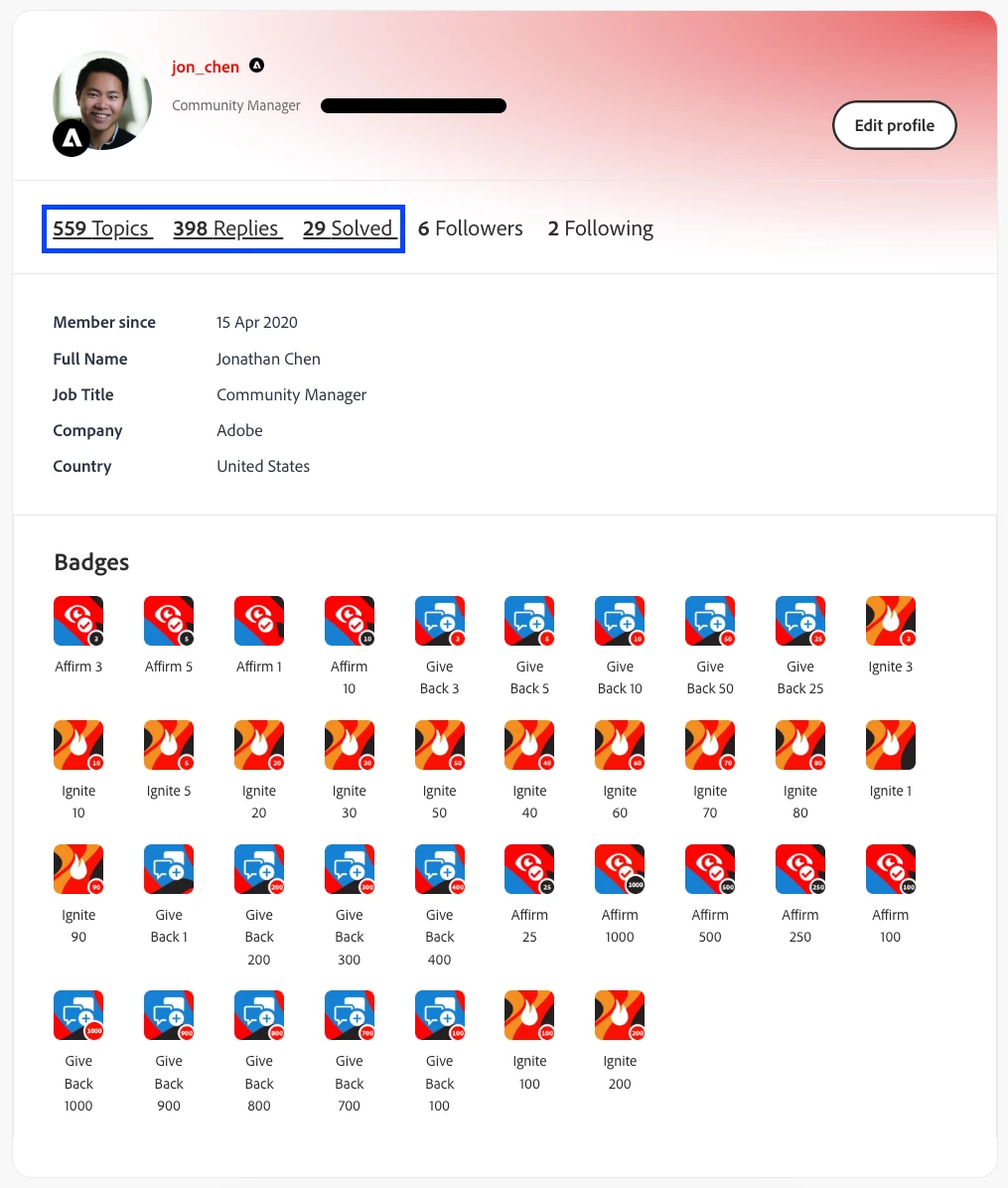


Hope that’s helpful, and let me know if you have any further questions.

4 replies

Sant_Singh_Rath
Adobe Champion
Adobe Champion
January 30, 2026

Same for me as well ​@Vinay_Kumar

@kautuk_sahni: FYI, if this is a known issue. 

~ Sant Singh Rathaur
Dave_Roberts
Level 10
January 30, 2026

Any idea how to see these details in the new setup? I went looking in my profile for the badges, level, etc and can’t find that stuff anywhere.

Dave_Roberts
Level 10
January 30, 2026

… after posting this, I notice that if I hover over my profile pic in the previous post ^^ I get a pop-up with badges and level, etc and I can click my profile image to view my “member” page but I don’t see anywhere in the interface where I can access this otherwise. Anyone know if this just got looked over in the migration or if there is a more straight-forward path to view my “member page”?

jon_chen
Community Manager
jon_chenCommunity ManagerAccepted solution
Community Manager
January 30, 2026

Hi ​@Vinay_Kumar ​@Sant_Singh_Rath ​@Dave_Roberts Thanks for your questions. Regarding your ideas, solved questions, and other content, please note that a portion of community content published between late November 2025 to mid-January 2026 has not fully migrated to the new Community. We are working to resolve this with the platform team.


As for levels - we did a restructuring of our gamification model as part of the migration which removes level visibility for our advocates (including Community Advisors and Adobe Champions). 


Lastly, accessing your profile contributions and badges can be done by clicking on your avatar on any post, as Dave confirmed. You can also access your profile by hovering over your avatar dropdown at the top right of any page and selecting “My Community profile.” From there, please click on any of the underlined tabs “Topics”, “Replies”, or “Solved”, to view your filtered contributions. Please see the photo for details.


Hope that’s helpful, and let me know if you have any further questions.

Dave_Roberts
Level 10
February 2, 2026

Thanks for looking into this ​@jon_chen , appreciate you. I was missing the “Community” portion of the dropdown menu below my profile icon on the page but it looks like that is populating now and I’m able to navigate to my Community Profile from there. Thanks again for helping everyone thru this transition to the new interface and for keeping the ball rolling on making the community a better place to be!


jon_chen
Community Manager
Community Manager
February 2, 2026

Thanks for confirming ​@Dave_Roberts. Glad to hear that you’re able to visit your profile now!

PeeyushSachdeva
Level 4
January 31, 2026

Same for me as well. 

jon_chen
Community Manager
Community Manager
February 2, 2026

Hi ​@PeeyushSachdeva please see my response above and let me know if you have any further questions.

Jasbirka
Level 5
February 3, 2026

Hi ​@jon_chen

I’ve encountered this issue several times (around 3–4 instances). When I start typing a reply, the first word disappears within a few seconds, and any text I type afterward doesn’t appear in the reply field.

On a previous occasion, I completed my reply but was unable to post it. After clicking Send, the page simply reloaded and my response disappeared. When I tried again, the same thing happened. However, the next day, I noticed that my reply had been posted twice.

I experienced the same issue again today. I attempted to post here but was unable to do so initially. After reloading the page 2–3 times, I was finally able to submit my reply. Unfortunately, this workaround doesn’t always work, and there are times when I’m still unable to post my content.

I have never faced this problem before.

Any suggestion or help would be really helpful.