Trigger campaign set up? | Community
Skip to main content
Jennifer_Lydsto
Level 1
April 30, 2019
Solved

Trigger campaign set up?

  • April 30, 2019
  • 1 reply
  • 2577 views

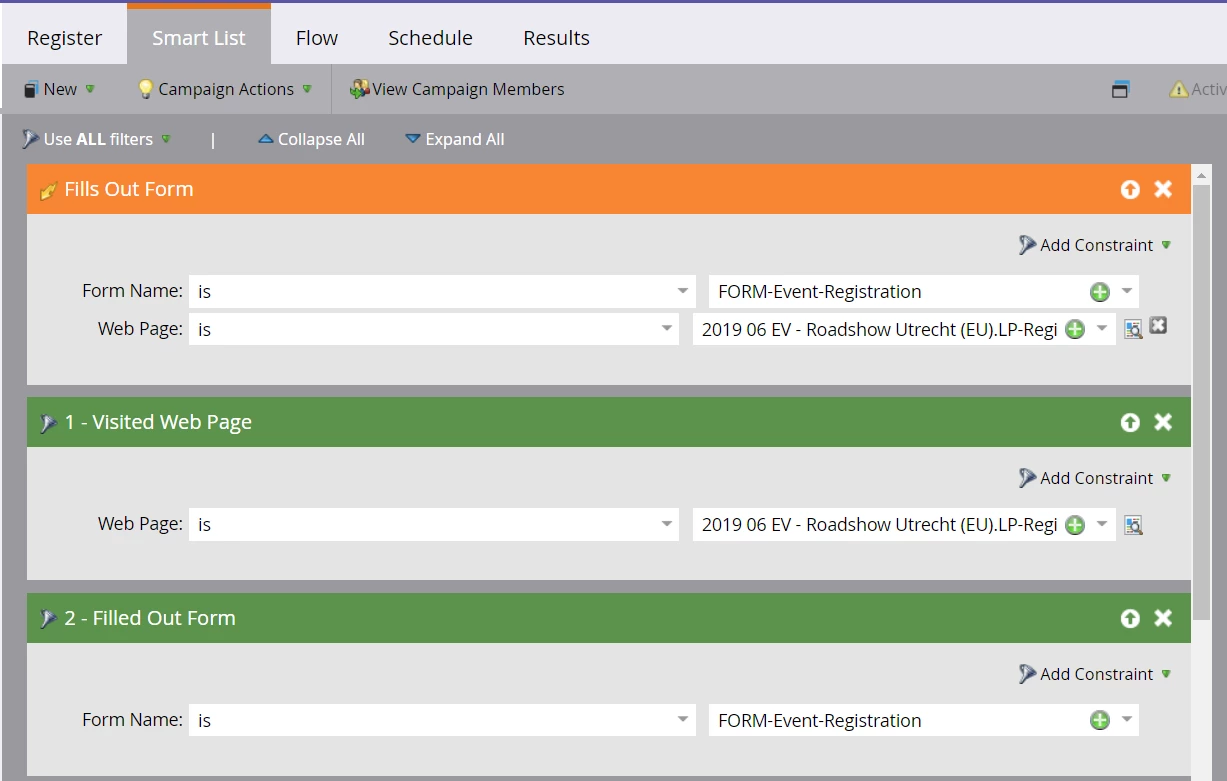
Can someone help me out? We have a general form for events, so when creating our registration campaign for each event, this is how I have set it up. I have played around with different scenarios with no luck. Seems redundant, however it seems to be a 50/50 shot as to whether people actually go through the flow steps. They become part of the program, however they never end up going through the flow steps. Support has said its a system timing issue which shouldn't happen often, however it is happening every time. I feel like I am always running back-fill campaigns! Do others experience this and if so, how do you solve this problem? I should also mention, we have a small database and not many trigger campaigns running. Thanks in advance!
This post is no longer active and is closed to new replies. Need help? Start a new post to ask your question.
Best answer by Bryan_Epstein

You do have redundancy in your Smart List for the Trigger Campaign. If you are reading out the logic you have:

  • Trigger If Person [Fills Out FORM-Event-Registration] AND [Web Page is X]
    AND
  • Filter by those that [Visited Web Page X] AND [Filled out FORM-Event-Registration]

You would only need the first trigger in this Smart List for the campaign. That being said, it would also help us to see the actual flow steps in this campaign too.

1 reply

Bryan_Epstein
Bryan_EpsteinAccepted solution
Level 5
April 30, 2019

You do have redundancy in your Smart List for the Trigger Campaign. If you are reading out the logic you have:

  • Trigger If Person [Fills Out FORM-Event-Registration] AND [Web Page is X]
    AND
  • Filter by those that [Visited Web Page X] AND [Filled out FORM-Event-Registration]

You would only need the first trigger in this Smart List for the campaign. That being said, it would also help us to see the actual flow steps in this campaign too.

Jennifer_Lydsto
Level 1
April 30, 2019

Thanks for responding! I went back to just the trigger campaign and web URL (So removed the filters) and seems to be working. I feel like I started with that, and it wasn't working which is why I brought in the filters - but who knows!!

Bryan_Epstein
Level 5
April 30, 2019

Not a problem. If that resolved your issue, please mark that answer as correct. This way, the community can see that your question has been answered.