
Laurie_Johnson
Level 2
March 21, 2019
Question

{{member.webinar url}} token not working in the Add to Calendar token description field

  • March 21, 2019
  • 4 replies
  • 8004 views

Hey guys!

Webinar token question...

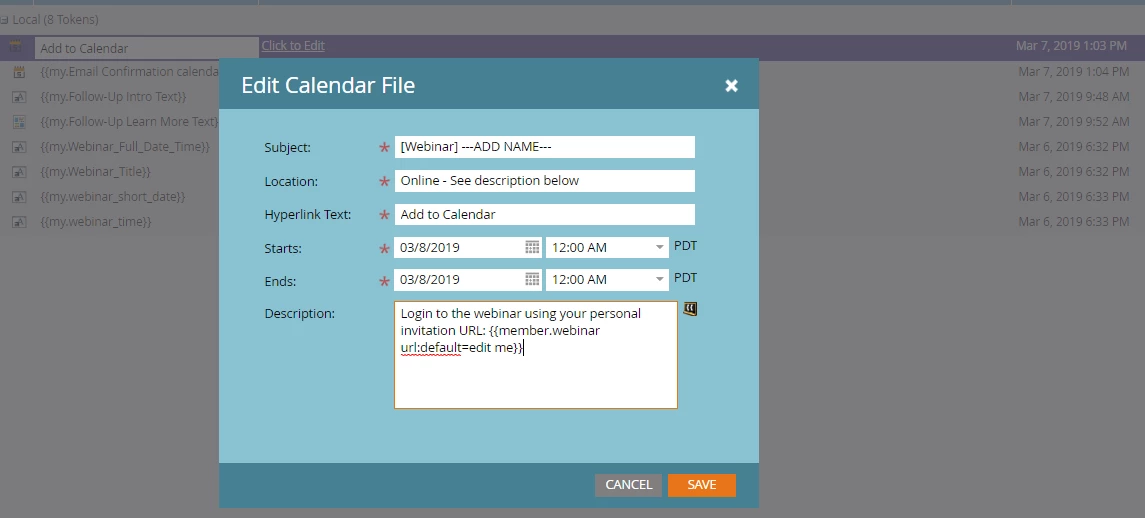
We're using local (my) tokens at the program level for an "Add to Calendar" link within a webinar confirmation email. The "Add to Calendar" token has another token listed within the description field that should be syncing with the event partner (GoToWebinar) from the event program. The token for the URL within the "Add to Calendar" token is:

{{member.webinar url:default=edit me}}

This token works in the confirmation email that we send as a link, but not within the "Add to Calendar" token description field. This leads me to believe that it is not due to the webinar provider integration with Marketo. Has anyone else experienced this issue? If so, how did you solve it?
Thanks in advance for your help!

This post is no longer active and is closed to new replies. Need help? Start a new post to ask your question.

4 replies

Corey_Bethel
Level 4
March 21, 2019

Hi Laurie,

Unfortunately, tokens do no work inside other tokens.

Corey BethelConsultant | Etumos
Laurie_Johnson
Level 2
March 21, 2019

Hey Corey, tokens do work inside other tokens. If you open the image I posted, you'll see a little black square image to the right of the description field and if you click that- it opens a pop-up box to insert a token.

Level 4
March 21, 2019

Hi Laurie,

Take a look at this thread: {{member.Webinar – url}} in the confirmation email to the Webinar Is the email and the calendar file in the event program? You can definitely use tokens inside a calendar invite, but it needs to be nestled under the Event Program.

Thanks,
Kyle

Laurie_Johnson
Level 2
March 21, 2019

Hi Kyle, Thank you for your reply. The Add to Calendar token/file lives within the event program (at the program level) and the confirmation email also lives within the same event program. I'm stumped

SanfordWhiteman
Level 10
March 21, 2019
Laurie_Johnson
Level 2
March 21, 2019

Thanks, Sanford but I'm not using a wait step. The Add to Calendar token is used in the confirmation email that is immediately sent post-registration.

SanfordWhiteman
Level 10
March 21, 2019

You cannot do that and expect the {{Member.Webinar URL}} to work when they click the link. That's why a Wait is usually used, but my blog post explains that it isn't necessary. And there's also a note about how to build a dynamic ICS file that includes the {{Member.Webinar URL}}.

Jessica_Meyers_
Level 2
March 21, 2019

Hey Laurie,

Where are you referencing the Add To Calendar Token? How are you testing and confirming its not working. Would love to get a better idea of how your using the token before troubleshooting.