Align button to right side of form | Community
Skip to main content
Nancy_Casler1
Level 2
July 16, 2020
Solved

Align button to right side of form

  • July 16, 2020
  • 1 reply
  • 16410 views

I'm trying to get my form button to align to the right per our web team's new design specs. I can't include a link to the page in development, but I put the form on a test LP here: https://info.gepower.com/WF_2020_GE-Power_Web-CUF_Main-Web-CUF-LP-Test.html

Can anyone suggest a way to move it over to the right? I don't want to drag it to the right in the form builder if I can avoid that...
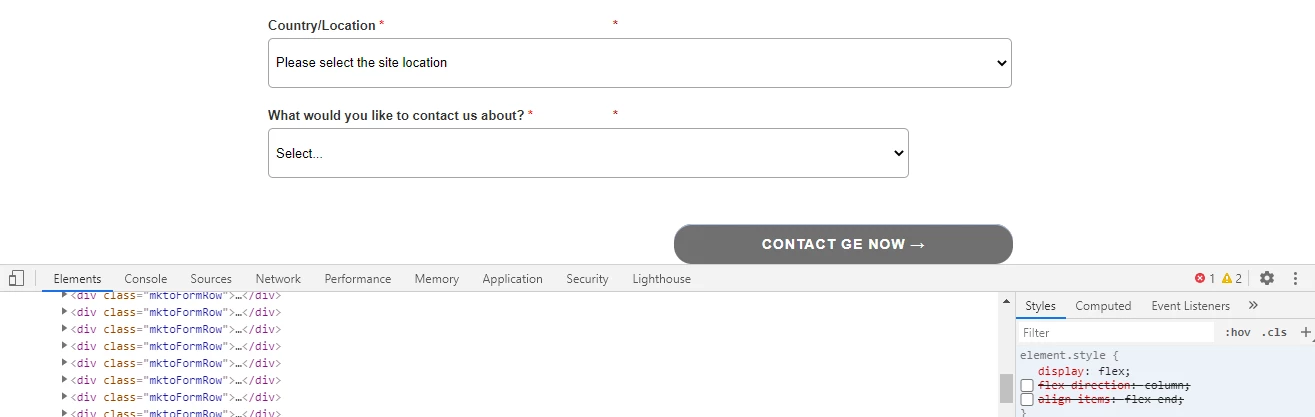
Best answer by Harish_Gupta6

Add this css on your page or form level.


.mktoForm .mktoButtonWrap {
margin-left: 0px !important;
width: 100% !important;
display: flex;
flex-direction: column;
align-items: flex-end;
}

.mktoButtonRow {
display: flex;
}


1 reply

Harish_Gupta6
Harish_Gupta6Accepted solution
Level 6
July 16, 2020

Add this css on your page or form level.


.mktoForm .mktoButtonWrap {
margin-left: 0px !important;
width: 100% !important;
display: flex;
flex-direction: column;
align-items: flex-end;
}

.mktoButtonRow {
display: flex;
}


Harish Gupta
SanfordWhiteman
Level 10
July 16, 2020

Flex isn't supported in IE. You'd also need the prefixed styles.


But this doesn't need anything that complex. Just:

.mktoButtonRow { display: block !important; text-align: right !important; }


Nancy_Casler1
Level 2
July 20, 2020

Thank you @harish_gupta6  and @sanfordwhiteman ! It turned out that I needed BOTH of your solutions. If I implemented either one without the other, my button remained aligned to the left.