
How to use AIO Events SDK getEventsObservableFromJournal inside Runtime action? The runtime action closes after 2-3 mins. How to keep action active and keep polling for events? | Community
Skip to main content
sarav_prakash
Community Advisor
Community Advisor
September 17, 2024
Solved

How to use AIO Events SDK getEventsObservableFromJournal inside Runtime action? The runtime action closes after 2-3 mins. How to keep action active and keep polling for events?

  • September 17, 2024
  • 2 replies
  • 928 views

Hi,

I created a runtime web-action that ll fetch events from journal api like this

const journalObservable = await client.getEventsObservableFromJournal(baseURL, journalOptions); journalObservable.subscribe( x => logger.log('onNext: ' + JSON.stringify(x)), // any action onNext event e => logger.error('onError: ' + e.message), // any action onError () => logger.log('onCompleted')) //action onComplete

I am able to invoke the web action from postman. And when I publish events into the journal api, my logs read the events from journal successfully. 


Now the web action stays alive like 1-2 mins. Then dies. So if event is published say after 5 mins, those events are not received. Is this expected? 


Alternate I could think is, create as non-web-action using alarm. And cron trigger the action every say 5 mins. Is this correct that "Reading journal events must be created as non-web-action using alarm cron?" 
 

This post is no longer active and is closed to new replies. Need help? Start a new post to ask your question.
Best answer by sarav_prakash

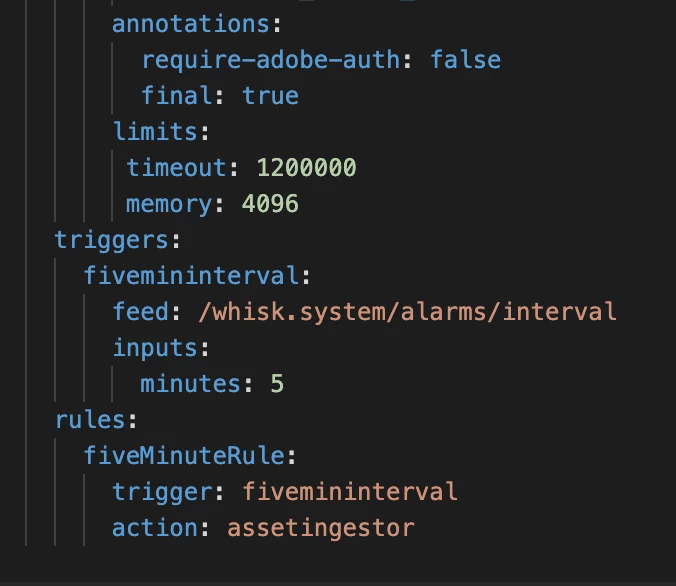
Here is the working solution I figured after trial-n-error.


1. After creating the App, change the default settings.Default app is created with 2min timeout, so it dies even when active actions are in progress. I am able to change timeout to 30 minutes and able to execute long-running-processes

2. Set the alarm trigger to more frequent (5 mins) so it polls and fetches events more frequent. 

3. One learning I figured, when changing frequency, make sure change trigger name and interval name. Else somehow alarms clashes and same action runs under both frequencies. 


This way by editing default settings and running cron, able to execute long processes. 

Thanks all for helping out. 


2 replies

Adobe Employee
September 30, 2024

Alternate I could think is, create as non-web-action using alarm. And cron trigger the action every say 5 mins. Is this correct that "Reading journal events must be created as non-web-action using alarm cron?" 


This is correct.
It can be a web action too using an alarm.

Please refer to https://developer.adobe.com/app-builder/docs/resources/journaling-events/ codelab for an example on the same

sarav_prakash
Community Advisor
Community Advisor
October 8, 2024

@sangeethakrishnan , Nopes, I tested and found not working. So this is serverless world. Everytime cron executes and triggers action, its a NEW container instance created. and watever action running at old container is lost. 

Still working with adobe for better solutions. I ll capture my findings once I find a satisfactory answer. 

Adobe Employee
October 10, 2024

Thats why you need to store the state which is the last read position as stated here: https://developer.adobe.com/app-builder/docs/resources/journaling-events/lesson2/ 

sarav_prakash
Community Advisor
sarav_prakashCommunity AdvisorAuthorAccepted solution
Community Advisor
October 10, 2024

Here is the working solution I figured after trial-n-error.


1. After creating the App, change the default settings.Default app is created with 2min timeout, so it dies even when active actions are in progress. I am able to change timeout to 30 minutes and able to execute long-running-processes

2. Set the alarm trigger to more frequent (5 mins) so it polls and fetches events more frequent. 

3. One learning I figured, when changing frequency, make sure change trigger name and interval name. Else somehow alarms clashes and same action runs under both frequencies. 


This way by editing default settings and running cron, able to execute long processes. 

Thanks all for helping out.