I´ve seen that this has already been raised some times in the past years, but I still wanted to ask if maybe now there´s a solution/update that i can fetch the Report Data via API call, rather then only Meta Data?
Building on Ivan's suggestion: there is still no supported "run this report and return the rows" endpoint, but you don't have to rebuild the filter by hand either. The report object exposes the IDs of its filter and view, and both definitions come back as JSON you can feed straight into a normal search. I tested this read-only on a sandbox, GET calls only, all HTTP 200, on both /attask/api/v19.0 and /attask/api-unsupported.
1. Get the report's filter, view and grouping IDs
The report object is PTLSEC. The fields are filterID, viewID and groupByID (not uiFilterID):
GET /attask/api/v19.0/ptlsec/<reportID>?fields=name,filterID,viewID,groupByID&apiKey=***
2. Fetch the filter definition (the query)
Ask for "definition" by name. It is lazy-loaded and is NOT included in fields=*:
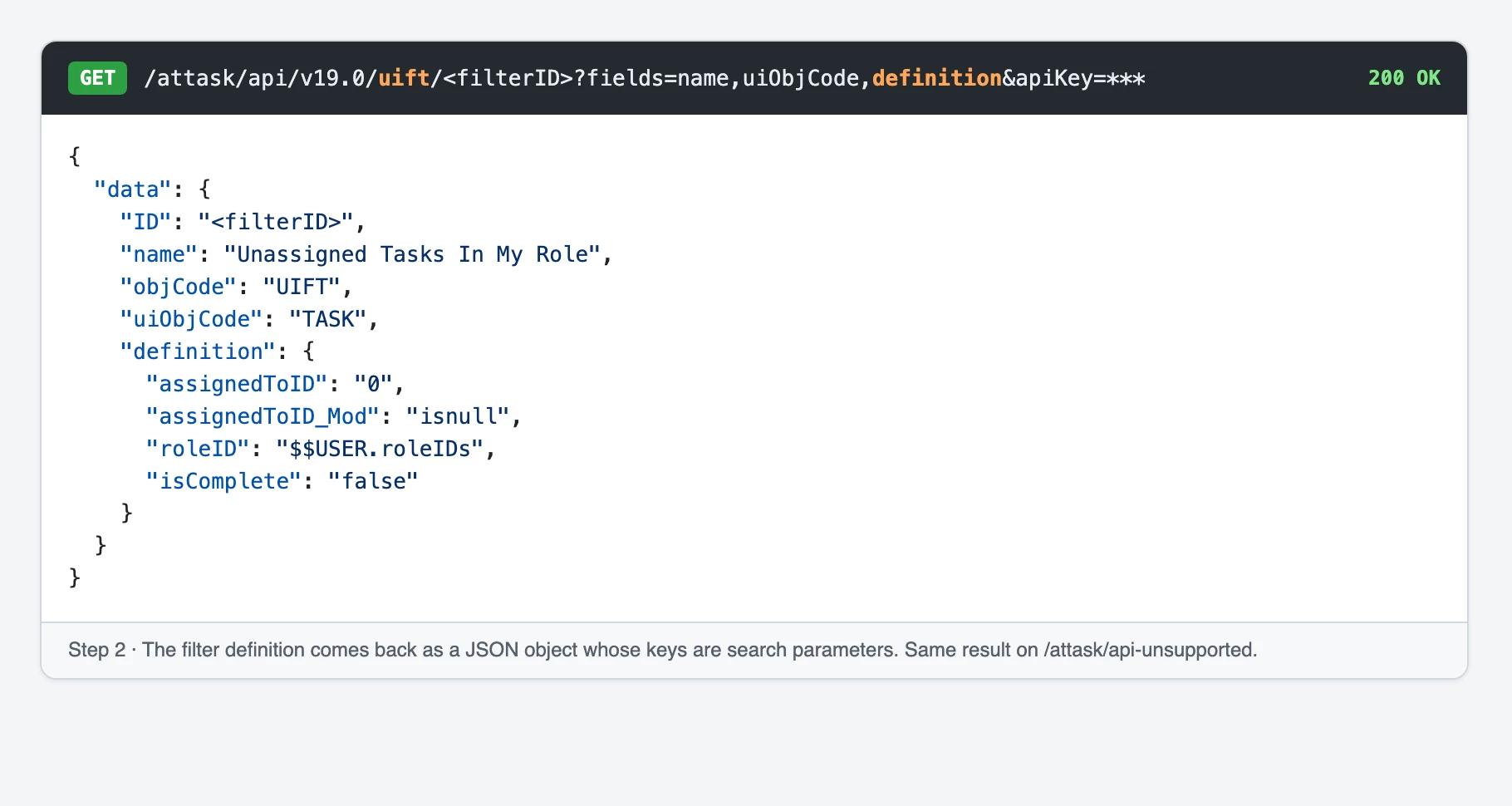
GET /attask/api/v19.0/uift/<filterID>?fields=name,uiObjCode,definition&apiKey=***
It returns a JSON object whose keys are exactly the search parameters the API expects, and uiObjCode tells you which object to search. From the out-of-the-box "My Unassigned Tasks" report:
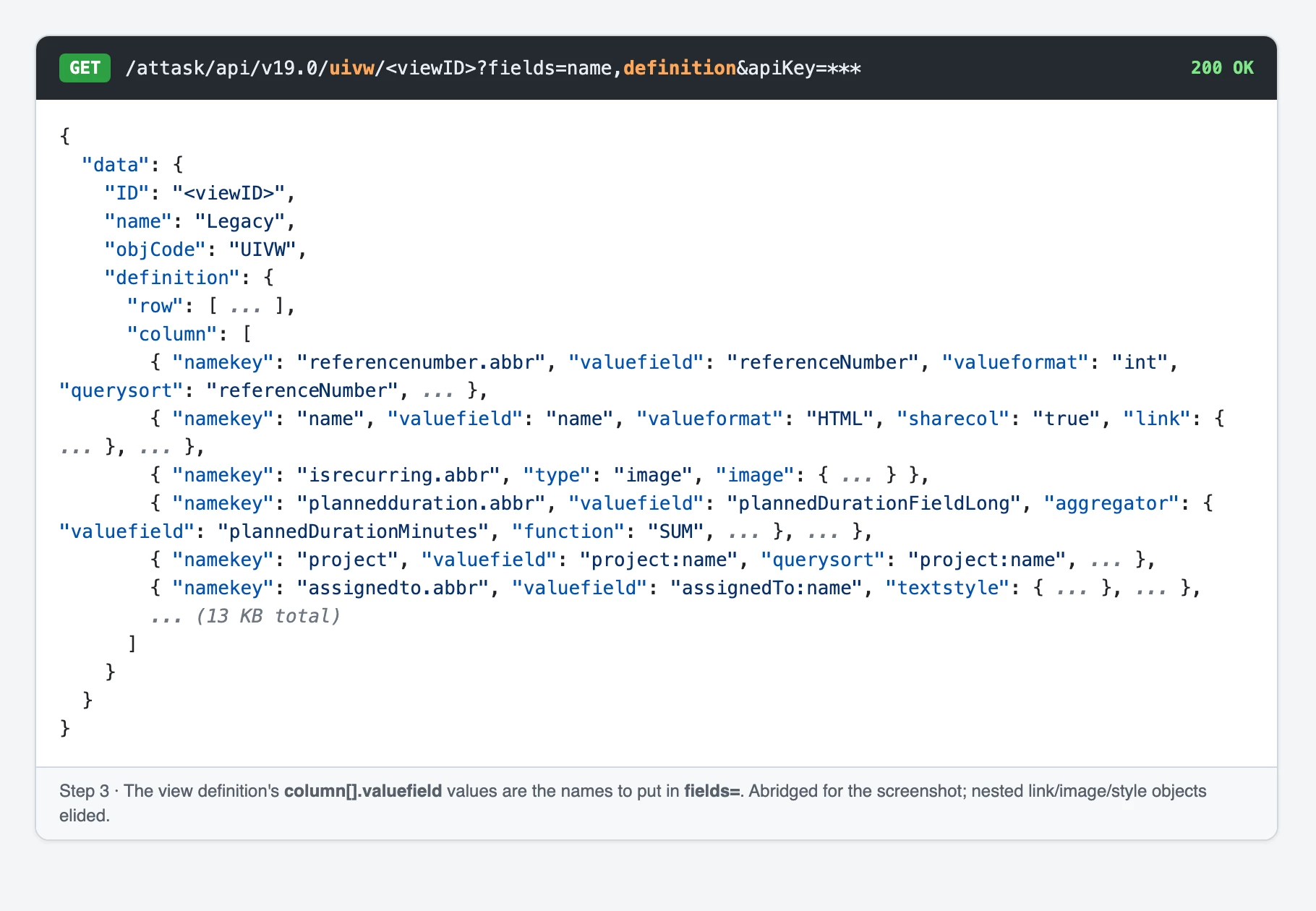
GET /attask/api/v19.0/uivw/<viewID>?fields=name,definition&apiKey=***
The definition has a "column" array. Each column's valuefield (for example name, project:name, assignedTo:name) is a field name for the search. Cross-object columns are already in the API's nested-field syntax, so they go into fields= unchanged.
4. Run one search that combines them
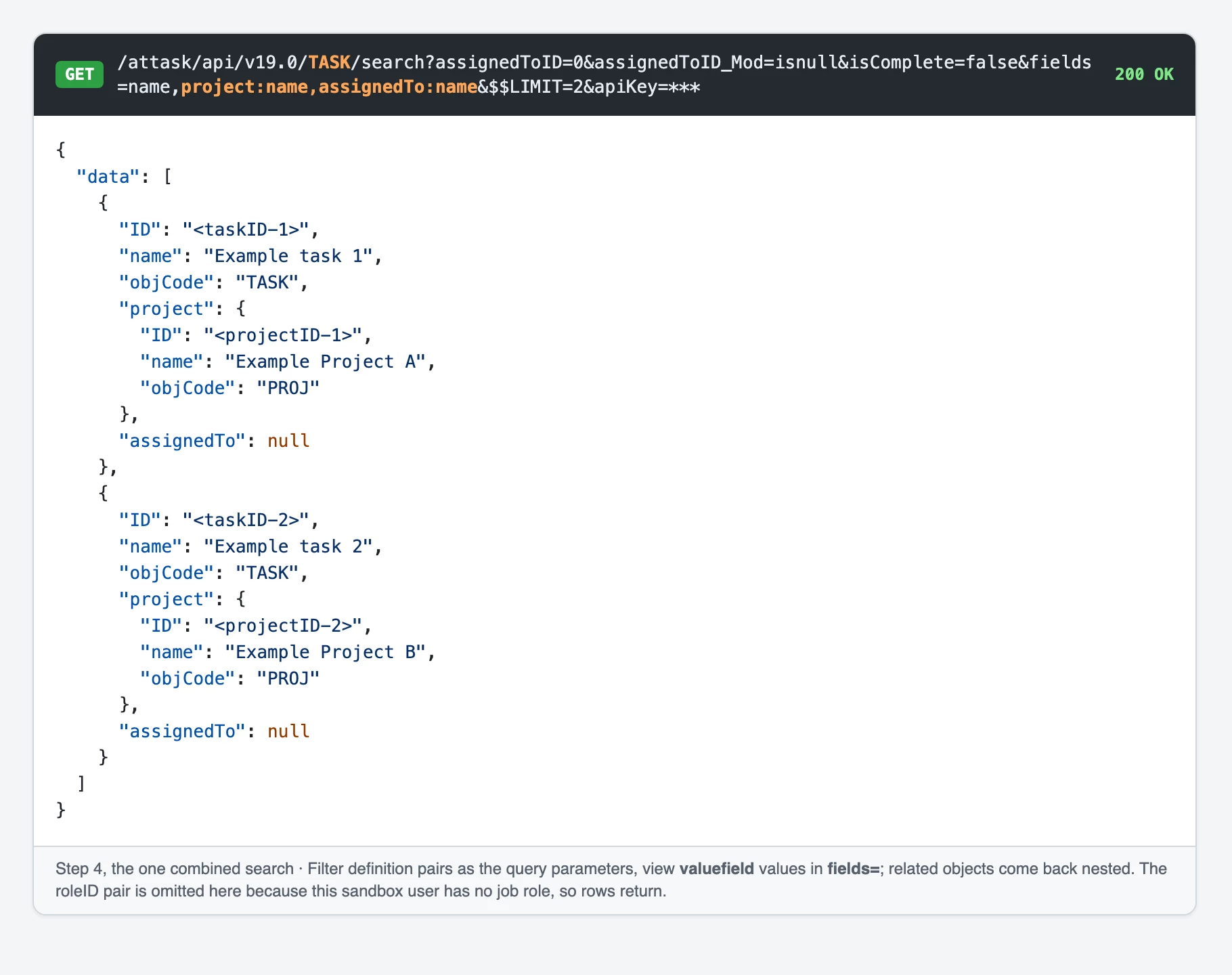
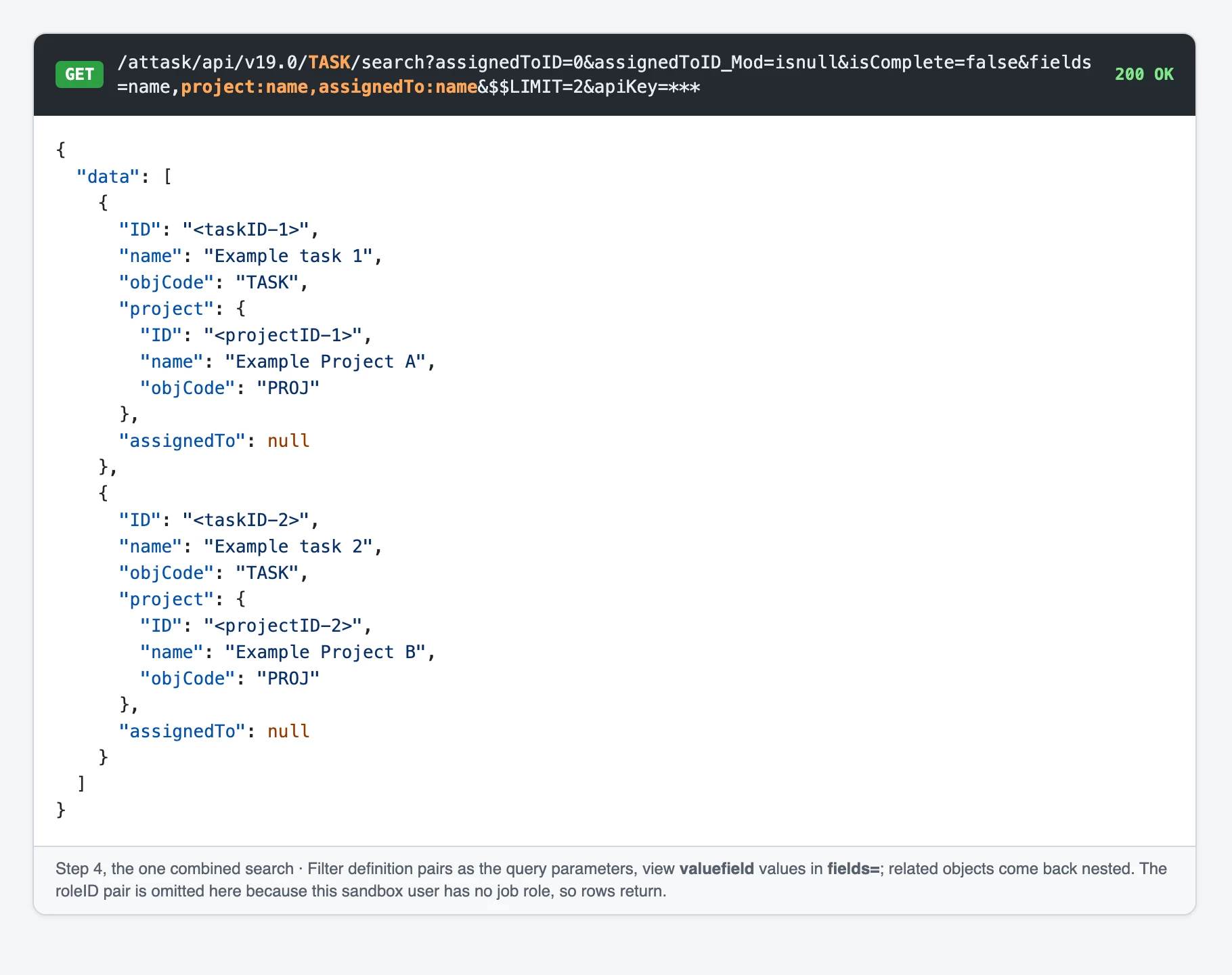
The filter pairs become the query parameters and the view valuefields become fields=:
GET /attask/api/v19.0/TASK/search?assignedToID=0&assignedToID_Mod=isnull&roleID=$$USER.roleIDs&isComplete=false&fields=name,project:name,assignedTo:name&$$LIMIT=5&apiKey=***
Related objects come back nested in each row, for example a project object with its name inside each task. Wildcards such as $$USER.roleIDs and $$TODAY are accepted, and they resolve against the user who owns the API key. That matters: my test key belonged to a user with no job role, so this filter correctly returned zero rows, and the same call without the roleID pair returned data.
Caveats
Grouping and aggregation (sums, counts) are not applied by the search. Fetch the rows and roll them up yourself, or in Fusion. The grouping definition is on the UIGB object behind groupByID.
Columns that use valueexpression or conditional formatting are computed at render time. The API gives you the raw field, not the calculated display value.
Row-level access is the API user's, not the report viewer's. Use a key from a user with the same access or the row set will differ.
Definitions come back as JSON objects, not text mode, so a UIFT definition maps 1:1 onto query parameters.
This beats scraping /internal/qslist: it is plain documented objects and standard search syntax, and it survives UI changes.
I would ask you how complex is the report, could you get the same data via Fusion API call (do the same filtering as on the report)? If yes this would be the way to go.
I hope this explains it. If you have any questions, please reach back.
Building on Ivan's suggestion: there is still no supported "run this report and return the rows" endpoint, but you don't have to rebuild the filter by hand either. The report object exposes the IDs of its filter and view, and both definitions come back as JSON you can feed straight into a normal search. I tested this read-only on a sandbox, GET calls only, all HTTP 200, on both /attask/api/v19.0 and /attask/api-unsupported.
1. Get the report's filter, view and grouping IDs
The report object is PTLSEC. The fields are filterID, viewID and groupByID (not uiFilterID):
GET /attask/api/v19.0/ptlsec/<reportID>?fields=name,filterID,viewID,groupByID&apiKey=***
2. Fetch the filter definition (the query)
Ask for "definition" by name. It is lazy-loaded and is NOT included in fields=*:
GET /attask/api/v19.0/uift/<filterID>?fields=name,uiObjCode,definition&apiKey=***
It returns a JSON object whose keys are exactly the search parameters the API expects, and uiObjCode tells you which object to search. From the out-of-the-box "My Unassigned Tasks" report:
GET /attask/api/v19.0/uivw/<viewID>?fields=name,definition&apiKey=***
The definition has a "column" array. Each column's valuefield (for example name, project:name, assignedTo:name) is a field name for the search. Cross-object columns are already in the API's nested-field syntax, so they go into fields= unchanged.
4. Run one search that combines them
The filter pairs become the query parameters and the view valuefields become fields=:
GET /attask/api/v19.0/TASK/search?assignedToID=0&assignedToID_Mod=isnull&roleID=$$USER.roleIDs&isComplete=false&fields=name,project:name,assignedTo:name&$$LIMIT=5&apiKey=***
Related objects come back nested in each row, for example a project object with its name inside each task. Wildcards such as $$USER.roleIDs and $$TODAY are accepted, and they resolve against the user who owns the API key. That matters: my test key belonged to a user with no job role, so this filter correctly returned zero rows, and the same call without the roleID pair returned data.
Caveats
Grouping and aggregation (sums, counts) are not applied by the search. Fetch the rows and roll them up yourself, or in Fusion. The grouping definition is on the UIGB object behind groupByID.
Columns that use valueexpression or conditional formatting are computed at render time. The API gives you the raw field, not the calculated display value.
Row-level access is the API user's, not the report viewer's. Use a key from a user with the same access or the row set will differ.
Definitions come back as JSON objects, not text mode, so a UIFT definition maps 1:1 onto query parameters.
This beats scraping /internal/qslist: it is plain documented objects and standard search syntax, and it survives UI changes.
This is also great approach. I have tried it and it works also thank you for providing caveats. I would just ask you to correct the first step as the first step is now step four and it might be confusing.
I have also created a demo fusion scenario, at the moment the report ID is hardcoded but this could be made generic for any input ID if needed.