Level 2
April 17, 2024
Solved

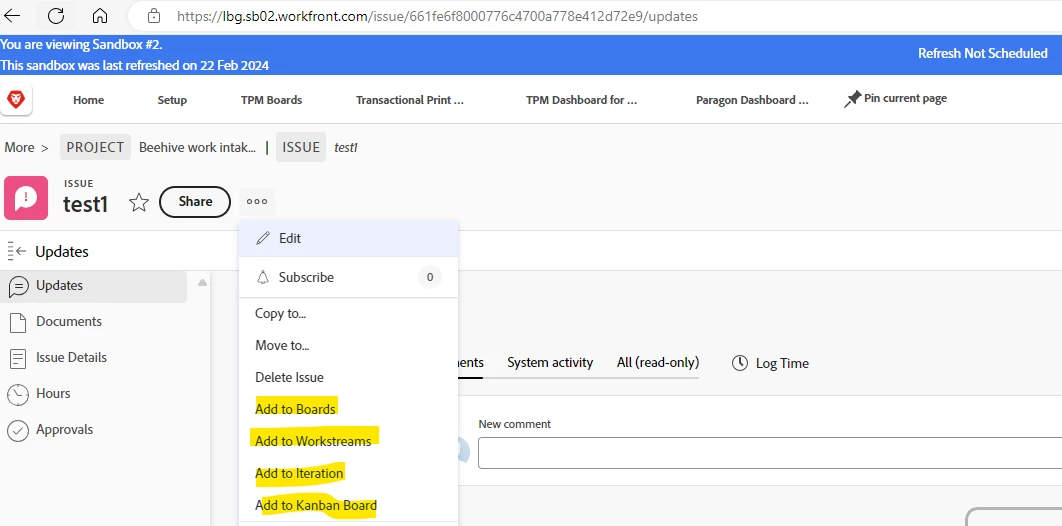
What is the purpose and functionality of the highlighted options in the Issues object

Can someone help with understanding these highlighted options in the screenshot on what they mean and their functionality? I understand what Boards is but why is there 2 boards option? One for Boards and other is Kanban boards.  Also what is add to workstreams and add to iteration mean. This is a screenshot of an issue and when we click on the 3 dots to convert it.

 

This post is no longer active and is closed to new replies. Need help? Start a new post to ask your question.
Rafal_Bainie
Rafal_BainieAccepted solution
Community Advisor
April 18, 2024

This should be a good starting point: https://experienceleague.adobe.com/en/docs/workfront/using/agile/agile-overview

Make sure to click "view more" in the menu on LHS and browse through all of the content

3 replies

KellieGardner
Community Advisor
Community Advisor
April 17, 2024

They are the different types of agile options available in Workfront. 


Translate
anasooyaAuthor
Level 2
April 17, 2024

thanks for your response. Is there any documentation that you can share and point me to understand more on these options? especially iteration and workstream


Translate
Rafal_Bainie
Community Advisor
Rafal_BainieCommunity AdvisorAccepted solution
Community Advisor
April 18, 2024

This should be a good starting point: https://experienceleague.adobe.com/en/docs/workfront/using/agile/agile-overview

Make sure to click "view more" in the menu on LHS and browse through all of the content

Translate